Looking for Shopify Buy Button alternatives? You’re not alone. While Shopify’s official Buy Button sounds great in theory, it comes with frustrating limitations that leave many merchants searching for better solutions.
You’ll discover the best alternatives to Shopify’s Buy Button, from free DIY methods to powerful apps like Checkout Links that can dramatically boost your conversion rates. This guide covers what makes each solution work, their pros and cons, and helps you choose the perfect fit for your business. (If you’d rather skip to the punchline: see our Shopify Buy Button alternative comparison page.)
Why the Shopify Buy Button Doesn’t Work (And What to Use Instead)
Shopify’s Buy Button lets you embed products on any website and send customers to Shopify checkout. Sounds perfect, right?
Not quite. After using it for a while, merchants quickly discover several pain points that make them search for alternatives.
Customization is severely limited. You can tweak colors and pick from a few layouts, but that’s about it. One frustrated user complained: “I think this app sucks… buttons can’t be customized well.” If you have specific branding needs, the Buy Button feels rigid and generic.
It only handles one product at a time. Shopify’s documentation confirms you can create Buy Buttons for single products or collections, but complex scenarios like bundles or conditional offers require workarounds.
Performance takes a hit. The Buy Button loads via JavaScript, which can slow down your pages. Multiple Buy Buttons create separate carts for each product unless you customize the code manually. So you’re stuck juggling separate carts or diving into custom code. Neither option is ideal.
Analytics become messy. When customers click the Buy Button, they jump to a different domain (yourshop.myshopify.com). This breaks attribution because Google Analytics can’t easily track the complete customer journey without special cross-domain setup. You lose visibility into what’s actually driving sales.
Limited app compatibility. Many Shopify apps don’t work with Buy Button checkouts. Subscription apps, review systems, and cart abandonment tools often fail to function properly through the Buy Button channel. It’s frustrating when half your tech stack stops working.
The future isn’t bright. Shopify deprecated the underlying JS Buy SDK in January 2025, stating there will be no new features coming to the Buy Button. It’s essentially frozen in time.
Critical Reality: The Buy Button isn’t evolving. While e-commerce moves forward with AI, personalization, and advanced checkout optimization, Shopify’s Buy Button remains stuck in the past. If you’re serious about conversions, you need a solution that’s actively improving.
Given these limitations, it’s no wonder merchants search for better alternatives.
How to Create Free Shopify Checkout Links (DIY Method)
The simplest alternative uses Shopify’s built-in cart permalink feature. You can create direct-to-checkout links manually using URL parameters.
How to Build Shopify Checkout Links with URL Parameters
Every Shopify store can create links that pre-load specific products and apply discounts:
https://your-store.myshopify.com/cart/VARIANTID1:QTY,VARIANTID2:QTY?discount=CODEFor example, you could create a link that adds three specific products to the cart with a discount code already applied. Some merchants use this approach to create direct checkout URLs that load 3-pack bundles with automatic discount and free shipping (though this requires significant manual setup compared to automated solutions).
Why Free Checkout Links Work Better Than Buy Buttons
→ It’s completely free (no app fees)
→ Better performance since you’re not loading JavaScript widgets
→ More flexibility for creating bundles and applying specific discounts
→ Works anywhere you can share a link (email marketing campaigns, social media, QR codes)
What Are the Downsides of DIY Checkout Links?
Manual work is required for every single link. You need to:
-
Find variant IDs for each product
-
Construct URLs manually
-
Update links when products change
-
Handle any errors yourself No advanced features like:
-
Usage limits or expiration dates
-
Personalized customer experiences
-
Built-in analytics beyond Shopify’s basic reports
-
Dynamic pricing based on cart value Subscription products often don’t work properly through manual links, as merchants have discovered. This is where advanced checkout solutions become essential.
Bottom line: DIY links work great for simple, occasional use cases. If you just need a few bundle links for email campaigns, this free method gets the job done. But as your e-commerce business grows, you’ll likely need more sophisticated solutions.
Best Paid Shopify Buy Button Alternative: Checkout Links
If you’re serious about direct-to-checkout marketing, Checkout Links represents the gold standard for Shopify merchants.
This isn’t just another app claiming to solve your problems.
Checkout Links won Shopify’s Build Award 2025 for UX & Innovation, and Shopify’s team highlighted it for delivering “higher conversions in fewer clicks” through its “beautifully simple” approach.
What Makes Checkout Links Better Than Shopify Buy Button?
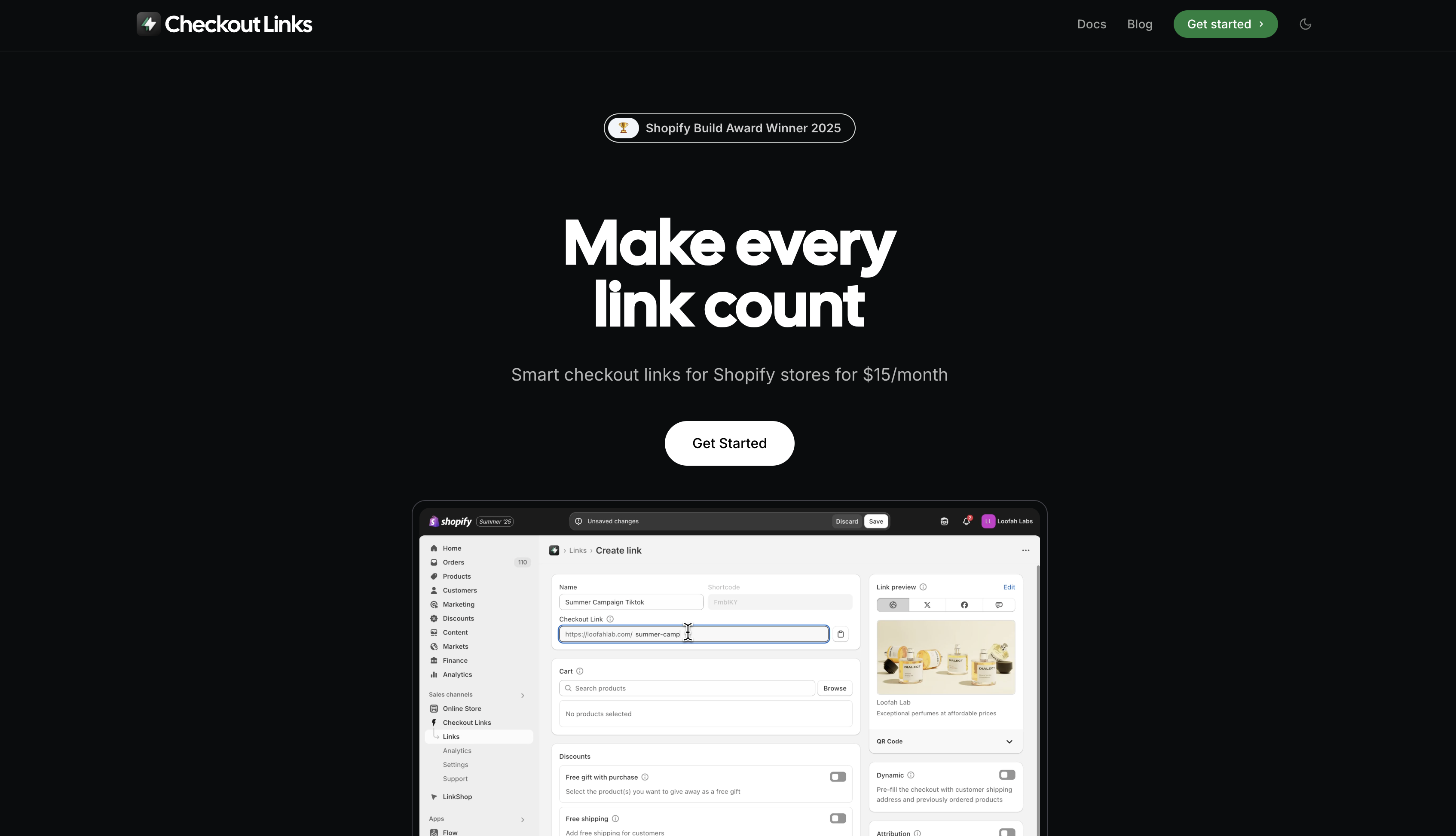
Pre-filled carts with unlimited flexibility. Unlike the Buy Button’s one-product limitation, Checkout Links lets you create checkout links with any mix of products, variants, and quantities. Perfect for bundles, curated collections, or influencer marketing campaigns.
Automatic discounts without codes. Instead of hoping customers remember to enter coupon codes, Checkout Links applies discounts automatically using Shopify Functions. You can create percentage discounts, fixed amounts, BOGO deals, or conditional offers based on cart value. Perfect for abandoned cart recovery campaigns. (Side-by-side: Checkout Links vs Buy Button.)
Smart personalization. The app creates dynamic links that adapt per customer. Send abandoned cart recovery links that automatically load what each customer left behind, or create one-click reorder links with their previous purchases using customer data.
Checkout Links Features: Discounts, Analytics, and Personalization
| Feature | Capability | Use Case |
|---|---|---|
| Free Gifts | Auto-add bonus products at $0 | Gift-with-purchase promotions |
| Passcode Protection | Require codes for VIP access | Exclusive drops, internal sales |
| Usage Limits | Control how many times links are used | Limited offers, first 100 customers |
| Scheduling | Set active timeframes automatically | Flash sales, timed promotions |
| A/B Testing | Compare different offers (beta) | Optimize conversion rates |
Real analytics that actually work. Checkout Links provides detailed analytics for each link while keeping all sales data in your main Shopify reports. No more guessing which campaign drove sales with proper attribution tracking.
Built for Shopify’s ecosystem. The app carries the “Built for Shopify” badge and works with subscriptions, Shopify Functions, and modern checkout features that the legacy Buy Button can’t handle.
How Much Does Checkout Links Cost? (Pricing Breakdown)
Checkout Links isn’t free. Pricing starts at $25/month for the Starter plan, with Growth at $199/month for advanced features like dynamic personalization and API access.
But merchants are seeing results: “20-40 percent revenue bumps when testing different offers” according to case studies. With all reviews being 5-star rated, merchants consistently report significant ROI.
When Checkout Links makes sense:
- You run frequent email marketing campaigns with special offers
- Influencer marketing is part of your strategy
- You use QR codes in physical marketing
- Paid ads need to skip landing pages and go straight to purchase
- You want to test different offers systematically
Should You Use Stripe or Square Instead of Shopify Checkout?
Sometimes merchants consider completely separate payment solutions. But should you?
Stripe Payment Links vs Shopify: Pros and Cons
Stripe offers hosted checkout pages for individual products or subscriptions. You create a product in Stripe, get a shareable link, and customers pay through Stripe’s checkout.
| Aspect | Stripe Payment Links | Shopify-Based Solutions |
|---|---|---|
| Cost | No monthly fees (just processing) | $0-$199/month depending on solution |
| Integration | Completely separate from Shopify | Full Shopify integration |
| Inventory | No sync with Shopify | Real-time inventory sync |
| Analytics | Separate dashboard | Unified Shopify reports |
| Customer Experience | Different receipts/branding | Consistent brand experience |
Bottom line: Stripe makes sense if you’re considering leaving Shopify entirely. But most successful Shopify merchants benefit more from staying within the Shopify ecosystem.
Square Payment Links for Shopify Merchants: Worth It?
Similar to Stripe, Square offers payment links for businesses already using Square for in-person transactions.
When it makes sense: If you primarily sell in-person with Square POS but occasionally need online sales without maintaining a full e-commerce store.
When it doesn’t: For existing Shopify merchants, it creates unnecessary complexity and fragmented customer data.
Which Shopify Buy Button Alternative Should You Choose?
Your best Shopify Buy Button alternative depends on your specific needs and budget.
The key question: Is saving money now more important than maximizing conversions long-term?
Shopify Buy Button Alternatives Comparison: Features and Pricing
| Solution | Monthly Cost | Setup Time | Best For | Biggest Advantage | Main Limitation |
|---|---|---|---|---|---|
| DIY Links | $0 | 5-10 min per link | Occasional use | Completely free | Manual everything |
| Checkout Links | $25-$199 | 5 minutes total | Serious merchants | 40% conversion boost | Premium pricing |
| ZipLinks | $8 | 15 minutes | Small businesses | Budget-friendly | Basic features only |
| CCL Links | $6.99 | 15 minutes | Simple needs | UTM tracking | Limited functionality |
| LinkHero | $29+ | Unknown | Early adopters | Landing pages | No track record |
| Stripe/Square | $0 (fees only) | 30 minutes | Non-Shopify | No monthly cost | Separate ecosystem |
Choose DIY checkout links when:
-
You need just a few simple links occasionally
-
Budget is extremely tight
-
You’re comfortable with manual setup and maintenance
-
Advanced features aren’t necessary Choose a budget app (ZipLinks, CCL) when:
-
You want to eliminate manual work and automate your sales process
-
Basic link creation and tracking is sufficient
-
You’re a small business with straightforward needs
-
$6-8/month fits your budget Choose Checkout Links when:
-
Conversion optimization is a priority
-
You run sophisticated marketing automation campaigns
-
Personalization and automation matter
-
You need reliable support and ongoing development
-
The ROI justifies the investment (most users see significant revenue increases) Avoid non-Shopify solutions unless:
-
You’re planning to leave Shopify entirely
-
You have a specific use case that can’t be handled within Shopify’s ecosystem
Best Shopify Buy Button Alternative in 2025
The Shopify Buy Button served its purpose when it launched, but e-commerce has evolved. Today’s merchants need more flexibility, better analytics, and sophisticated marketing features.
For most Shopify stores, Checkout Links represents the best balance of power and usability. It’s why Shopify recognized it with a Build Award, and why merchants consistently report significant revenue improvements from better checkout experiences.
Actually, here’s what really matters:
Any solution that reduces friction in your buying process will increase conversions. Whether you choose DIY links, a budget app, or a premium solution like Checkout Links, the goal remains the same: make it as easy as possible for customers to complete their purchase through optimized checkout flows.
Ready to boost your conversions? Start with whichever solution fits your current needs and budget. You can always upgrade later as your e-commerce business grows.
Want to see Checkout Links in action? The app offers a 7-day free trial and works with development stores at no cost for testing. You can have your first optimized checkout link running in under 5 minutes using Checkout Links’ quick start guide.