Most Shopify growth advice assumes you have a developer on speed dial and a budget to match. You don’t. And honestly? You don’t need one.
We’ve spent years watching Shopify merchants grow their stores using nothing but settings toggles, free apps, and a bit of strategic thinking. The tactics in this guide have driven millions in additional revenue across thousands of stores, and every single one can be implemented without writing a line of code.
What you’ll find here are 11 battle-tested strategies backed by real data. Some take five minutes to set up. Others might take an afternoon. All of them work, and they compound when used together
How to Speed Up Your Shopify Store for Better Conversions

Your Shopify store might look gorgeous, but if it takes more than three seconds to load, you’re bleeding money. Research shows that nearly half of consumers expect pages to load in two seconds or less, and over 40% will abandon your site if it takes longer than three seconds.
The impact on your bottom line is dramatic. Studies have found that e-commerce sites loading in one second see conversion rates 2.5 times higher than those loading in five seconds. Every additional second costs you sales.
What you can do without touching code:
- Compress your images. Oversized product photos are the number one speed killer. Shopify has built-in optimization, but image compression apps can compress images further without visible quality loss. Consider switching to WebP format for better compression.
- Audit your apps ruthlessly. Case studies have documented merchants with 25+ apps running, many completely unused. Each app adds JavaScript that slows your pages. If you haven’t used an app in the last month, uninstall it.
- Stick with Online Store 2.0 themes. Shopify’s newer themes are optimized for speed out of the box. If you’re running an older or heavily customized theme, an upgrade might be your fastest path to faster pages.
- Check your Core Web Vitals. These Google metrics directly affect both conversion rate optimization and SEO rankings. Research confirms that improving these metrics delivers measurable conversion increases. Aim for Largest Contentful Paint under 2.5 seconds on mobile. This isn’t glamorous work, but it might be the highest ROI change you make all year. A faster site means more sales from the exact same traffic.
How to Fix Navigation and Mobile UX on Shopify
If shoppers can’t find what they want in seconds, they’re gone. And on mobile (where most of your traffic probably comes from), the frustration threshold is even lower. The goal here is simple: remove every unnecessary click and scroll between your customer and their purchase.
Start with your menu order. Shopify’s own research suggests experimenting with navigation order. Move your best-selling or most-clicked categories to the front of your menu. Their data shows this simple change can increase engagement, add-to-cart rates, and ultimately sales. You can do this in about two minutes through Shopify’s navigation editor.
Make search impossible to miss. Studies show visitors who use site search are 2 to 3 times more likely to convert than those who browse. Don’t hide your search bar behind an icon. Make it prominent, especially on mobile.
Add a sticky add-to-cart button on mobile. When someone scrolls through a long product description on their phone, they shouldn’t have to scroll all the way back up to buy. Research shows that a fixed CTA bar on mobile keeps the purchase action visible and encourages more taps. Many modern themes include this feature. Check your theme settings to add it.
A few more quick wins for improving your Shopify conversion rate:
-> Break up text with bullets and headings. Mobile shoppers skim. Structure your product detail pages with scannable bullets for key benefits and specs.
-> Enable collection filters. If you have more than a dozen products in a category, let people filter by size, color, or price. Online Store 2.0 themes have this built in.
-> Minimize checkout steps. You can’t change Shopify’s checkout completely, but you can customize your Shopify checkout page by removing unnecessary fields (like company name) in Settings > Checkout. And definitely don’t force account creation. Research shows that lengthy checkout flows kill impulse purchases.
Small UX improvements add up fast. If your mobile users have high product page views but low add-to-cart rates, one of these fixes could be the answer.
How to Use Reviews and Social Proof to Boost Sales
When a new visitor lands on your store, their internal dialogue sounds something like: “Is this legit? Will this product actually work? Can I trust these people with my money?”
Reviews answer all three questions. And the data on their impact is staggering.
Research shows that displaying product reviews can increase conversions by 3% to 37%, depending on how many reviews you have. Even a single review on a product can boost its conversion by 10% or more.
The numbers get more impressive as reviews accumulate:
| Reviews on Product | Conversion Impact |
|---|---|
| 1 review | ~10% lift |
| 5+ reviews | 270% more likely to purchase |
| 100 reviews | ~37% conversion lift |
| High-priced items with reviews | 380% conversion increase vs. without |
That last stat is particularly important. Reviews help overcome the hesitation that comes with higher price tags.
How to implement this (no code needed):
Install a reviews app if you haven’t already. Shopify’s own Product Reviews app is free and works with most themes. These apps let you:
- Display star ratings on product pages and collection pages
- Send automated review request emails after purchase
- Import existing reviews if you’re migrating from another platform Don’t fear negative reviews. This might sound counterintuitive, but research indicates that 68% of consumers actually trust a brand more when they see a mix of positive and negative reviews. A product with only perfect 5-star reviews looks suspicious. A few honest 3-star reviews increase credibility.
Leverage user photos. Studies show that 30% of consumers say real customer photos increase their purchasing confidence more than polished product shots. Encourage photo submissions in your review requests, or pull in tagged Instagram photos using a UGC app.
More than 90% of shoppers read reviews before buying. If your products don’t have them, you’re asking people to take a leap of faith most won’t take.
How to Add Live Chat to Your Shopify Store
Sometimes the fastest path to a sale is simply answering a question. A visitor might love your product but hesitate because they’re unsure about sizing, shipping time, or compatibility. If they have to email you and wait, they’ll probably leave and forget about it.
Live chat fixes this. And the conversion impact is significant.
Studies show that implementing live chat typically boosts conversions by about 20% on average, and customers who engage with chat are 2.8 times more likely to complete a purchase. Those same customers spend 60% more per transaction, probably because their concerns got addressed and they felt confident adding more to their cart.
Research has found that live chat can lift conversion rates by up to 40% for high-consideration products where customers have lots of questions.
Your no-code options:
Set up quick replies for common questions. Things like “Where’s my order?” or “What’s your return policy?” shouldn’t require a human every time. Program your chat tool to handle these automatically, and you’ll capture sales even when you’re asleep.
Research shows that AI chatbots alone can raise conversions by over 20% by handling inquiries during off-hours.
Pro tip: Use chat proactively on high-intent pages. A gentle “Need help choosing?” popup on your cart page or after someone spends 30+ seconds on a product page can invite engagement without being pushy. Just don’t trigger it the second someone lands. That’s annoying.
Chat essentially puts a helpful salesperson in your store around the clock. For a solo merchant, that’s powerful.
How to Set Up Express Checkout on Shopify
Your customer has found a product they love, added it to cart, and clicked checkout. They’re ready to buy. Don’t make them type their entire life story to complete the purchase.
Express payment options (Apple Pay, Google Pay, Shop Pay, PayPal) let customers pay with a tap or two using saved information. No hunting for credit cards. No tedious form filling on a tiny phone screen.
Analysis of millions of orders found that brands offering multiple express checkout methods see 10-20% higher conversion rates compared to those with only credit card fields. People clearly prefer tapping a wallet button over manually entering 16 digits.
One particularly striking stat: one brand saw a 61% increase in sitewide conversion after adding PayPal as an option. That’s massive, and it happened because many customers would rather abandon a purchase than pull out their credit card.
How to enable these (all in settings, no code):
① Turn on Shop Pay, Apple Pay, and Google Pay. If you’re using Shopify Payments, these are just checkboxes in your payment settings. Once enabled, the wallet buttons appear automatically on your checkout page. Learn more about how Shop Pay works.
② Add PayPal. Go to Settings > Payments and choose PayPal Express. Even if you think most customers have credit cards, remember that PayPal has over 400 million active users who feel safer paying through their PayPal account.
③ Consider buy-now-pay-later options. Klarna, Afterpay, and Shop Pay Installments can capture customers who want to split payments. These are typically app installs or built-in integrations.
④ Reduce required fields. In Settings > Checkout, review which fields are actually necessary. Do you really need company name as a required field? Probably not. Top-performing Shopify checkout optimization flows tend to have fewer fields than average.
⑤ Never force account creation. Research shows that 26% of shoppers will abandon checkout if forced to create an account. Make it optional and let them checkout as a guest.
Cart abandonment averages around 70%, and friction is a top cause. By simplifying checkout, you’re recovering sales that were already won. The customer was ready to pay; they just got frustrated.
How to Increase Average Order Value with Upsells
Getting someone to buy once is hard. Getting them to add something extra to a purchase they’re already making? Much easier.
Upselling and cross-selling are classic retail tactics that work beautifully online. You’ve already done the hard work of convincing someone to buy. They’re in purchasing mode. A well-timed suggestion can significantly increase what they spend.
Research found that upselling can increase revenue by 10-30% on average and boost customer lifetime value by 20-40%. Brands using cross-sell tactics see roughly 20% higher profits.
Think about Amazon. 35% of their revenue comes from their recommendation engine. Those “Frequently bought together” and “Customers also bought” sections aren’t decorative. They’re profit engines.
No-code ways to implement upsells:
- Install an upsell app. When someone adds a laptop to their cart, you can trigger an upsell for extra storage or a cross-sell for a case and mouse.
- Enable native product recommendations. Most Shopify themes have a “You may also like” section on product pages. Make sure it’s turned on in your theme customizer. It uses Shopify’s algorithm to suggest related items automatically.
- Create product bundles. You don’t need an app for this. Just create a bundle product (like “Shampoo + Conditioner Set”) priced slightly lower than buying separately. Shoppers get a deal, you get a higher average order value.
- Use Shopify’s “Buy X Get Y” discounts. In your Discounts menu, create offers like “Buy 2, get 1 at 50% off.” This encourages people to add more items to hit the threshold.
- Try post-purchase upsells. Apps let you show a one-click upsell after checkout is complete (on the thank-you page). “Add matching socks to your order for 20% off!” This doesn’t risk the original purchase and can only increase your revenue. Effective upselling can increase AOV by 10-40%. Even if only 5-10% of customers take an upsell offer, that’s significant extra revenue from your existing traffic.
The key: keep offers relevant. Don’t push random products. Suggest items that genuinely complement or upgrade what they’re buying. When done well, it feels like helpful customer service rather than a sales pitch.
How to Use Scarcity and Urgency Without Being Pushy
“Only 3 left in stock!”
“Sale ends in 2 hours!”
These messages work because humans are wired to avoid missing out. We value things more when they’re scarce, and we fear loss more than we desire gain. But these tactics only work when they’re true.
Research found that showing low-stock badges on popular products triggers a roughly 7% conversion lift. Limited-time offers increase conversion rates by 9% to 30% by pushing indecisive shoppers to pull the trigger.
Surveys have found that over 60% of online shoppers have made a purchase due to FOMO triggered by limited-time offers or low-stock alerts.
Ways to add urgency without coding:
Stock scarcity messages: Some themes automatically show “Only X left” when inventory drops below a threshold. Check your theme documentation. You can also manually add a note in your product description like “(Almost sold out!)” and update it as inventory changes. Just be honest about it.
Countdown timers: If you’re running a genuine sale with a real end date, add a countdown timer. Apps take minutes to configure. Use them for authentic deadlines, not manufactured ones.
Scheduled offers: This is where tools like Checkout Links shine. You can schedule links to activate at specific times, perfect for flash sales that truly start and end on a schedule. If you tell customers “This deal is available today only,” the link literally stops working tomorrow.
Usage limits: Want to create exclusivity? Checkout Links lets you set per-customer or total usage limits on any offer link. “First 100 customers get 25% off” becomes a real thing you can enforce, not just marketing copy.
When done ethically, urgency creates action out of mere interest. Exit-intent popups with time-limited discounts can recover 5-7% of abandoning visitors. Some brands report conversion rate jumps as high as 332% with well-crafted limited offers (extreme case, but illustrative).
How to Recover Abandoned Carts on Shopify

About 70% of shoppers who add items to their cart will leave without buying. That’s not a reflection on your store. It’s just how e-commerce works. People get distracted, have second thoughts, or decide to “think about it.”
But those abandoned carts aren’t lost causes. They’re opportunities. A good cart abandonment recovery program can win back a significant chunk of that revenue.
The numbers are compelling:
Nearly 45% of abandoned cart emails are opened, and about 21% of those clicks lead to a completed purchase. Overall, cart recovery emails can recover 10-30% of abandoned carts. One analysis of Shopify stores showed an average of nearly 30% of cart recovery emails converting into sales.
This is essentially free money. You’ve already done the hard work of getting these people interested.
How to set it up:
Step 1: Enable Shopify’s built-in abandoned checkout email. Go to Settings > Checkout and turn on “Email abandoned checkouts.” This sends a basic reminder to anyone who reaches checkout, enters their email, but doesn’t complete the purchase. It’s a checkbox. Takes 30 seconds.
Step 2: Use an email marketing app for a multi-email sequence. Apps like Klaviyo or Omnisend let you create more sophisticated abandoned cart email flows. A three-email sequence (1 hour, 24 hours, 72 hours) recovers 69% more orders than a single email. You can add product images, reviews, and discount codes to sweeten the deal.
Step 3 (critical): Include a one-click return link. The easier you make it to resume the purchase, the more people will do it. Shopify’s default email includes a checkout URL that restores their cart.
This is where Checkout Links becomes particularly valuable.
The Checkout Links abandonment feature automatically generates personalized recovery URLs that prefill the exact items a customer left behind. When they click the link, their cart is instantly restored. No hunting around. No rebuilding. Just one click to checkout.
You can pair this with an automatic discount that applies when they return. “We saved your cart + here’s 10% off to complete your order” becomes a powerful recovery combination.
Timing matters. Emails sent within 1 hour have much higher conversion rates. The intent is still hot. Open rates around 40-50% are common for well-timed abandoned cart email best practices.
Consider SMS too. Research shows that 90% of text messages are read within 3 minutes. SMS apps can send recovery texts with a short link back to the customer’s cart.
One more stat worth mentioning: the AOV of recovered orders is often 58% higher than typical orders. People who come back tend to buy more, especially if you’ve offered an incentive or cross-sell.
If you’re not actively recovering abandoned carts, you’re leaving substantial revenue on the table. The setup takes maybe an hour, and it runs automatically forever.
What Checkout Links Does and Why It Works
We’ve referenced Checkout Links throughout this guide, so here’s what it actually does and why it’s worth your attention.
At its core, Checkout Links creates smart URLs that control the entire checkout experience. Each link can prefill carts, apply discounts, add free gifts, and attribute revenue in Shopify’s native analytics. When a customer clicks one of these links, they skip the browsing and go directly to a pre-configured purchase flow.
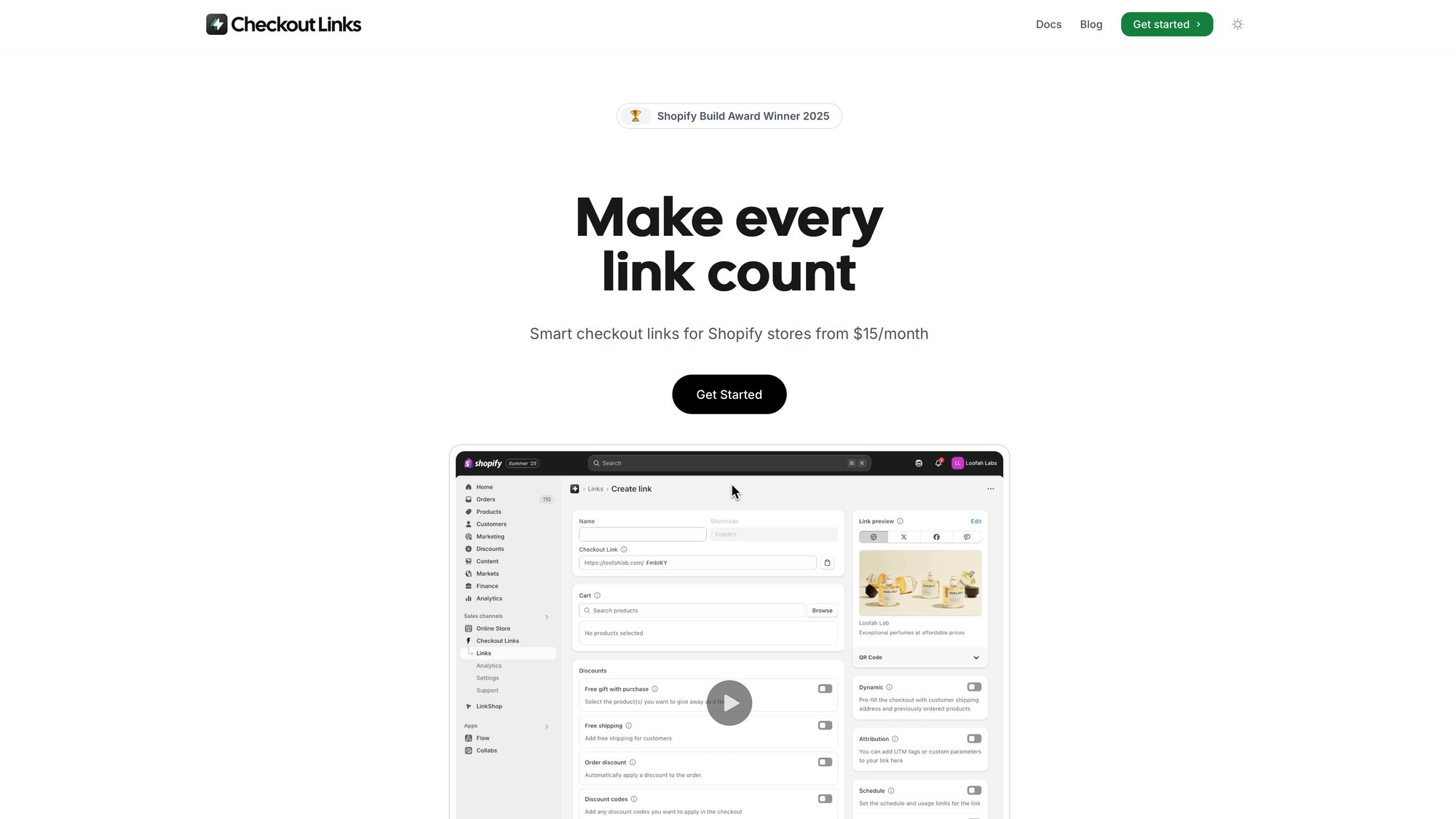
Why this matters for no-code growth:
-> Abandoned cart recovery: As we covered above, Checkout Links can automatically generate personalized URLs that prefill the exact items a customer abandoned. Pair these with email flows in Klaviyo and you’ve got a powerful one-click recovery system.
-> Campaign-specific offers: Running an influencer campaign? Flash sale? Email promotion? Create a link that preloads specific products with an automatic discount. Drop it into any channel and track results in Shopify analytics with UTM parameters that flow natively into your reports.
-> QR codes for offline-to-online: Checkout Links generates branded QR codes for any link. Put them on packaging, event signage, or in-store displays. Scan, and customers go straight to a checkout-ready cart. UTM tags let you see exactly how much revenue each offline touchpoint generates.
-> Scheduled flash sales: Use the scheduling feature to set exact start and end times for offers. When you tell customers a deal ends at midnight, it actually ends at midnight. No manual intervention needed.
-> Usage limits for exclusivity: Restrict links to once per customer or a total number of uses. “First 50 customers only” becomes enforceable, not just marketing copy.
-> Free gifts with thresholds: Add free gifts to any link, either simple (always included) or threshold-based (spend 100, get a free product). Progressive messaging like “Spend 20 more to unlock your free gift” creates natural upsell motivation.
-> Native Shopify analytics: All revenue from Checkout Links flows into Shopify’s built-in analytics. KPIs, conversion rates, AOV, performance by link, visualization of conversion journeys. No third-party dashboards to maintain.
The pricing makes this a no-brainer. Checkout Links is 25/month flat, no percentage of sales. If your average gross profit per order is 25, a single incremental order per month covers the cost. Everything beyond that is pure profit.
Checkout Links won a 2025 Shopify Build Award, carries the Built for Shopify badge, and connects to Klaviyo for personalized links. It’s designed to work with Shopify’s infrastructure, not around it.
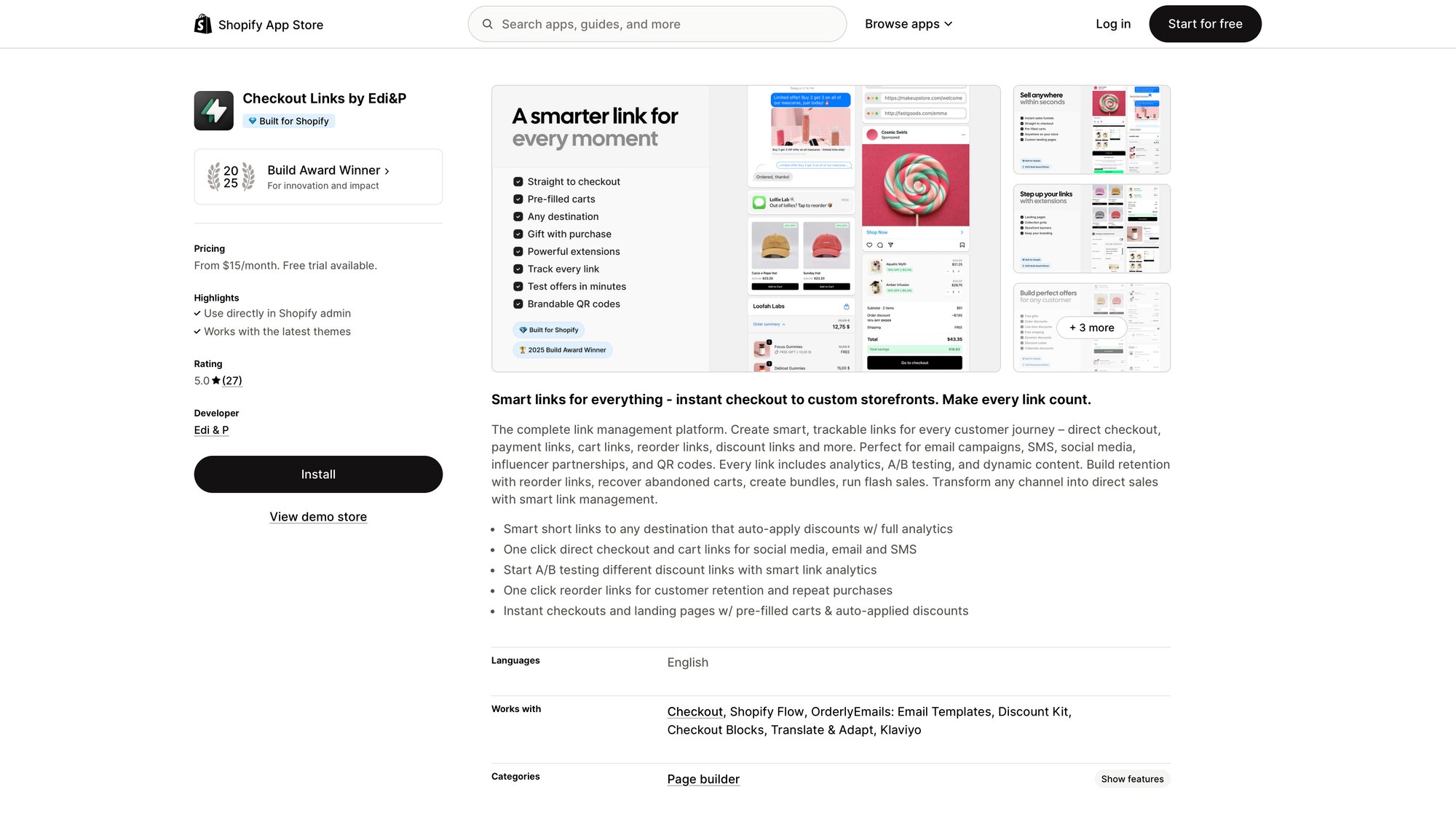
If you’re implementing the growth tactics in this guide, Checkout Links makes several of them significantly easier to execute and track. Check out the quickstart guide to get started.
How to Set Up a Shopify Loyalty Program
Acquiring a new customer costs 5-7 times more than keeping an existing one. Yet most Shopify merchants focus almost exclusively on new customer acquisition. The real growth hack? Get your existing customers to buy more often.
A loyalty program formalizes the value of repeat purchases. Points, rewards, VIP tiers. These structures give customers a tangible reason to choose you over competitors and to consolidate their spending with your store.
The stats back this up:
Research shows that loyalty programs drive about 83% of consumers to make repeat purchases. Members typically spend 20-40% more per visit than non-members. And critically, your chance of selling to an existing customer is 60-70%, compared to just 5-20% for new prospects.
Customer retention strategies show that customers in loyalty programs have a 25% higher retention rate than those not enrolled. Members are 62% more likely to spend more on your brand over time.
No-code setup:
Install a loyalty app like Smile.io, LoyaltyLion, or Growave. These integrate seamlessly with Shopify and come with customer-facing widgets for point balances and reward redemption.
Keep your structure simple to start:
- Points for purchases: 1 point per dollar spent is easy to understand. When they hit 100 points, they get $5 off.
- Bonus points for actions: Reward sign-ups, birthdays, reviews, social shares. These encourage engagement beyond purchases.
- VIP tiers (optional): Bronze, Silver, Gold levels with escalating perks. Higher tiers get better point earning rates or exclusive products. This motivates big spenders to stay loyal. Promote it actively. Add a banner announcing your rewards program. Mention earned points in order confirmation emails. Make the value visible so customers remember to redeem.
Target structure: Aim for rewards equivalent to 5-10% of purchase value. Spend 100, get points worth 5-10 toward next purchase. Too stingy and customers won’t care. Too generous and you hurt margins.
Understanding customer lifetime value is essential here. If 20% of your customers currently make a second purchase, and a loyalty program increases that to 30%, you’ve just added significant recurring revenue with minimal cost. That’s the power of retention.
How to Create a Referral Program That Works
Your happiest customers are your best salespeople. They’ve bought from you, loved the experience, and would gladly tell their friends. A referral program just makes that word-of-mouth official and incentivized.
Why referrals are so powerful:
Research found that 92% of consumers trust recommendations from friends and family over any other form of advertising. That’s the gold standard of trust. When Alice tells Bob about your store, Bob shows up pre-sold.
The downstream effects are significant:
- Referred customers have 25% higher lifetime value on average
- They’re 18% less likely to churn
- 37% higher retention rate compared to non-referred customers
- 4 times more likely to buy when referred by a friend
- 68% higher conversion rate for referred traffic Referred customers aren’t just more numerous. They’re better customers.
Setting up a referral program (no code needed):
Referral apps handle the tracking and reward distribution. You just configure the incentive structure.
Two-sided incentives work best. Reward both the referrer (“Give 10”) and the friend (“Get 10”). The friend is more likely to use the referral if there’s something in it for them.
Typical structures:
- “Give 10, Get 10” (store credit)
- “Give 20% off, Get 20% off”
- “Refer 3 friends, unlock VIP status” Promote it strategically:
Target your best customers. People who’ve bought multiple times or left 5-star reviews are your most likely advocates. Consider reaching out to them personally with an extra incentive (“As a VIP customer, here’s bonus credit for each referral this month”).
You can use Checkout Links to create personalized referral links with built-in discounts that automatically apply when friends click through, making the experience seamless.
If 5% of your customers refer one friend each month, and half of those referrals convert, you’re adding meaningful new customer growth with essentially zero acquisition cost. The only expense is the discount or credit you give when a sale actually happens.
How to Use Content Marketing for Shopify Growth
Not every growth tactic produces instant results. Content marketing is a longer play, but it compounds over time in ways that paid advertising never can.
When you publish helpful content (blog posts, guides, videos, how-tos), you’re creating assets that attract your target customers through search engines and social shares. Each piece continues working for you months or years after you publish it, bringing in free traffic that doesn’t require constant ad spend.
The numbers are compelling:
Research shows that companies with blogs produce 67% more leads per month than those without. Marketers who prioritize blogging are 13 times more likely to achieve positive ROI because content continues driving traffic long after publication.
Studies show blogging can increase website traffic by 55% and boost lead generation by 126% for small businesses.
How to leverage content on Shopify (no code required):
Start blogging. Shopify has a built-in blog engine. Go to Online Store > Blog Posts and start publishing. Write about topics your potential customers care about and search for. A store selling coffee equipment might write “How to Make Better Pour-Over at Home.” A skincare brand might cover “5 Ingredients to Avoid in Moisturizers.”
Optimize for search. Use descriptive titles with keywords people actually search. Edit the SEO meta title and description for each post. Structure content with headings and short paragraphs so it’s easy to scan. Learn more about SEO best practices.
Create evergreen guides. Beyond regular posts, build comprehensive resources. A “Complete Guide to [Your Niche]” can rank for broad terms and establish authority. These pages attract links from other sites, which improves your overall SEO.
Use video. Product demonstrations, tutorials, unboxing videos. You don’t need professional equipment. A smartphone and decent lighting work fine. Embed the best videos on your product pages and blog. Studies suggest shoppers who watch product videos are significantly more likely to buy.
Distribute what you create. Email new posts to your subscriber list. Share on social media. Pin visual content to Pinterest. Content only works if people see it. Building your email list is essential for distribution.
The compounding effect: If one blog post starts ranking and brings 500 visitors per month, and 2% convert, that’s 10 extra orders monthly from one piece of content. Publish 20 posts over a year, and a few hits can add up to substantial ongoing traffic and revenue.
Content also builds trust. People who find your site through helpful articles associate you with expertise. When they’re ready to buy, you’re already top of mind.
How to Combine These Shopify Growth Tactics
None of these tactics require code, but they do require action. And they work best in combination.
A fast site (Hack #1) converts the traffic brought in by your content (Hack #11) and referral program (Hack #10). Reviews and social proof (Hack #3) give hesitant visitors confidence to buy. Streamlined checkout (Hack #5) captures those ready to purchase. Upsells (Hack #6) increase what they spend. And when some inevitably abandon their cart, your recovery emails with one-click Checkout Links (Hack #8) bring them back.
Loyalty programs (Hack #9) keep customers returning, spending more each time. They become the advocates who power your referral program (Hack #10). And so the cycle continues.
The key is continuous experimentation. Set up these tactics, monitor your Shopify Analytics to see the impact, and iterate. If cart recovery emails are recovering 10% of carts, try adding a second email or a slightly better incentive to push it to 15%. If upsell take-rates are low, test different products or discounts. There’s always room to optimize. A/B testing can help you find what works best for your store.
One final note: the best growth hacks align with delighting your customers. Faster pages delight. Personalized offers delight. Helpful content delights. Smooth checkout delights. Do more of what makes customers happy, and revenue growth follows.
You now have 11 battle-tested strategies proven in e-commerce. No developers required. No code necessary.
Time to put them to work.