If you’re googling “Stan Store alternative,” chances are you’re not just shopping for a different app.
You’re asking a much deeper question:
“What’s the smartest way to turn my audience into revenue without boxing myself into a corner later?”
This guide exists to answer that question properly. Not just throw 20 tool names at you and call it a day.
We’re going to:
• Strip Stan down to first principles so you understand exactly what it does (and doesn’t do)
• Show you why creators go looking for alternatives in the first place
• Map out the three real paths in front of you
• Walk through the most relevant alternatives for 2025
• Explain how a Shopify stack with Checkout Links fits into the picture when you want genuine ownership and room to scale
All the pricing and feature info here comes from public data captured in 2024-2025. Always verify on the provider’s actual pricing page before you commit to anything.
What “Stan Store Alternative” Actually Means
When someone types “Stan Store alternative” into Google, they’re usually in one of three situations.
Pre-purchase hesitation
You’ve seen Stan in TikTok videos. The “no website needed” pitch sounds attractive. But something feels a bit too simple, and you want to make sure you’re not walking into a trap that limits you later.
Outgrowing the tool
You already use Stan. It got you started. But now you need:
• More control over branding and design
• A real website with SEO and blog capability
• The ability to sell physical products or handle a bigger catalog
• Deeper analytics and integrations with tools you actually use
Economics starting to sting
Early on, simplicity justified the cost. Now that you’re doing real revenue, you’re running the numbers:
→ Monthly subscription fees
→ Transaction fees (if applicable)
→ Payment processing costs
→ All of it versus what you’re actually earning
Underneath all of that, the real job to be done is this:
So the content that truly serves this search intent has to:
• Compare business models, not just feature checklists
• Explain trade-offs in actual numbers
• Respect that you might be on TikTok and Instagram today but want a real brand tomorrow
• Show realistic paths for growth
That’s the bar we’re aiming for here.
What Is Stan Store and How Does It Work?
Let’s be precise about what Stan is before we talk about alternatives.
According to recent independent reviews and Stan’s own documentation:
Stan (formerly “Stan Store”) is an all-in-one creator storefront that lives behind a single link in your bio. It’s built specifically for digital-first creators: coaches, influencers, course creators, template sellers.
You connect Stripe and/or PayPal, Stan handles the page and checkout, and you remain the merchant of record.
What you can sell with Stan
On Stan, you can sell mostly digital and service-based offers:
→ Digital downloads (PDFs, templates, guides, workbooks)
→ Online courses (hosted inside Stan’s platform)
→ Memberships and community access
→ 1-on-1 coaching sessions and calls with calendar booking
→ Webinars and live group sessions
→ External URLs and affiliate links
All of this gets bundled inside a mobile-first, link-in-bio storefront that opens directly from TikTok or Instagram. No separate website required.
Pricing snapshot (late 2025)
As of late 2025, Stan’s official help docs reference two main subscription tiers:
| Plan | Monthly Cost | Transaction Fee |
|---|---|---|
| Creator | ~$29/month | 0% (Stan’s claim) |
| Creator Pro | ~$99/month | 0% (Stan’s claim) |
Stan’s marketing says they don’t charge platform transaction fees. You pay the flat subscription plus normal Stripe/PayPal processing fees (usually around 2.9% + $0.30 per transaction).
However, some third-party articles claim the entry plan includes a 5% platform fee. Given the conflict, the safest approach is:
Important 2025 change: Funnels discontinued
Historically, Stan heavily promoted its funnel and upsell features. But in February 2025, they discontinued the Funnels feature for new users. Existing funnels still work if you already had them, but new stores can’t create them anymore.
That matters because a lot of “Stan vs X” blog posts still reference funnels as if every new account gets them. Many of those comparisons are now out of date.
What Stan is not
By design, Stan is not:
- A full ecommerce platform with inventory management, shipping labels, and physical product workflows
- A real website with blog, custom layouts, robust SEO, or deep design control
- An open platform with a public API or app ecosystem
Your store lives at something like
stan.store/yourname. You get a nice mini-site, but the center of gravity for your business doesn’t live on a domain you own. You’re renting storefront space on Stan’s property.
That trade-off works great for many creators, especially early on. It starts to hurt when you care about:
• SEO and organic search traffic
• Long-form content strategy
• Advanced automations and third-party integrations
• Multi-product brand experiences beyond “a handful of core offers”
Why Creators Go Looking For A Stan Store Alternative
From analyzing dozens of recent “Stan alternatives” comparisons, the same patterns show up again and again.
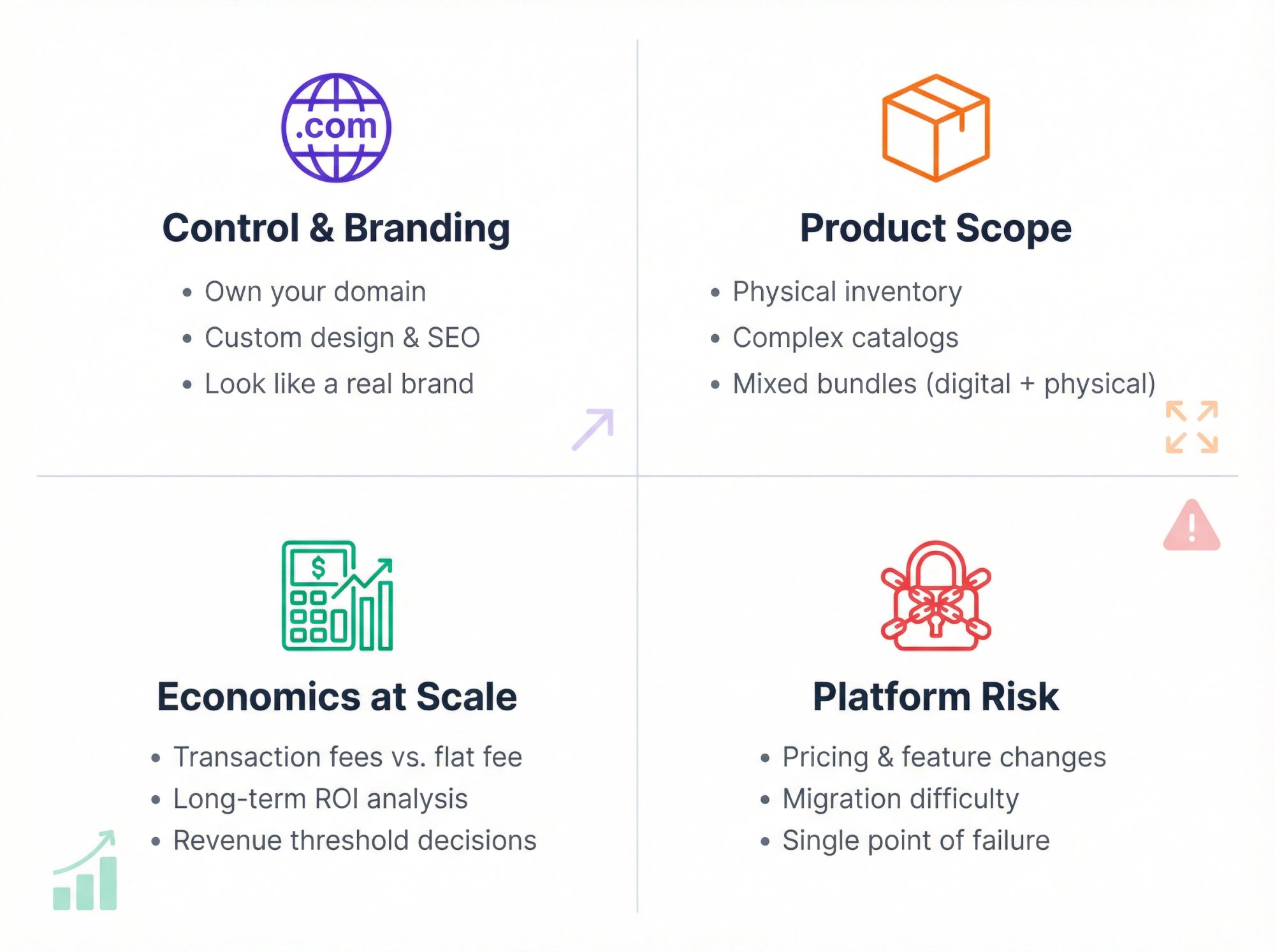
Control and branding
You want your site on your own domain, with your own layout, blog, SEO strategy, and tracking setup. You want to look and feel like a real brand, not “Creator Using Stan Store.”
Platforms like Shopify give you that control. The cost is more initial setup and a steeper learning curve.
Product scope limitations
Stan is digital and services only. It’s not built for:
- Physical inventory
- Complex product catalogs
- Bundling digital and physical items together
- Wholesale or B2B sales If you want to sell merch, kits, or bundles that mix formats, you’re already in Shopify or WooCommerce territory. (For community-led creators specifically — Discord servers, fandom audiences, paid memberships — see our guide to running a Discord merch store on Shopify with member-gated drops.)
Economics at scale
Early on, Stan’s speed and simplicity easily justify the subscription. As revenue grows, you start asking harder questions:
→ Would a transaction-fee model actually be cheaper at my volume?
→ Would a full ecommerce platform with higher base fees but more control give me better long-term upside?
You’re not just comparing Stan versus “free.” You’re comparing:
Platform risk
When everything you do lives inside one black box:
• You’re exposed to pricing changes, feature removals (like Funnels), and policy updates you can’t control
• Moving later becomes harder because all your links, automations, and customer logins point to that one system
• Your business has a single point of failure
This is the single biggest blind spot most creators have when they start. They optimize for “easy now” and forget to think about “stuck later.”
3 Types of Stan Store Alternatives (Which Is Right for You?)
Once you strip away the marketing noise, almost every option falls into one of three paths.
Path A: Another link-in-bio storefront
Swap Stan for a similar “creator storefront” tool. Keep the basic model. Trade one hosted platform for another with slightly different features or pricing.
Examples: Link-in-bio tools, creator storefronts, bio link pages
Path B: An all-in-one creator platform
Move to a system that bundles courses, memberships, email marketing, and landing pages all in one place. More power, more features, steeper learning curve.
Examples: All-in-one creator platforms with email marketing automation and course hosting
Path C: Own your stack with Shopify + Checkout Links
Use Shopify as your commerce foundation and layer Checkout Links on top as your “offer engine” that turns any traffic source into a pre-configured checkout flow.
You’re not choosing between apps. You’re choosing a business architecture.
Let’s walk through each path.
Link-in-Bio Alternatives to Stan Store
If you like the basic Stan model but want different economics or features, these are the closest cousins.
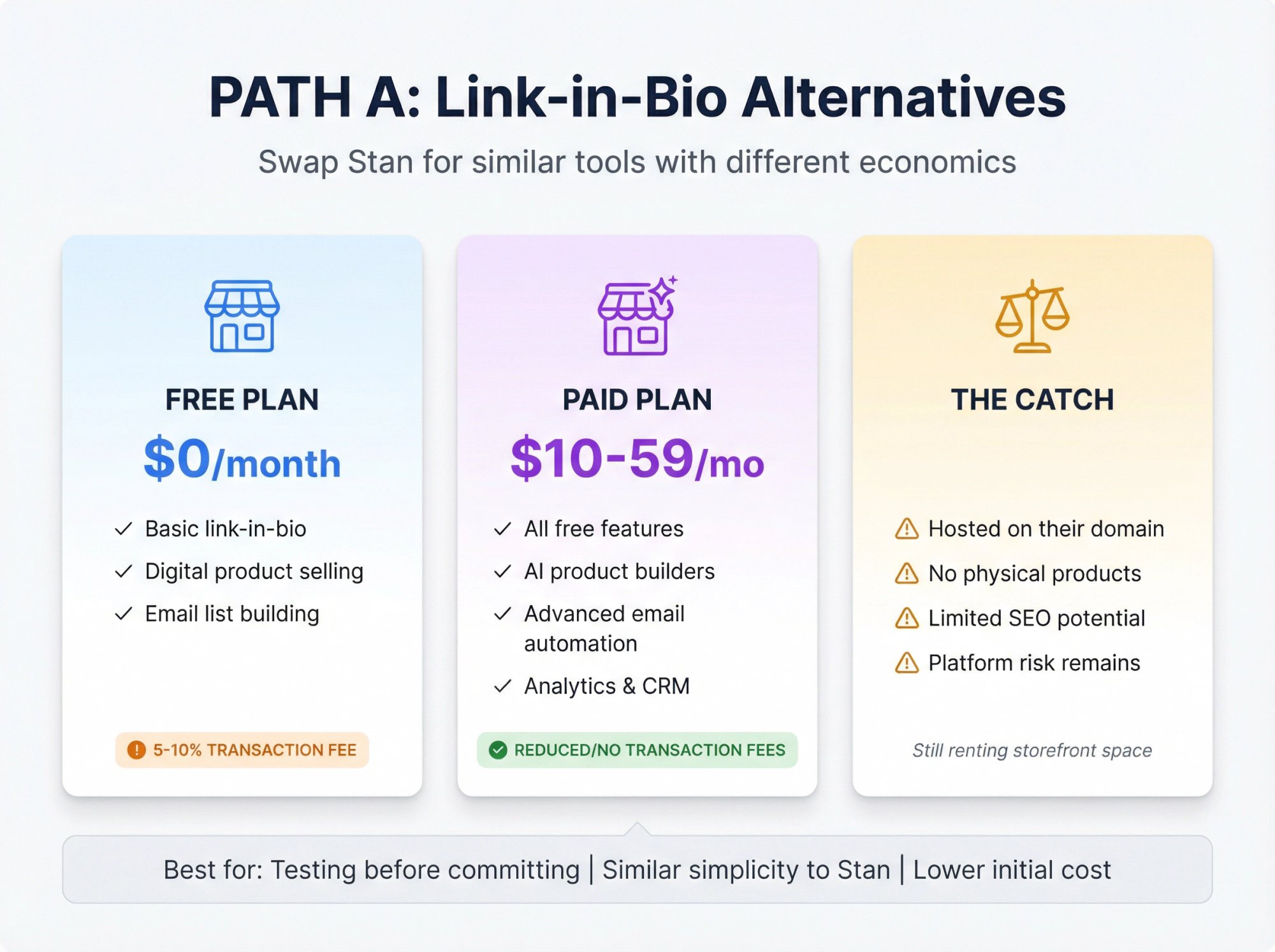
Link-in-bio creator tools
Type: Free or low-cost link-in-bio storefronts
Good for: Creators who want simple digital product selling from social media
Many link-in-bio tools now offer:
→ Link-in-bio storefront
→ Digital product selling
→ Email list building with automation
→ Basic CRM and audience analytics
Typical Pricing (2024-2025):
Most link-in-bio tools offer:
• Free plans with transaction fees (often 5-10%)
• Paid plans starting around $10-59/month to reduce or eliminate fees
Where they beat Stan:
Free plans let you test properly before committing. Many offer AI-assisted product builders and more powerful email tools than Stan’s basic features.
Where they lose:
Still a hosted storefront on someone else’s domain by default. No physical products. No real SEO-optimized website. Platform risk remains.
All-in-One Creator Platforms vs Stan Store
These tools play a different game. Instead of “just” a bio link store, they try to replace your entire stack: website, course hosting, memberships, email marketing, sometimes communities and coaching tools.
You trade some simplicity for significantly more power.
All-in-one platform considerations
Type: Comprehensive creator platforms with courses, memberships, and marketing
Good for: Creators who want a full “home base” without going full enterprise
Most all-in-one platforms offer:
① Multi-page website with blog
② Online course hosting
③ Digital download store
④ Webinars and coaching booking
⑤ Community features
⑥ Email marketing with automation
Typical Pricing Ranges (2025):
All-in-one creator platforms typically range from $30-500+/month depending on features, user limits, and scale requirements
Pros:
Real multi-page website with blog and content categories. More flexible course and membership experiences. Built-in email gets more powerful over time without needing third-party integrations.
Cons:
More to learn and configure. Transaction fees on cheaper plans can add up. Still “all-in-one or nothing” rather than composable architecture. Migration becomes extremely complex because everything is interconnected.
Shopify + Checkout Links: Own Your Store and Sales
So far we’ve looked at “hosted creator tools” that keep you inside someone else’s ecosystem.
Path C is fundamentally different.
You run your business on Shopify, which is a full ecommerce platform used by everyone from tiny creators to billion-dollar brands. Then you layer Checkout Links on top as the “offer engine” that turns any traffic source into a pre-configured checkout or landing page on your own domain.
This is where we come in.
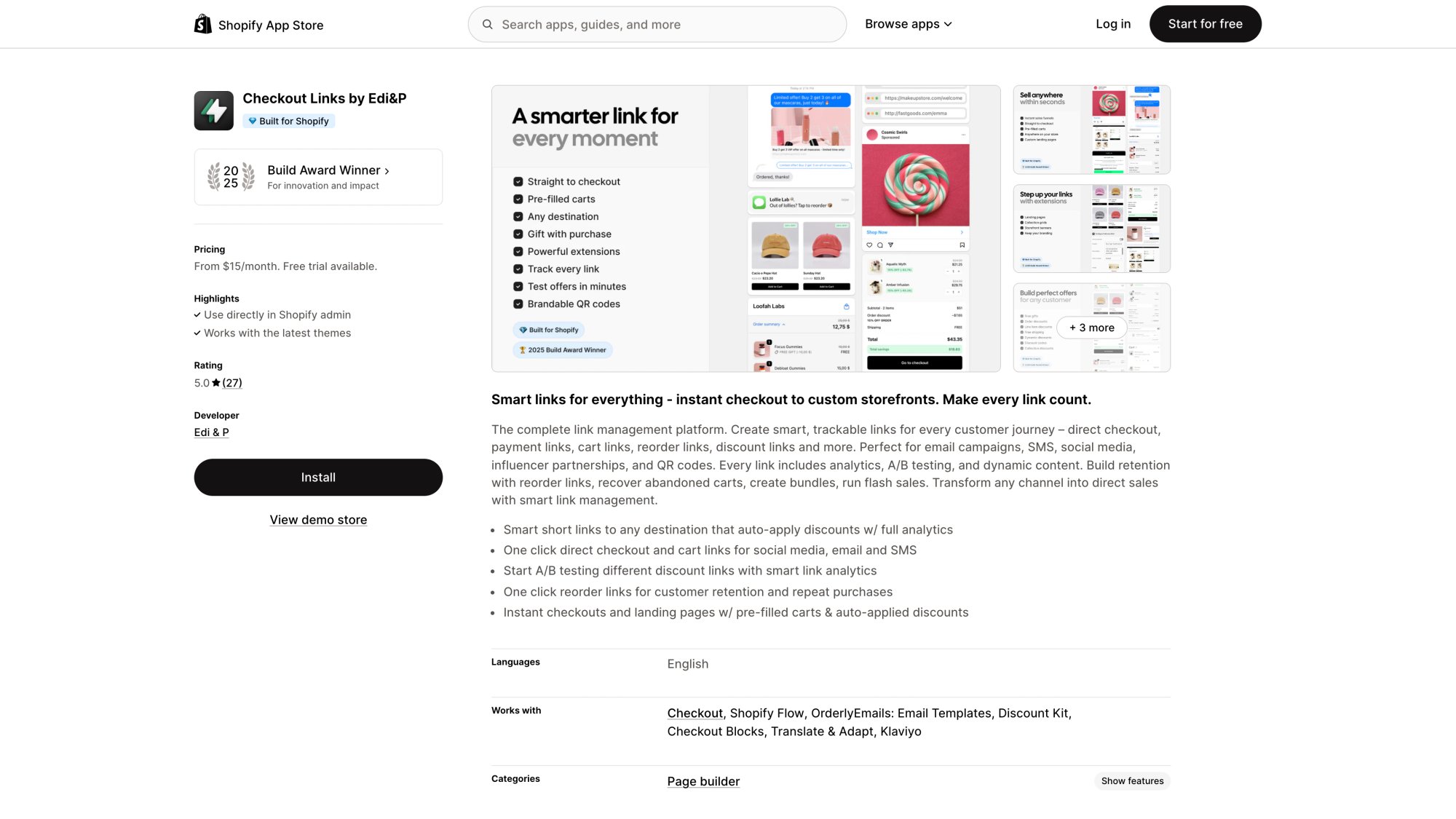
The Checkout Links Shopify app carries Shopify’s Built for Shopify badge and won a 2025 Build Award, signaling that it meets Shopify’s quality standards for merchant value, performance, and UX.
Checkout Links transforms traditional browse-to-buy flows into direct, pre-configured purchase paths that work from any traffic source.
What Shopify gives you that Stan never will
Out of the box, Shopify provides:
• A real online store on your domain
• Support for physical and digital products in the same catalog
• Inventory management, shipping calculators, tax automation, fulfillment tools
• SEO-friendly pages and blog with full content control
• Massive app ecosystem for almost any business need
• In-depth analytics and multi-channel selling (TikTok, Instagram, Google, point-of-sale)
Pricing (typical ranges in 2025, actual amounts vary by region):
| Plan | Monthly Cost | Best For |
|---|---|---|
| Starter | ~$7/month | Simple social selling only |
| Basic | ~$29/month (annual) | Most new stores |
| Grow/Shopify | ~$79-99/month | Growing stores |
| Advanced | ~$299-399/month | High-volume businesses |
| Plus | From ~$2,300/month | Enterprise |
So even a Basic Shopify store costs about the same as Stan Creator Pro, but with far more long-term flexibility and ownership.
What Checkout Links adds on top
Shopify is incredibly powerful. But its default purchase flow is still “browse → product page → cart → checkout.”
Checkout Links transforms that into:
According to our product documentation and Shopify’s official app listing, a Checkout link can:
• Send buyers straight to checkout, to cart, or to a custom landing page
• Prefill carts with specific products, quantities, bundles, or even dynamic content (past orders, abandoned carts)
• Attach order discounts, free gifts, and free shipping with granular scoping rules
• Enforce schedules, per-customer usage limits, or 4-digit passcodes for “secret” VIP offers
• Add UTM tags and custom parameters that flow into Shopify’s native analytics
• Open a popup over your store with the offer, upsells and a checkout button
• Work seamlessly with QR codes, email flows, Meta ads, Klaviyo, and more
The result is a programmable offer layer living directly on top of Shopify’s checkout infrastructure.
For someone coming from Stan, think of Checkout Links as:
Cost comparison: Stan versus Shopify + Checkout Links
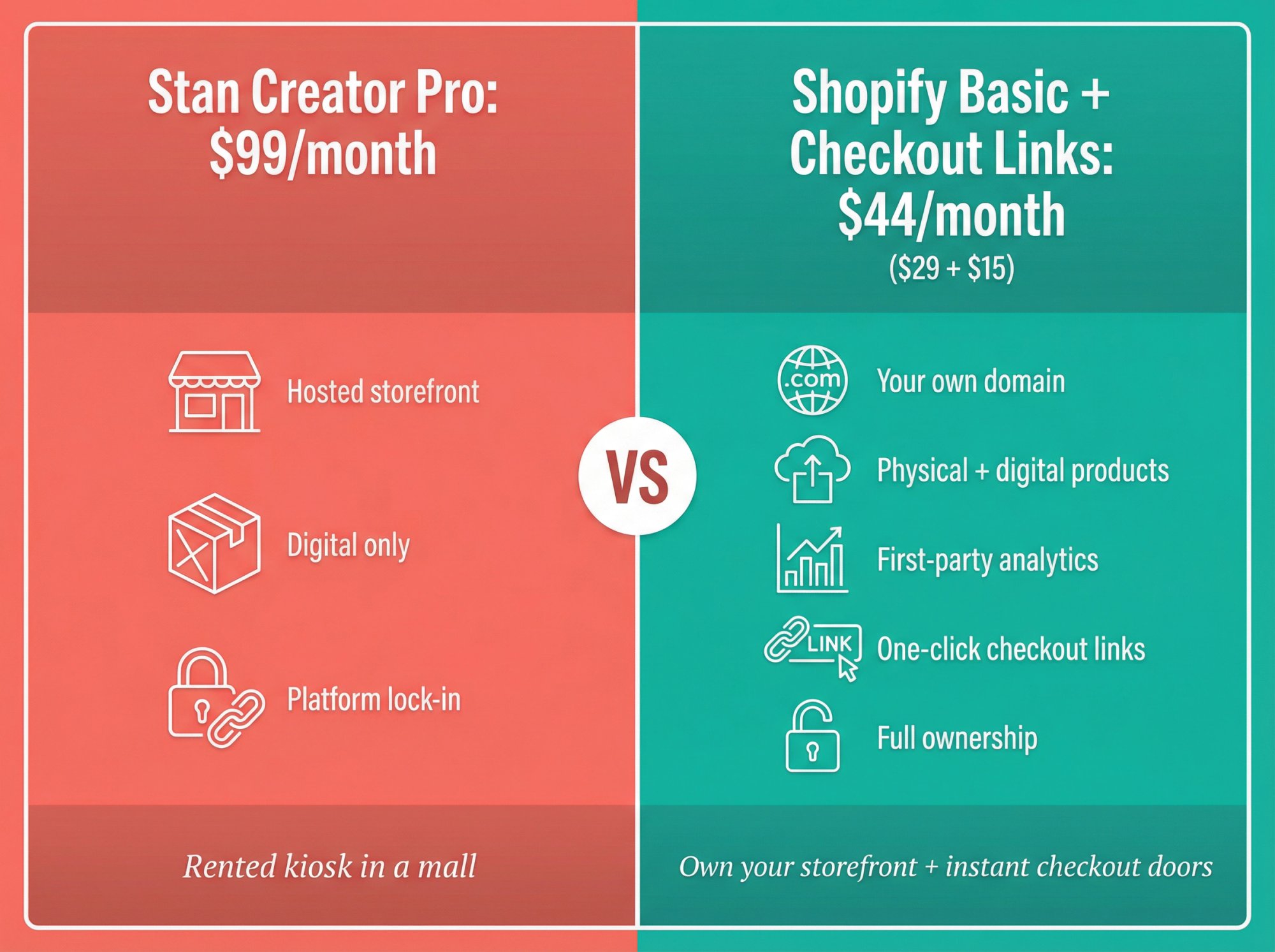
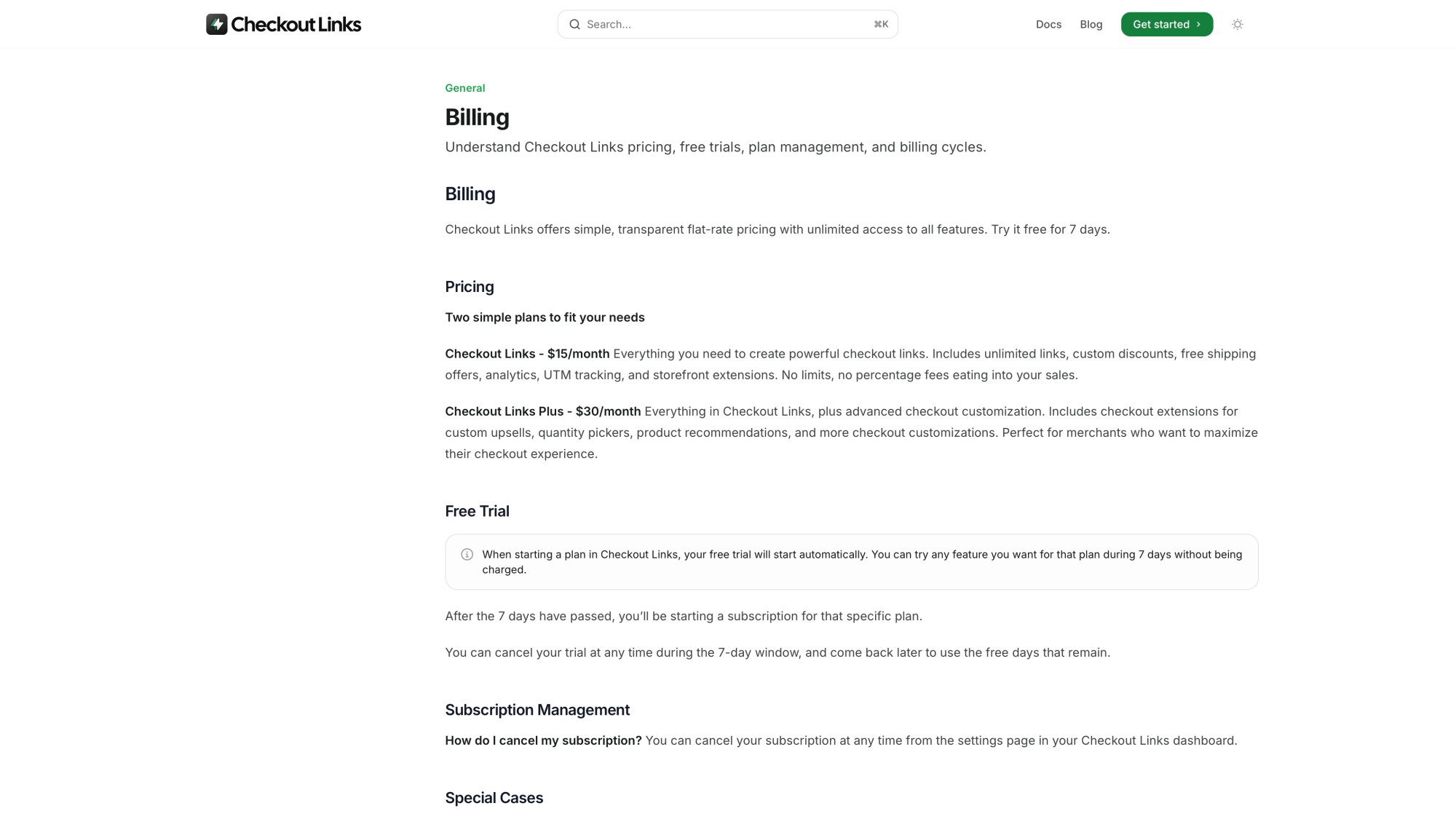
As shown on the Checkout Links billing page, the app costs a flat $25 per month with no transaction fees—making the cost structure straightforward and predictable regardless of sales volume.
Let’s run quick math on a realistic scenario.
Example Assumptions:
• You’re doing $2,000/month in sales
• Payment processing is roughly 3% + $0.30 per order in both setups
• You’re comparing:
- Stan Creator Pro at $99/month
- Shopify Basic at 29/month](https://www.shopify.com/pricing) + [Checkout Links at ****25/month Ignoring payment processor fees (they exist either way):
| Setup | Monthly Platform Cost |
|---|---|
| Stan Pro | $99/month |
| Shopify Basic + Checkout Links | 54/month (29 + $25) |
Even if your local Shopify pricing varies slightly, you’re in the same ballpark as Stan Pro, sometimes cheaper, while owning your entire store and domain.
The real difference isn’t the $50 or so each month. It’s:
• All your assets live on your Shopify store
• You can sell physical products, digital products, subscriptions, bundles, and anything else Shopify supports
• You get first-party analytics built into Shopify
• You can still create one-click social-to-checkout paths with Checkout Links
How to recreate a “Stan-style” experience with Shopify + Checkout Links
Here’s an opinionated 6-step blueprint.
① Spin up Shopify
Start a Shopify trial and choose a mobile-friendly theme. Add your core products: digital downloads, coaching packages, memberships. If you sell digital products, install a reputable digital delivery app from the Shopify App Store.
② Install Checkout Links
Install Checkout Links from the Shopify App Store. Follow our quickstart guide to create your first link.
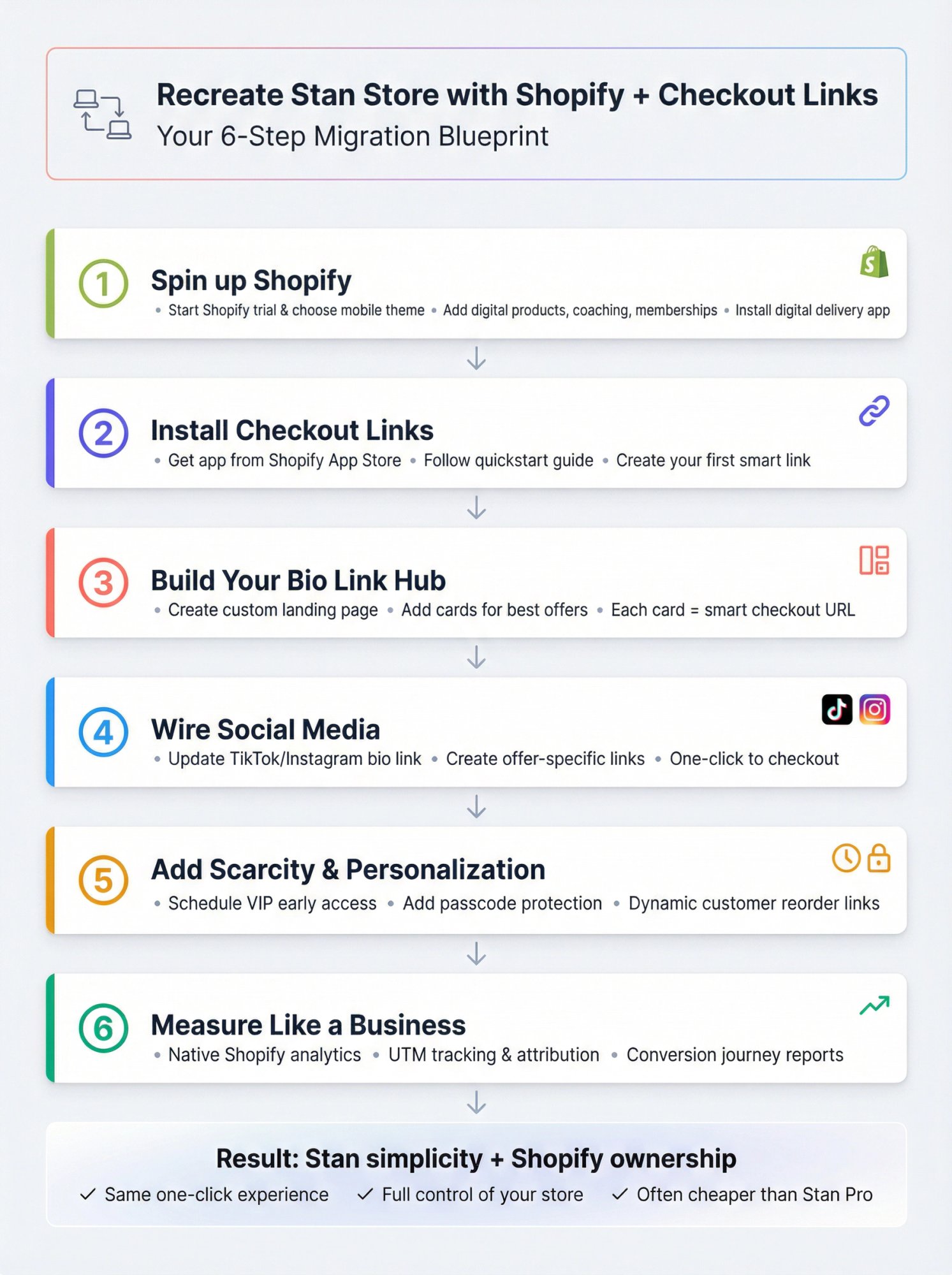
③ Build your main “bio link” offer
Create a custom landing page link that acts as your main Stan-style hub: clean hero section, short pitch, small grid of your best offers.
For each “card” on that page, create a Checkout Links smart URL that:
• Prefills the cart with the exact product
• Applies any discount or free gift automatically
• Sends buyers straight to checkout
④ Wire your social media
Put your main landing page link in your TikTok/Instagram bio. Optionally create separate Checkout Links for:
- “Book coaching”
- “New product drop”
- “Best seller bundle” Every link can go straight to a customized checkout or time-limited landing page.
⑤ Add scarcity, personalization, and rewards
This is where you get beyond what Stan can easily do:
• Use scheduling and passcodes for VIP early access windows or exclusive launches
• Use dynamic customer links for one-click reorders and personalized recovery offers
• Add a free gift threshold with a progress bar in the popup, so buyers see “Spend $X more to unlock Y” before they check out
⑥ Measure like a real business
Because everything runs through Shopify:
• Your Checkout Links traffic appears in Shopify’s native analytics and conversion journey reports
• You can break down performance by UTM source or campaign and properly attribute revenue
You end up with:
How to Choose the Right Stan Store Alternative
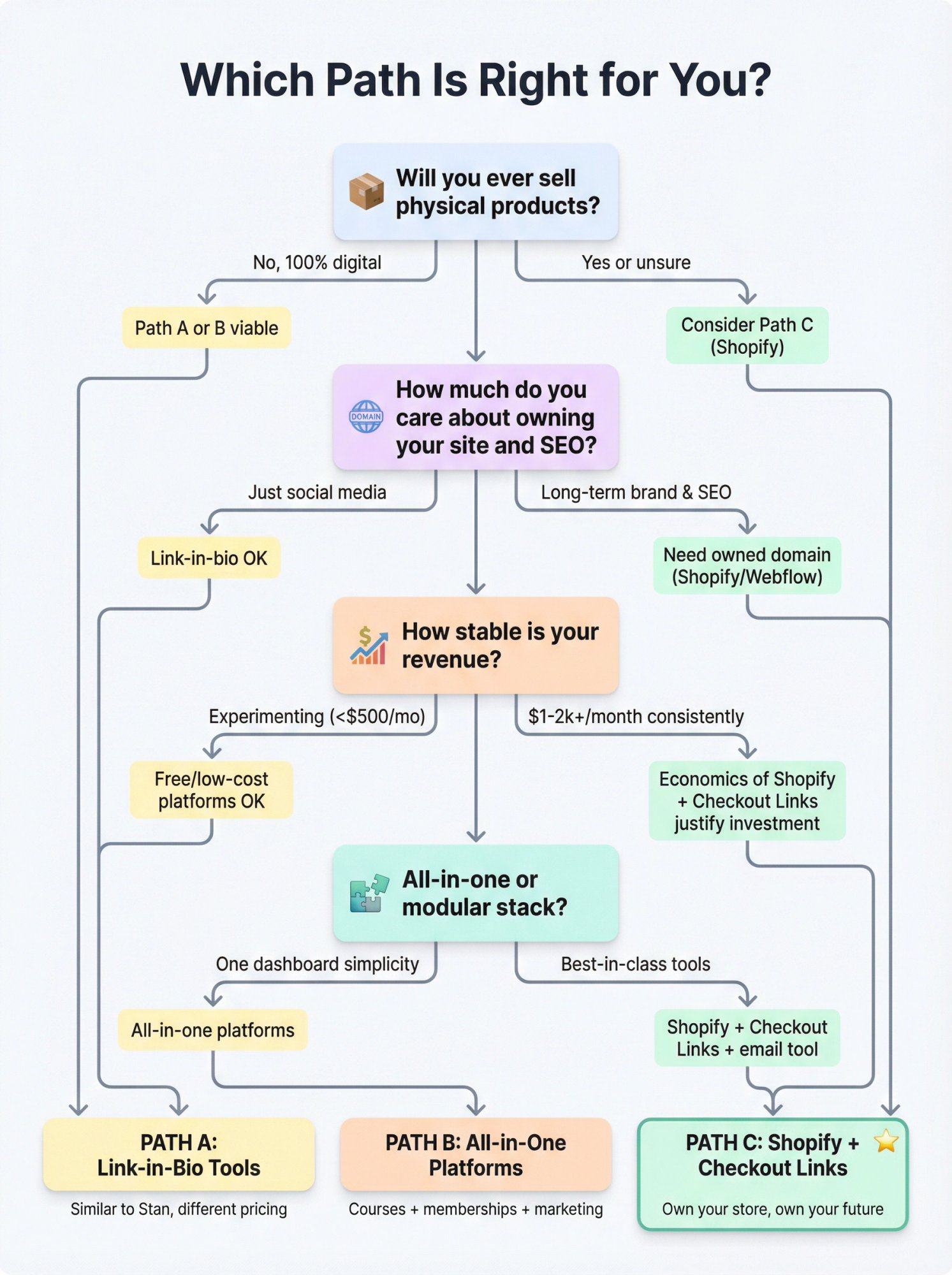
Here’s a blunt way to decide which path even deserves your attention.
Question 1: Will you ever sell physical products?
No, I’m 100% digital and plan to stay that way.
Path A or B can work for a long time.
Yes, or I’m not sure. I might add merch, kits, or physical bundles.
You’re almost certainly going to end up on Shopify or similar anyway. Strong case for Path C sooner rather than later.
Question 2: How much do you care about owning your site and SEO?
I live on TikTok and Instagram. I don’t care about blogs or organic search right now.
Link-in-bio tools are fine starters.
I want long-term organic traffic and a brand that people can Google.
You need a platform where you control the domain, pages, and SEO structure. Shopify with a good theme, or a website builder like Webflow with separate checkout, beats any pure bio link tool.
Question 3: How stable is your revenue?
I’m experimenting, making less than a few hundred dollars per month.
A free or low-commitment platform is a rational test bed.
I’m consistently making $1-2k+ per month or aim to soon.
Every percentage point and platform limitation now matters. This is where the economics of Shopify plus Checkout Links start to look very logical.
Question 4: Do you want “one app to rule them all” or “strong core with modular tools”?
One dashboard simplicity is my top priority.
All-in-one platforms give you that, at the cost of being locked into their specific way of doing things.
I’m okay combining a few best-in-class tools.
Shopify as the hub, Checkout Links for programmable offers, and a solid email service (Klaviyo, ConvertKit, or even Shopify Email) give you a powerful but still understandable stack.
What Creators Miss When Switching from Stan Store
A few assumptions worth challenging before you commit.
“No transaction fees” automatically means cheaper
Stan markets “keep 100% of your sales” because they don’t charge platform transaction fees. You still pay card processing fees regardless.
On the flip side, some tools charge 5-10% plus a fixed amount per sale but offer:
- No monthly base fee
- Merchant of Record status with tax and VAT handling taken completely off your plate If you do tiny volumes or genuinely hate dealing with VAT compliance, a transaction-fee platform can be a rational choice.
“All-in-one” means “less work”
In reality:
• You still have to learn a massive feature set
• If you ever leave, you have to unwind everything at once: email lists, courses, payments, automations, customer logins
Often, a small but composable stack (Shopify + a course host + Checkout Links + an email tool) is easier to evolve than a giant all-in-one platform that owns your entire funnel.
“I can always migrate later”
Technically yes. Practically:
• Thousands of links in old content will still point to your old store
• Customers will have logins, saved payment methods, and expectations tied to the old system
• Rebuilding funnels and automations from scratch is non-trivial
You want to choose a path where your core assets (domain, email list, customer data) stay under your control, even if individual tools in your stack change over time.
How to Migrate from Stan Store to Shopify + Checkout Links
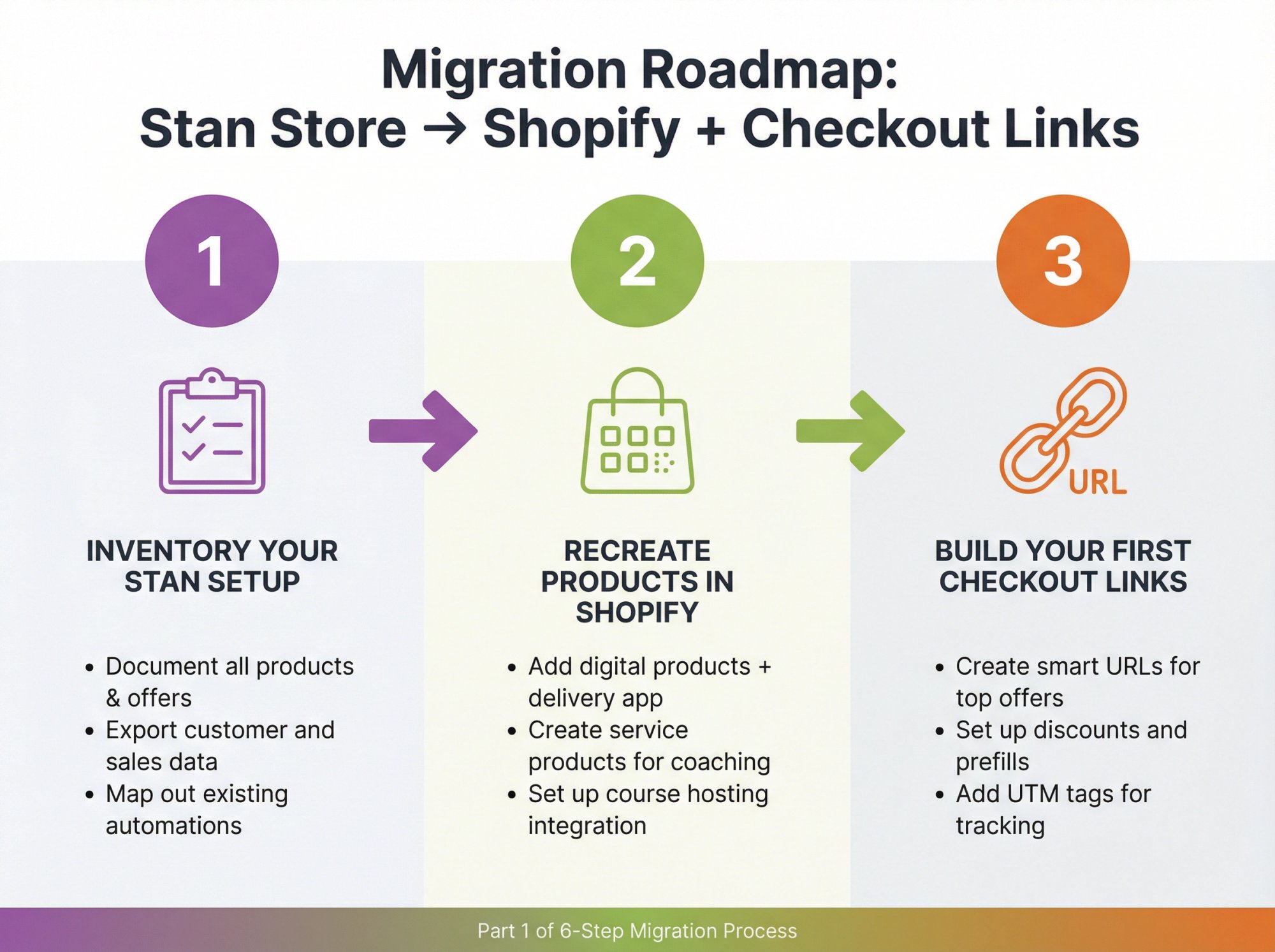
If you choose Path C, here’s a high-level migration plan that avoids common pitfalls.
① Inventory your Stan setup
From inside Stan, document:
- All products (digital, coaching, memberships, courses)
- Active funnels or upsells (if you’re an older user who still has them)
- Lead magnets and email entry points
- Existing email automations
- Every important link you’ve shared in content, emails, and social profiles Export customer and sales data to CSV wherever possible.
② Recreate products in Shopify
• Add digital products and connect a digital delivery app
• Create “service” products for coaching or consulting offers
• Decide where courses will live:
- A Shopify course app
- Or a dedicated course platform that integrates with Shopify ③ Build your first Checkout Links
Start with your highest-traffic offers:
- Your main “Start here” or “Work with me” flagship offer
- Your top-selling digital product
- One core lead magnet For each one, create a Checkout Links smart URL that:
• Prefills the exact product(s) and quantities
• Sets the correct discount, if any
• Sends directly to checkout or to a compact landing page
• Includes clear UTM tags so you can compare “old Stan link versus new Shopify link” performance side-by-side
④ Update your bio links and top content
- Swap your link-in-bio to your new Shopify-backed landing page URL
- Edit descriptions and profile links on the top 10-20 videos or posts that still drive the most traffic
- Pin a short video or story explaining the change and directing people to the new buying experience ⑤ Rebuild key automations
Inside Shopify and your email platform:
• Set up abandoned checkout and post-purchase flows that include Checkout Links for one-click returns or reorders
• Recreate any “DM me a word” style opt-ins using your new landing pages and email capture forms
• Use Checkout Links’ dynamic customer link features for personalized promos to repeat buyers
⑥ Give yourself a 30-day overlap
If financially feasible, keep Stan running for one more billing cycle while:
- New buyers start flowing through Shopify
- Old links gradually get replaced with new ones
- You confirm that delivery workflows and automations are stable Then cancel Stan once your Shopify analytics clearly show the new setup is working smoothly.
When Is Checkout Links The Right “Stan Store Alternative”?
Checkout Links is not a drop-in replacement for Stan if you:
- Have zero interest in running a real online store
- Only want one simple link-in-bio and a basic checkout
- Are extremely early-stage and want absolutely zero setup complexity We shine when:
✓ You either already run Shopify or you’re ready to commit to it as your commerce foundation
✓ You want to turn social media, email, QR codes, ads, and support channels into direct, trackable, optimized purchase flows
✓ You care about using Shopify’s native analytics and payment infrastructure instead of fragmenting data across multiple platforms
In that world, the right mental model is:
Your Action Plan: Choosing and Implementing a Stan Store Alternative
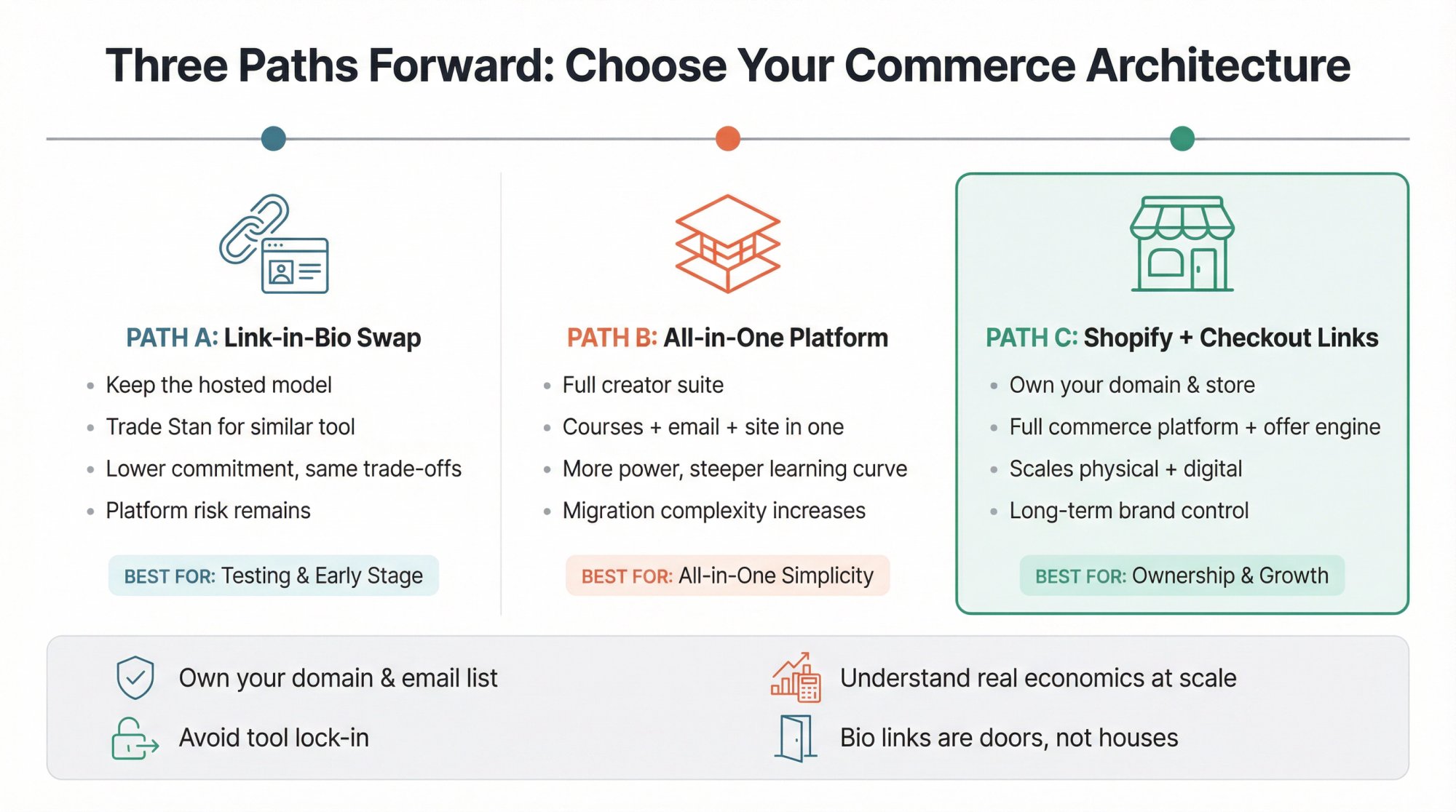
To recap and make this actionable:
If you want a fast swap with similar vibes:
Look at link-in-bio tools and creator storefronts. Pick based on transaction fees, email needs, and how serious you are about long-term growth potential.
If you want a more serious all-in-one home for courses and digital products:
Evaluate all-in-one creator platforms with a spreadsheet open. Model your actual revenue versus monthly fees plus transaction fees at realistic volumes. Consider email marketing automation capabilities as part of your evaluation.
If you want a long-term brand and store you truly own:
Use Shopify as your foundation and layer Checkout Links on top to keep the “one click from social to checkout” superpower that made Stan attractive in the first place.
Whichever path you choose, keep these principles in mind:
① Own your domain and email list wherever possible
② Understand your effective fee percentage at your realistic revenue level, not hypothetical seven figures
③ Avoid locking critical business assets into tools that don’t export data cleanly
④ Treat bio link tools and storefronts as front doors to your business, not the entire house.


