Sending a link sounds simple, right? But in today’s world, just dropping a standard URL into an email or a social post is leaving money on the table. We’ve moved beyond that. Now, it’s all about intelligent checkout links that skip the clunky sales funnel and take customers straight to a pre-filled cart—discount included—turning a flicker of interest into a sale, instantly. This isn’t just a neat trick; it’s how you win on every channel you sell on.
It’s More Than Just a Click
The hyperlink has been around forever. It was born back in 1965 when Ted Nelson first came up with ‘hypertext,’ but it really took off in 1993 with the Mosaic browser, making the web a clickable, visual place for everyone. Fast forward to today, and links are the absolute backbone of e-commerce. With global sales rocketing to $7.5 trillion, how you create and share links has become a core part of your strategy.
Sending a potential customer to a generic product page just creates work for them. They have to find the “Add to Cart” button, click over to the cart, and then start the whole checkout process. Every single one of those steps is an opportunity for them to get distracted and bail.
This is where a smart, conversion-focused checkout link completely changes the game. Instead of just pointing to a webpage, these links carry critical data. They can pre-load a specific product—or even a whole bundle of them—into the cart and automatically apply a discount code. This is the kind of frictionless experience that actually boosts your conversion rates.
From Static Pointer to Active Sales Tool
Think about the difference here. A standard link basically asks the customer to do all the work. A smart checkout link does the work for them. It’s the difference between showing someone a picture of a car and handing them the keys with the engine already running.
This simple shift opens up a ton of powerful, targeted campaign ideas:
- Influencer Marketing: Give an influencer a unique link that automatically applies their special discount right at checkout. Their followers get a seamless experience.
- Flash Sales: Blast an email or SMS with a link that takes shoppers to a cart already loaded with the sale items. They just need to pay.
- Abandoned Cart Recovery: Lure shoppers back with a link that not only restores their cart but maybe even adds a small surprise discount to sweeten the deal.
Standard Product Links vs Smart Checkout Links
The advantages of using a dedicated tool for your links become incredibly clear when you see them side-by-side. One is just a passive pointer; the other is an active, intelligent sales tool designed to make you money.
| Feature | Standard Product Link | Smart Checkout Link |
|---|---|---|
| Destination | Generic product page | Pre-loaded checkout page |
| Customer Action | Must add to cart manually | Cart is ready to purchase |
| Discounts | Requires manual code entry | Applied automatically |
| Friction | High (multiple steps) | Low (direct to payment) |
| Tracking | Basic page views | Detailed conversion data |
The bottom line is that a smart checkout link is built from the ground up to convert, turning a simple click into a completed order with as few steps as possible.
And this thinking doesn’t have to stop with text. You can use free online QR code generators to put these powerful links on packaging, in-store displays, or at events, bridging the gap between your physical and digital storefronts.
Of course, every link you share should be built to convert, and a huge part of that is knowing how it’s performing. To get a better handle on your analytics, take a look at our guide on UTM tracking best practices.
Alright, let’s stop talking theory and start building a link that actually makes you money. It’s time to roll up our sleeves and create your first high-converting checkout link. You won’t need to write a single line of code, but you will need a clear goal for your campaign.
For this walkthrough, let’s pretend we’re launching a weekend flash sale. The mission? Create one powerful link we can blast out on social media and email. This link won’t just go to a product page; it will drop customers directly into a checkout with a specific product bundle pre-loaded and a sweet 15% discount automatically applied.
This is a world away from the old method of just pointing people to your homepage and hoping for the best. The modern sales funnel is all about slashing the number of steps between a customer’s interest and their purchase.
Think of it as an evolution. We’ve moved from simple hyperlinks to intelligent, direct-to-checkout experiences that do the heavy lifting for you.
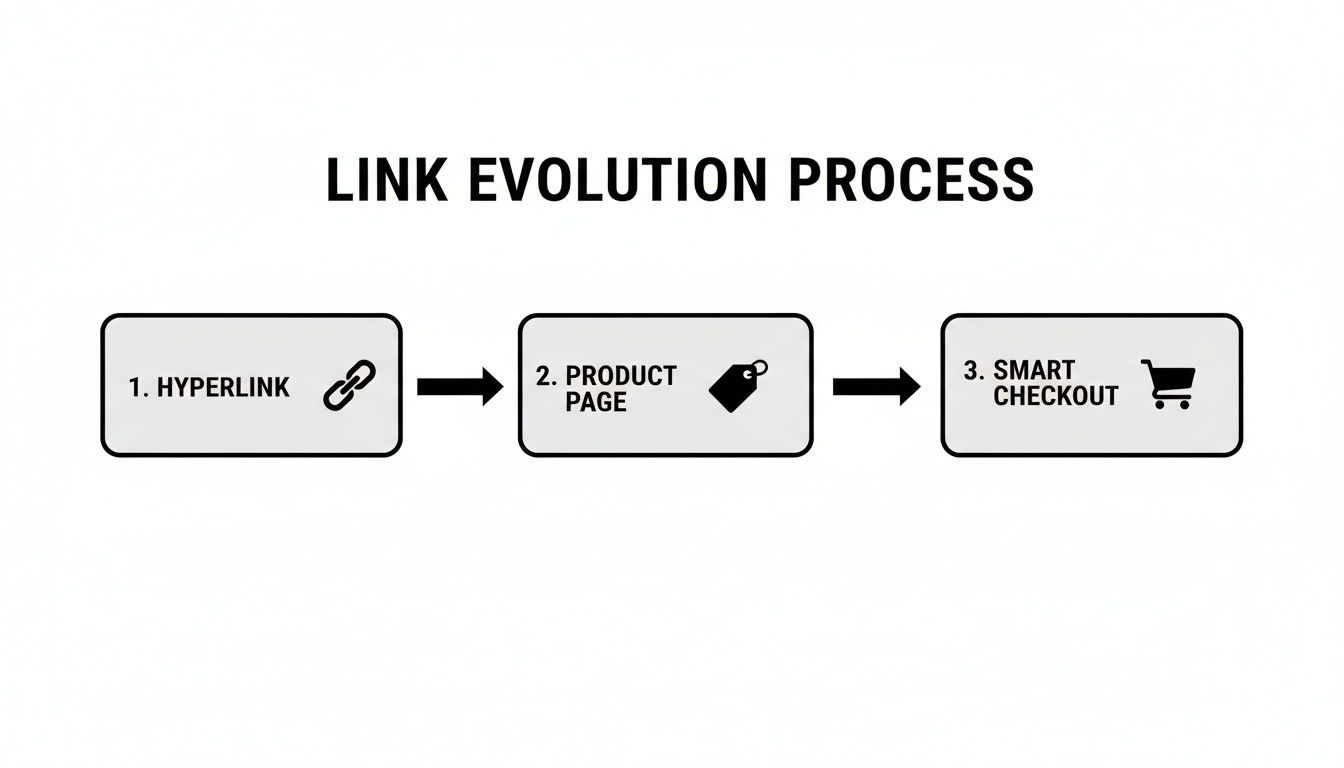
As you can see, the journey has shifted from a basic signpost to an active sales tool, completely cutting out the product and cart pages to minimize friction and drop-off.
Picking Your Products
First thing’s first: what are you selling? For our flash sale, a product bundle is a no-brainer. Bundling is a fantastic strategy because it bumps up your Average Order Value (AOV) while delivering more value to the customer. It’s a classic win-win.
So, instead of just linking to a single best-selling t-shirt, let’s pair it with a popular accessory, like a matching hat. In your link creation tool, you’d simply select both the “Graphic Tee - Large” and the “Classic Logo Hat.” Boom. Now, anyone who clicks this link lands at checkout with both items ready to go.
I’ve seen this tactic work wonders for clearing out specific inventory or even just introducing shoppers to products they might have otherwise missed.
Applying an Automatic Discount
This next part is where the magic really happens. Making a customer hunt for a coupon code field and type it in is just asking for trouble. It creates hesitation, and many will leave to search for a better code, never to return. We’re going to eliminate that friction entirely.
Inside the link’s settings, you’ll create a unique discount. Let’s name it WEEKEND15. Set it to a 15% discount, and here’s the key: configure it to apply automatically. The price your customer sees is the final sale price. No codes to remember, no boxes to find—just instant savings.
This is where you truly start to feel the power of a purpose-built link. You’ve just turned a standard URL into a personalized, frictionless buying experience.
Scheduling Your Link for the Campaign
In a flash sale, timing is everything. You can’t have your special offer floating around before the sale starts or after it ends. This is where scheduling becomes your best friend.
I rely on this feature all the time for influencer collaborations and weekend promos. You can set the link to go live at a specific time—say, Friday at 5 PM—and then automatically deactivate on Sunday at midnight.
This simple setup accomplishes a few critical things:
- Urgency: Customers know the clock is ticking on the offer.
- Control: You prevent the discount from being abused outside the promotional window.
- Automation: Forget setting a weekend reminder. You don’t have to lift a finger to turn the link on or off. For Shopify merchants, this level of control is a game-changer. You can dig deeper into how to create and use Shopify checkout links to really maximize your campaigns.
Once you hit “Create,” you have a single, supercharged URL. This one link is now a self-contained sales campaign, ready to be deployed anywhere. Whether you text it to your VIP list, use it as the CTA for a Facebook ad, or drop it in your Instagram bio, the experience is perfectly consistent and optimized for a sale from the very first click.
Where to Share Your Links for Maximum Impact
So, you’ve created the perfect checkout link. That’s a great start, but it’s only half the battle. Now for the most important part: getting that link out into the world where your customers can actually click it. A brilliant link is useless if it’s not seen by the right people at the right time.
This isn’t about just blasting a URL everywhere you can. It’s about strategic placement. You need to understand the context of each channel and tweak your approach to match how people behave there. A link in an SMS message, for example, serves a totally different purpose than one in a paid social ad.
To really nail this, you have to think like your customers. Where do they hang out online? How do they like to shop? Let’s break down the most effective channels for sharing your links and how to get the most out of each one.
Email Campaigns and Cart Recovery
Email is still one of the most powerful and direct lines you have to your customers. It’s the perfect place for personalized, high-intent links. Think beyond your standard weekly newsletter and get creative with targeted, automated flows.
Abandoned cart emails are the classic example, and for good reason. A shopper was this close to buying. Sending them a direct link back to their pre-loaded cart—maybe even with a small, unexpected discount already applied—can work wonders. In fact, studies show that a 3-email sequence can recover up to 69% more orders than just sending a single reminder.
Here are a few other ways to put this into practice:
- Welcome Series: Greet new subscribers with a special offer delivered via a checkout link. A “10% off your first order” link that takes them directly to a cart with your bestseller and the discount ready to go is a fantastic first impression.
- Win-Back Campaigns: Re-engage customers who haven’t bought from you in a while. Send them a checkout link featuring a product they’ve previously looked at or a new item you know they’ll love based on their history.
- VIP Exclusives: Make your loyal customers feel special. Give them early access to new products or private sales using a checkout link sent only to them.
SMS Marketing for Instant Action
When you need to grab someone’s attention right now, nothing beats a text message. With open rates as high as 98%, SMS is built for time-sensitive offers like flash sales or limited-inventory drops. The trick is to keep your message short, urgent, and incredibly easy to act on.
Imagine you’re running a 24-hour flash sale. A text that says, “Our flash sale ends tonight! Click here for 25% off our new collection” creates immediate urgency. The direct checkout link provides a frictionless path to purchase—no promo codes to remember, no website to navigate. Just one tap, and they’re ready to buy.
Social Media: From Discovery to Purchase
Social media is where people discover new things, but the journey from seeing a product to actually buying it is often long and clunky. Smart checkout links can completely change that, turning passive scrolling into active shopping.
This is especially powerful on visual platforms like Instagram and TikTok. Instead of just relying on a generic “link in bio,” you can use these links in much more dynamic and immediate ways.
Here are a few scenarios where this works beautifully:
- Instagram Stories: Use the “link” sticker to send viewers straight to a checkout page for the exact product you’re featuring in your Story.
- Paid Ads: Make your checkout link the destination URL for your Facebook or TikTok ads. This dramatically cuts down on drop-off compared to sending users to a standard product page where they have to click “add to cart” all over again.
- Influencer Collaborations: Give your influencer partners unique, trackable checkout links that automatically apply their discount code. It makes the experience seamless for their audience and simplifies commission tracking for you. The opportunity here is massive. Global e-commerce sales are projected to hit $6.42 trillion, making up 20.5% of all retail sales. With over 2.77 billion people shopping online, learning to use these links effectively lets you capture a real piece of that market. You can explore more e-commerce statistics to see just how big the online shopping world has become.
QR Codes: Connecting the Physical and Digital Worlds
Finally, don’t sleep on the power of connecting your offline and online worlds. QR codes are basically physical hyperlinks, and they’re incredibly useful for all sorts of in-person situations.
You could put a branded QR code on your product packaging that links customers to a checkout page for a refill or a complementary product. Or, if you’re at a pop-up shop or trade show, a QR code on your display can let people buy right from their phones without having to wait in line. This simple tool turns any physical space into a point of sale, making it easier than ever for customers to buy from you, wherever they are.
Advanced Tactics for Driving More Revenue
https://www.youtube.com/embed/ezFHbpNvOfk
Once you’ve got the hang of creating and sharing basic checkout links, it’s time to dig into the strategies that truly set the top brands apart. This is where you move beyond just sending a link and start deploying a targeted, intelligent sales tool. These advanced tactics are all about using data, creating exclusivity, and staying flexible to squeeze every bit of revenue out of each click.
Fine-Tuning Your Offers with A/B Testing
Let’s be honest, guesswork has no place in a smart marketing strategy. This is where A/B testing your checkout links becomes absolutely essential. It’s a straightforward concept: create two very similar links with one key difference and see which one gets better results.
For example, are you wondering if a 15% discount would pull in more sales than a “Free Shipping” offer? Simple. Create two separate links, send them to similar audience segments, and let the data tell you the story. By tracking clicks, conversions, and revenue for each, you’ll have a clear winner, taking all the guesswork out of your promotions.
This isn’t just for discounts, either. You can test almost any variable to constantly refine your approach. It’s this data-driven method that helps you systematically bump up your conversion rates over time.
Consider testing variables like:
- Product Bundles: Pit a “T-Shirt + Hat” bundle against a “T-Shirt + Socks” bundle. Send the different links to segments of your email list and see which combo people actually want.
- Price Points: Is a product more appealing at 49.99 or ****44.99? Sometimes a small price tweak can make a surprisingly big difference in sales volume.
- Ad Copy Pairings: While the link itself is neutral, you can pair different A/B tested links with different ad copy or email subject lines. This helps you figure out which message and offer combination really clicks with your audience.
Creating Exclusivity with Passcode Protection
Another incredibly effective tactic is to use passcode-protected links. This feature lets you put a virtual “gate” in front of a specific checkout experience, which is perfect for creating a sense of exclusivity for VIP events or limited-edition product drops.
Imagine you’re about to launch a highly anticipated new product. You could send a special link to your most loyal customers 24 hours before the public launch. To get to the checkout page, they’d need a unique passcode sent to them through a private email or SMS. This not only makes your best customers feel special but also generates a ton of buzz.
This strategy plays right into the fear of missing out (FOMO). When an offer feels exclusive and time-sensitive, people are far more likely to jump on it immediately. It’s a fantastic way to drive a huge surge of sales while strengthening your community. To build out that direct communication channel for these private offers, you might look into growing your Substack subscribers, which ensures your exclusive content lands in front of a dedicated audience.
Using Dynamic Links for Ongoing Campaigns
Finally, let’s talk about being agile. What happens when you need to change a promotion that’s already out in the wild? Maybe a product in your featured bundle sells out, or you decide to update a discount percentage halfway through a campaign.
This is where dynamic links are an absolute game-changer. A dynamic link lets you edit the contents of the checkout—the products, the discount, even the quantities—after you’ve already created and shared the link. The URL itself never changes.
Think about the “Weekly Special” link in your Instagram bio. Instead of manually updating that link on all your social profiles every single week, you can use one dynamic link. Just pop into your dashboard, swap out the product or discount tied to that link, and the change is instantly live everywhere. This saves a massive amount of time and guarantees your ongoing campaigns are always accurate.
Before we wrap up, it’s crucial to know how to measure the success of these advanced campaigns. Tracking the right metrics is the only way to know what’s working and what’s not.
Campaign Performance Tracking Metrics
Here’s a breakdown of the key metrics to monitor when sending checkout links. Understanding these will tell you exactly how your campaigns are performing and where you can make improvements.
| Metric | What It Measures | How to Optimize It |
|---|---|---|
| Click-Through Rate (CTR) | The percentage of people who clicked your link after seeing it. | Improve your ad copy, email subject line, or call-to-action (CTA) to make the offer more compelling. |
| Conversion Rate | The percentage of link clicks that result in a completed purchase. | A/B test offers, simplify the checkout page, and ensure pricing is competitive. |
| Average Order Value (AOV) | The average amount a customer spends per transaction. | Promote product bundles, offer tiered discounts, or suggest relevant upsells at checkout. |
| Revenue Per Click (RPC) | The total revenue generated divided by the total number of clicks. | This is a holistic metric. Improve it by boosting both Conversion Rate and AOV. |
| Link Abandonment Rate | The percentage of people who click the link but don’t complete the purchase. | Simplify the checkout process, offer multiple payment options, and ensure there are no hidden fees. |
Keeping a close eye on these numbers will transform your checkout link strategy from a simple sales tool into a powerful, data-backed revenue engine.
Turning Social and Global Shoppers into Buyers
Your customers aren’t just in your city or country; they’re everywhere. To really grow your brand, your checkout links need to be as worldly and social as your audience. This means ditching the one-size-fits-all strategy and mastering how to send links that turn Instagram scrollers and international visitors into happy customers.
Think about it: the modern customer journey rarely starts on a homepage anymore. It kicks off with a TikTok video, an influencer’s Instagram Story, or a well-placed Facebook ad. The trick is making that leap from discovery to purchase feel instant.
Connecting with a Global Audience
Going global can seem intimidating, but it’s one of the biggest growth levers you can pull. A well-crafted checkout link can tear down the usual barriers by making international buying dead simple. You have to put yourself in the shoes of someone halfway around the world and consider how your link will work for them.
It’s the small things that build trust. Your checkout process must be crystal clear, no matter where your customer is browsing from. While many payment gateways handle currency conversion automatically, your link is that very first step in what needs to be a trusted transaction.
The opportunity here is massive. Cross-border e-commerce now makes up 18.8% of all online sales, and a whopping 59% of global shoppers buy from foreign retailers. For Shopify store owners, this is your key to unlocking huge markets—from China’s 3.2 trillion e-commerce scene to the ****1.8 trillion powerhouse in the US. If you want to dive deeper, you can find more of these e-commerce statistics on ecommercegermany.com.
Turning Social Engagement into Direct Sales
Social media is the new storefront, but getting people from a post to a purchase has always been a clunky process. That old “link in bio” trick just adds too many extra steps. Checkout links change the game by creating a direct, frictionless path from a social post right to a completed order.
This is where you can get really creative. Every platform gives you different ways to drop in a direct purchase link, essentially making your social profile a high-powered sales machine.
Here are a few ways I’ve seen this work brilliantly:
- Instagram Story Links: Showcasing a new drop? Use the “link” sticker to pop a checkout link right into your Story. A quick swipe up, and your follower is on the checkout page. It’s that easy.
- TikTok Bio & Ads: Your TikTok bio is prime real estate. Put a checkout link there for your latest viral product or a special promotion. When you run paid ads, make that link the destination URL for a truly seamless experience.
- Facebook & Instagram Ads: Even if you use the native Shops, you can supercharge them with targeted ads. Create an ad for a special bundle or a flash sale and use a direct checkout link to send people straight to that specific offer.
By tailoring how you share links for both international and social audiences, you’re tapping into two of the most significant growth areas in e-commerce today. You’re making your products available to anyone, anywhere, with just a single, powerful click.
Got Questions About Sending Checkout Links? We’ve Got Answers
As you get the hang of sending checkout links, you’re bound to have a few questions pop up. It’s totally normal. In fact, most store owners hit the same speed bumps when they first start out. Let’s walk through some of the most common ones.
Getting these details sorted out from the beginning will make your life a whole lot easier and ensure your campaigns hit the ground running.
Do Checkout Links Expire?
This is a big one, and the short answer is: only if you want them to.
Think about a flash sale you’re running for the next 48 hours. You’d absolutely want that link to stop working when the sale ends. Setting an expiration date is perfect for that—it builds urgency and prevents someone from snagging a deal weeks later.
But what about the link in your Instagram bio that showcases your bestsellers? That one should be permanent. Most checkout link tools give you the flexibility to create links that never expire, so you can set it and forget it.
Can I Actually Track How Well a Link is Doing?
Yes, and honestly, if you’re not tracking, you’re flying blind. When you create a proper checkout link, you’re not just making a URL—you’re creating a tiny, powerful tracking device. You can watch all the key metrics roll in right from your dashboard.
And we’re not just talking about how many people clicked. You get the full picture:
- Total Clicks: The raw number of people who tapped your link.
- Conversion Rate: The percentage of those clicks that turned into actual sales. This is where the magic happens.
- Total Revenue: The dollar amount a single link brought in.
- Average Order Value (AOV): How much customers are spending, on average, when they use that specific link. This is the kind of data that lets you make real business decisions. You’ll know instantly which SMS campaign is crushing it and which Facebook ad needs a rethink, helping you put your money where it counts.
What Happens if a Product in the Link Sells Out?
Great question. This is where we separate the basic links from the truly powerful ones. If you use a standard, static link and a product sells out, your customer clicks through only to hit a dead end—an “out of stock” page. Not a great look.
That’s why dynamic links are such a game-changer.
Let’s say you’ve sent out a “Weekly Favorites” bundle link. The star product sells out faster than you expected. No problem. With a dynamic link, you just log into your dashboard, swap out the sold-out item for something else that’s in stock, and the link automatically updates. The URL itself never changes, so your campaigns keep running smoothly.
This keeps the customer experience seamless and ensures you never send traffic to a dead page.
Ready to stop sending boring URLs and start sending links that actually sell? With Checkout Links, you can create powerful, trackable, and dynamic checkout experiences in seconds. Join thousands of top Shopify merchants who use our tool to recover abandoned carts, run killer flash sales, and turn every click into a customer. Start building your first high-converting link with Checkout Links today.