The click-to-open rate, or CTOR, is a simple but powerful metric. It tells you what percentage of the people who opened your email actually went a step further and clicked on a link inside.
More than any other stat, CTOR zeroes in on the quality of your email’s content. It’s the ultimate litmus test for whether your message, your offers, and your calls-to-action are actually hitting the mark with your audience.
Why CTOR Is Your Most Important Email Metric

For a long time, open rates were the gold standard. Shopify merchants lived and died by them. But things have changed. With privacy updates like Apple’s Mail Privacy Protection, open rates are now often inflated and unreliable. This has put a much more meaningful metric in the spotlight: the click-to-open rate.
Here’s a simple way to think about it:
- An open rate is like a customer walking into your storefront. It’s a promising start, but it doesn’t tell you if they’re just browsing or are genuinely interested.
- The click-to-open rate is that same customer picking up an item, checking the price tag, and showing real intent. It’s a much stronger signal.
Moving Beyond Simple Opens
Shifting your focus to CTOR means you stop asking, “Who opened my email?” and start asking the more important question: “Who acted on my email?” For any e-commerce brand, that’s a game-changing distinction. A healthy click-to-open rate is a pillar of successful email marketing for small business because it draws a direct line between your content and customer action.
To better understand where CTOR fits, let’s look at how it stacks up against other common email metrics.
Key Email Marketing Metrics at a Glance
| Metric | What It Measures | Why It’s Important for Shopify |
|---|---|---|
| Open Rate | The percentage of recipients who opened your email. | Measures subject line effectiveness and brand recognition, but can be inflated by privacy features. |
| Click-Through Rate (CTR) | The percentage of all recipients who clicked a link. | Shows overall campaign interaction but can be skewed by low open rates. |
| Click-to-Open Rate (CTOR) | The percentage of openers who clicked a link. | The best measure of your content’s persuasiveness and a true indicator of audience engagement. |
| Conversion Rate | The percentage of recipients who completed a desired action (e.g., a purchase). | The bottom-line metric for sales, but doesn’t tell you why an email succeeded or failed. |
While every metric tells part of the story, CTOR gives you the clearest insight into how compelling your email’s body content, design, and offer really are.
Calculating Your Click to Open Rate
The formula for CTOR is refreshingly simple. It shows you the percentage of unique openers who were engaged enough to click.
Formula: (Unique Clicks ÷ Unique Opens) x 100 = Click to Open Rate (CTOR)
Let’s say 1,000 people opened your last campaign email, and 150 of them clicked a link. Your CTOR would be a solid 15%.
This metric is becoming more and more central to email strategy. The average click-to-open rate recently jumped to 6.81%, up from 5.63% the year before. This tells us that brands are getting better at creating content that drives real action. You can dig into more benchmarks in MailerLite’s comprehensive analysis.
For Shopify merchants, getting a handle on CTOR isn’t just about sending better emails—it’s about forging a more profitable connection with your customers.
Decoding Your CTOR: What Your Numbers Really Mean

Your click-to-open rate is more than just a number on a dashboard; it’s direct feedback from your subscribers. It tells you a story about how well your email content resonates after they’ve been hooked by the subject line.
Think of it like this: your open rate shows if your subject line won the initial battle for attention. Your CTOR, on the other hand, tells you if the content inside actually won the war for their engagement.
What Is a Good Click-to-Open Rate?
So, what’s a “good” CTOR? While there’s no single magic number—it really depends on your industry and audience—we can look at some general benchmarks to see where you stand.
- Needs Improvement: A CTOR below 2% is a red flag. It usually points to a major disconnect between what your subject line promised and what your email delivered.
- Average: Most e-commerce brands land somewhere between 2% and 5%. This is solid ground, but there’s definitely room to improve.
- Good to Excellent: If you’re hitting 5% or higher, give yourself a pat on the back. This means your content is genuinely compelling and relevant to the people opening your emails. For Shopify merchants, this is the goal. It’s also worth noting that the landscape is changing. A recent Email Benchmark Report from Zeta Global found that average unique CTORs have actually climbed to 2.99%, even while open rates have dropped. This suggests that while fewer people might be opening emails, those who do are more engaged than ever.
The report also shows global medians reaching as high as 6.81%, proving that well-crafted, targeted content can achieve fantastic results. While some industries naturally have lower rates, e-commerce brands should really be aiming for that 5-7% sweet spot. If you want to dive deeper, you can find more industry specifics in Zeta’s comprehensive benchmark report.
Reading the Story Behind the Numbers
The real magic happens when you analyze your CTOR alongside your open rate. This combo gives you a much clearer picture of what’s working and what isn’t, helping you pinpoint exactly where to focus your energy.
Let’s look at two common scenarios for Shopify stores and what they mean:
- High Opens, Low CTOR: This is the classic “clickbait” problem. Your subject line created a ton of curiosity, but the email itself didn’t deliver on the promise. The fix? Make sure your subject line accurately reflects the value inside your email and leads naturally to your call-to-action.
- Low Opens, High CTOR: This isn’t necessarily a bad thing. It often means you have a small but mighty group of super-engaged fans. The people who open your emails are ready to act. Your opportunity here is to study this loyal segment—what do they love?—and test new subject lines to broaden your appeal without losing that core group. Understanding your CTOR is the first step toward sending emails that don’t just get opened, but get results. For a closer look at other key metrics, check out our complete guide to email marketing KPIs.
Common Mistakes That Crush Your Click to Open Rate
Before you can fix a low click-to-open rate, you have to figure out what’s broken. More often than not, a few common mistakes are silently sabotaging your campaigns, acting like roadblocks between your customer’s curiosity and that all-important click. Pinpointing these issues is the first step to building emails that actually get results.
A lot of Shopify stores fall into the trap of using vague, tired calls-to-action (CTAs). Think about it—buttons that just say “Shop Now” or “Learn More” don’t give anyone a compelling reason to act. They lack urgency and specific value. A great email builds up excitement, but a weak CTA stops that momentum dead in its tracks.
Another huge problem is email design that completely ignores the mobile experience. It’s a fact: over 50% of emails are now opened on phones. A cluttered, desktop-first design is a recipe for failure. If your links are tiny, your buttons are a pain to tap, and your text is impossible to read, you’re just making it harder for people to do what you want them to do. That friction will kill your CTOR.
Unclear Link Placement and Generic Messaging
You could have the most amazing offer in the world, but if your subscribers can’t find the link, it doesn’t matter. Burying your main CTA “below the fold” or hiding links inside a wall of text are classic design flaws. Your most important link needs to be obvious and easy to spot right away.
Sending the exact same email to your entire list is another classic mistake. When you don’t segment, you end up sending promotions for products a customer just bought or content that’s totally irrelevant to them. This lack of personalization screams, “This email isn’t for you,” and you slowly train your audience to ignore your CTAs.
Let’s look at a few examples of what not to do:
- Vague CTA: An email with a gorgeous product photo but a tiny, gray “Click Here” link at the very bottom. It feels like an afterthought, not a real invitation.
- Poor Mobile Design: A sale email that looks great on a laptop but forces mobile users to pinch and zoom to read the offer, with the CTA button cut off by the edge of the screen.
- Generic Blasting: A “New Arrivals” email sent to a customer who literally bought one of those items last week. The message is instantly irrelevant, and any chance of a click is gone. By checking your own campaigns for these common slip-ups, you can clear the way for strategies that actually drive clicks.
Actionable Tactics to Increase Your CTOR
Knowing your CTOR is low is one thing; fixing it is another. Boosting your click-to-open rate isn’t about random guesswork. It’s about a series of smart, targeted moves that guide a passive reader into becoming an active clicker. Your job is to make clicking on your offer feel like the most natural, obvious next step.
Of course, this whole process hinges on getting them to open the email in the first place. You can learn about proven email subject lines that get opened to nail that first impression. Once they’re in, your mission shifts: create a frictionless path from their inbox straight to your checkout.
Craft Compelling and Clear Calls to Action
Your Call to Action (CTA) is the single most important part of your email for driving clicks. We’ve all seen the tired, generic phrases like “Shop Now” or “Click Here.” They work, but they don’t inspire. To really move the needle on your CTOR, your CTA needs to be specific, highlight a clear benefit, and pop off the screen.
Think about the difference a few words can make. Instead of a generic button, try one that telegraphs exactly what the subscriber gets by clicking.
- Instead of: “Shop New Arrivals”
- Try: “Explore the Spring Collection”
- Instead of: “Get Your Discount”
- Try: “Claim Your 25% Off Now” This small change connects the action to a real, tangible outcome, which is far more persuasive. To really make your CTAs shine, check out our guide on best practices for email design.
Segment Your Audience for Maximum Relevance
Blasting the same email to your entire list is a surefire way to kill engagement. Segmentation is your best friend here. It’s the practice of grouping subscribers into smaller, specific lists so you can send them content that actually matters to them. This personal touch dramatically increases the chances they’ll click.
Think about it: a customer who has only ever bought men’s running shoes has zero interest in an email about your new line of women’s dresses.
Here are a few powerful segments every Shopify store should be using:
- Purchase History: Group customers based on the specific products or categories they’ve bought in the past.
- Customer Status: Create distinct segments for your first-time buyers, loyal repeat customers, and high-spending VIPs.
- Engagement Level: Reward your most active subscribers—those who always open and click—with exclusive offers. When you tailor your message this way, your emails feel less like mass marketing and more like a personal recommendation. That makes the CTA almost impossible to ignore.
Use Frictionless Checkout Links to Drive Action
Let’s be honest, the goal of most e-commerce emails is to make a sale. But every extra step you force a customer to take—navigating to the product page, adding it to the cart, remembering to type in a discount code—adds friction. And friction is the enemy of conversion.
This is where personalized checkout links come in. They are a game-changer for boosting your CTOR.
Instead of directing everyone to your homepage and hoping for the best, you can send them directly to a checkout page that’s already loaded with their items and has a discount pre-applied.
Imagine an abandoned cart email. A standard link might take them back to a product page or, worse, an empty cart. But a powerful Checkout Link takes them straight to a checkout page with their items waiting and a “We Missed You” discount automatically applied. You’ve just cut the path to purchase from five clicks down to one.
This turns your CTA from a vague suggestion into an immediate, easy action. By removing barriers and creating a clear, compelling, and utterly frictionless journey, you’ll not only see your engagement soar—you’ll see your sales climb right along with it.
How to A/B Test Your Way to a Higher CTOR
https://www.youtube.com/embed/zFMgpxG-chM
Fixing a low click-to-open rate isn’t about throwing random changes at the wall and hoping something sticks. The most successful Shopify merchants I know are methodical. They use a data-driven approach to figure out exactly what makes their audience tick—and click. This process is called A/B testing, and it’s your secret weapon for constant improvement.
At its core, A/B testing (or split testing) is simple. You create two versions of the same email—let’s call them Version A and Version B—changing only one single element between them. Then, you send each version to a different slice of your audience and see which one performs better. By isolating just one variable, you can say with confidence what change drove more clicks.
A lot of marketers stop at testing subject lines to get more opens. That’s a good start, but the real magic for CTOR happens inside the email. To move the needle, you need to test the elements that directly influence the click itself.
Building Your A/B Testing Framework
To run a test that gives you real answers, you need a plan. Don’t just change a button color on a whim. Start with a specific question, or a hypothesis, about what you believe will improve your click-to-open rate.
For example, a solid hypothesis might be: “I believe an action-oriented call-to-action that mentions the specific discount will get a higher CTOR than our generic ‘Shop Now’ button.” This gives your test a clear purpose and makes the results much easier to understand.
Here are the key variables you should be testing to boost your CTOR:
- Call-to-Action (CTA) Copy: Get specific and benefit-driven. Try pitting a punchy CTA like “Claim Your 20% Off” against a more standard “Shop the Sale.”
- Button Design and Color: Does a vibrant green button grab more attention than a subtle blue one that matches your branding? Test high-contrast colors that pop off the page.
- Link Placement: Is your main CTA more effective as a big, bold button right at the top, or does a hyperlinked product image in the middle of the email work better? Test different positions to see where your subscribers’ eyes (and cursors) go.
- Offer Presentation: Does framing a deal as “Free Shipping” get more clicks than “15% Off Your Order”? The way you present the value is a powerful variable to test.
To see how this works in practice, here is a simple plan an e-commerce store might use to test their CTA button.
Sample CTOR A/B Test Plan for a Shopify Store
| Element to Test | Variation A (Control) | Variation B (Test) | Hypothesis | Metric to Measure |
|---|---|---|---|---|
| CTA Button Copy | “Shop Now” | “Get 20% Off Today” | Including the specific discount and a sense of urgency in the CTA copy will increase clicks. | Click-to-Open Rate (CTOR) |
This simple structure keeps your tests focused and your results clear. After running the test, you can confidently apply the winning variation and then move on to testing the next element on your list, like the button’s color or placement.
The diagram below shows a simple process for how to think about layering in your tactics.
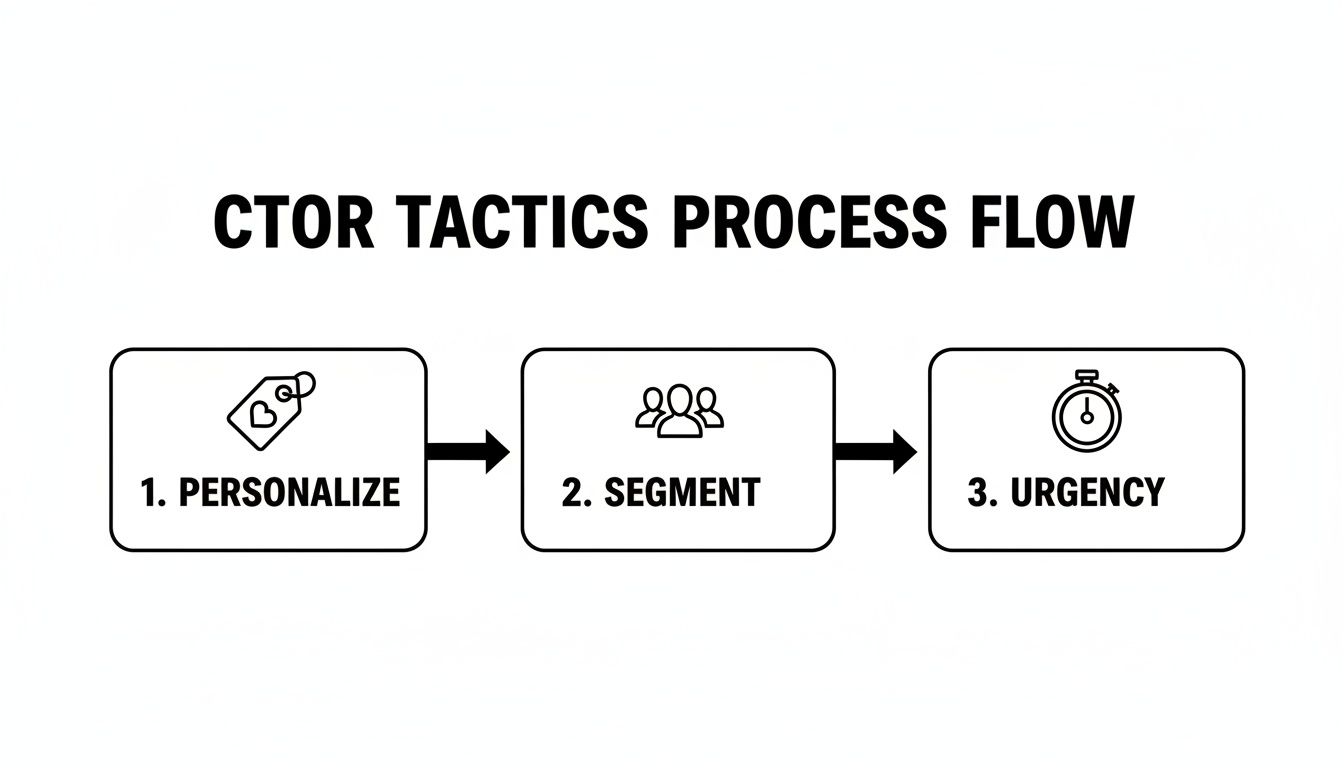
This workflow highlights how systematically applying personalization, segmentation, and urgency can build a more effective email campaign. By A/B testing each of these strategic pillars, you create a powerful feedback loop. Analyze the results from one test, implement the winning version, and then form your next hypothesis. This iterative cycle is exactly how you turn good emails into great ones, steadily climbing toward a higher CTOR and, ultimately, more sales.
Your Top Questions About Click-to-Open Rate, Answered
Once you start digging into email analytics, it’s natural for a few questions to pop up, even if you’ve got the basics down. Let’s tackle some of the most common things Shopify merchants ask about click-to-open rate so you can use this metric like a pro.
What’s the Real Difference Between Click-Through Rate and Click-to-Open Rate?
This is, without a doubt, the number one point of confusion. Their names are almost identical, but they measure two completely different things about your email’s performance.
- Click-Through Rate (CTR) looks at how many people clicked a link out of everyone who received the email. Think of it as answering: “Out of the entire crowd we sent this to, how many took an action?”
- Click-to-Open Rate (CTOR) measures how many people clicked a link out of only the people who actually opened the email. This one answers a more specific question: “Of the people who actually saw what was inside, did they find it interesting enough to click?” When you want to know if your email content is any good, CTOR is the better metric. It cuts through the noise of your subject line’s performance and tells you how compelling your message, offer, and call-to-action truly are.
How Often Should I Be Tracking My CTOR?
The short answer? For every single campaign. But the real magic isn’t in looking at one email’s CTOR in isolation.
A single campaign can always be a fluke—good or bad. The real insights come from zooming out and looking for patterns over time. Make it a weekly or monthly habit to compare the CTOR for your promotional blasts against your content newsletters, or to see how different customer segments behave. This is how you move from just collecting data to making smart decisions that actually improve your email strategy.
Can Certain Tools Actually Help Improve My CTOR?
Yes, absolutely. Any tool that makes it easier and more rewarding for a customer to click can have a massive, direct impact on your CTOR. The game is all about removing friction.
Think about it. A generic “Shop Now” link that just dumps a customer on your homepage is one thing. But what if you use a tool to create a link that takes them directly to a pre-filled cart with a discount already applied? A link that says “Click Here to Claim Your 25% Off” is infinitely more powerful. It’s not just a link; it’s a shortcut to a reward, making your call-to-action far more compelling and boosting that click-to-open rate.
My Open Rates Are Great, but My CTOR is Terrible. What Do I Fix?
Ah, the classic scenario. This means you wrote a fantastic, curiosity-piquing subject line that got people in the door, but the party inside was a letdown. The content didn’t live up to the hype.
Time to put on your detective hat and examine the body of the email.
- Is Your Call-to-Action Obvious? Your main CTA button needs to be unmissable. Is it a bold, contrasting color? Is it clear what happens when someone clicks it?
- Does the Email Deliver on the Subject Line’s Promise? If your subject teased a specific deal, that deal should be the first and most prominent thing they see. Don’t make them hunt for it.
- Is the Design Clean and Mobile-Friendly? A cluttered, confusing layout is a click-killer, especially on a phone. Too much text or too many images can create friction and cause people to bail. Nine times out of ten, the solution is to simplify your email, make the primary action painfully obvious, and ensure the content perfectly matches the expectation you set with the subject line.
Ready to turn more opens into sales? Checkout Links helps you create powerful, direct-to-checkout links with pre-applied discounts, making it effortless for customers to buy. Start boosting your CTOR and sales today at checkoutlinks.com.