A customer emails your support team:
On the surface this looks like a tiny edge case. In reality, it affects your profit margins, customer trust, support workload, and your entire discount strategy. (For the system-level fix — codes that don’t need to be typed — see our Shopify discount codes playbook.)
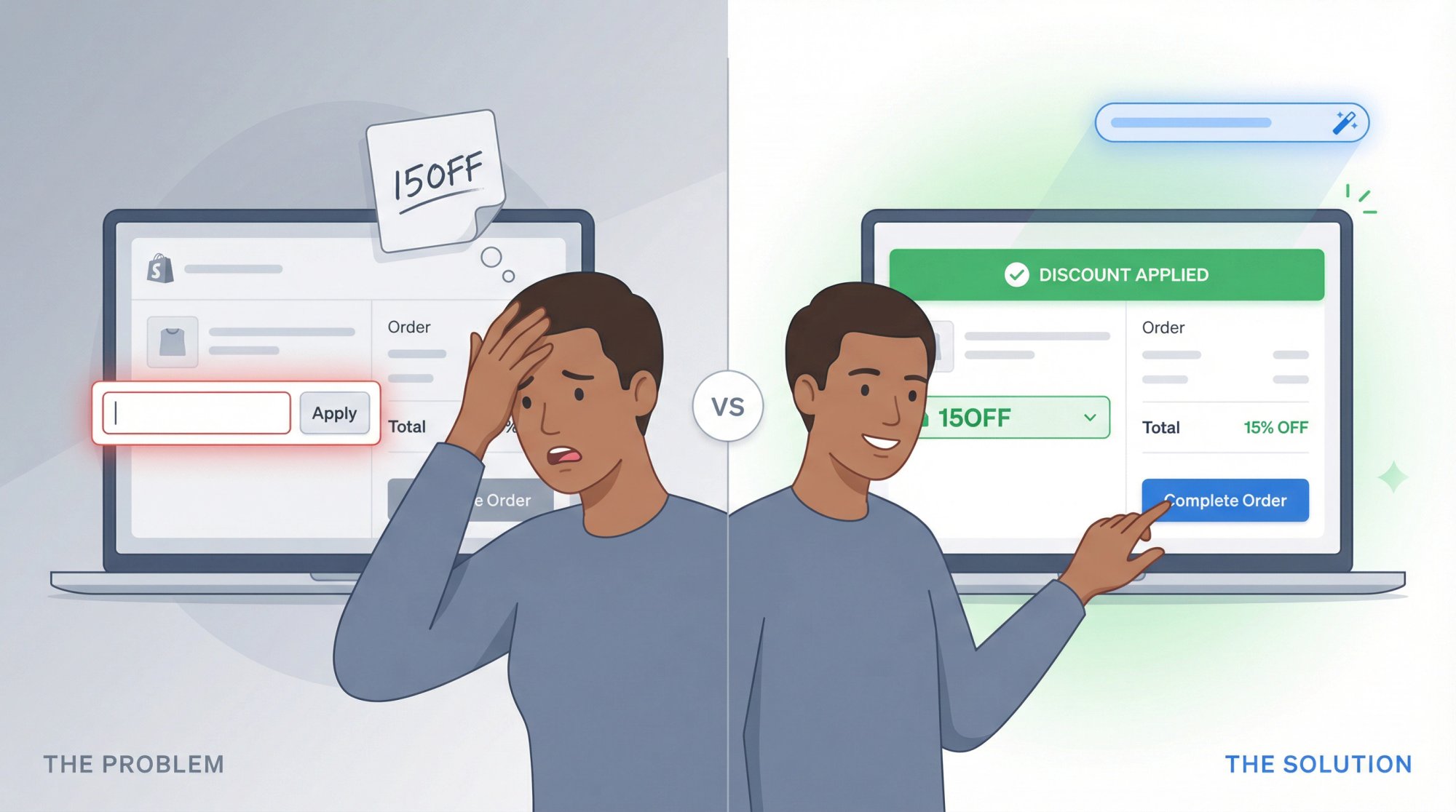
This guide treats “I forgot to use my coupon code” as a design problem instead of a customer mistake. You’ll learn how to handle these requests in Shopify step by step, build a clear policy that’s fair and defensible, understand why customers keep forgetting codes, and almost eliminate this issue using auto-applied offers and smart checkout links.
All stats and platform details here are based on 2024-2025 data and current Shopify behavior.
Why Do Customers Search “Customer Forgot to Use Coupon Code”?
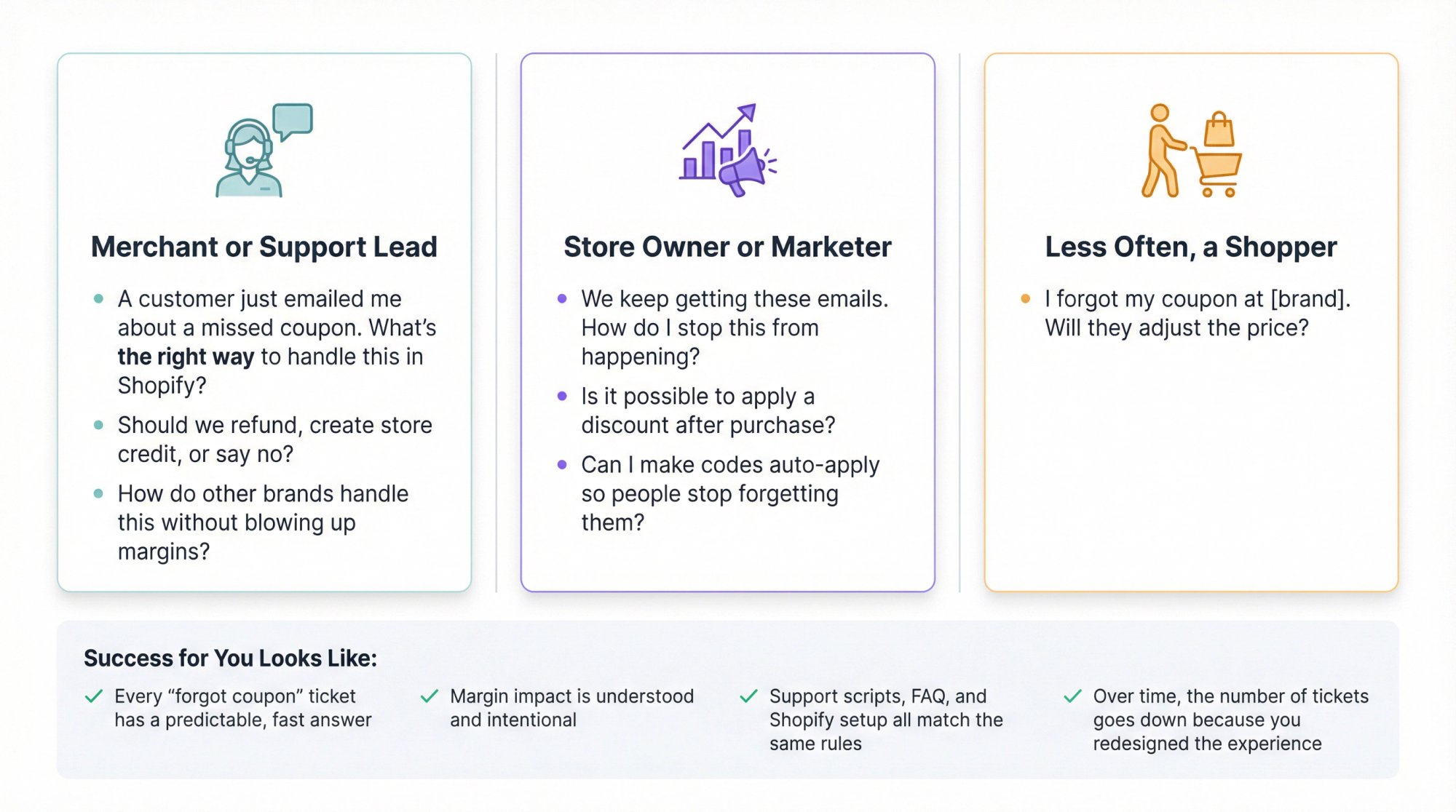
Nobody types that into Google for fun. They’re usually one of:
A merchant or support lead:
-
“A customer just emailed me about a missed coupon. What’s the right way to handle this in Shopify?”
-
“Should we refund, create store credit, or say no?”
-
“How do other brands handle this without blowing up margins?” A store owner or marketer:
-
“We keep getting these emails. How do I stop this from happening?”
-
“Is it possible to apply a discount after purchase?”
-
“Can I make codes auto-apply so people stop forgetting them?” Less often, a shopper:
-
“I forgot my coupon at [brand]. Will they adjust the price?” For Shopify merchants, the real job of this content is showing exactly what to do with today’s ticket, helping you define a policy you can hand to support and stick to, and helping you redesign your offers so customers barely ever need to type a coupon again.
Success for you looks like:
- Every “forgot coupon” ticket has a predictable, fast answer
- Margin impact is understood and intentional
- Support scripts, FAQ, and Shopify setup all match the same rules
- Over time, the number of tickets goes down because you redesigned the experience
Why Customers Forget Coupon Codes (Psychology)
At a basic level, a coupon code does three things:
① Adjusts price for a subset of customers
② Signals status (“I got a special deal”)
③ Introduces friction (something must be remembered, found, or typed at the most fragile part of checkout)
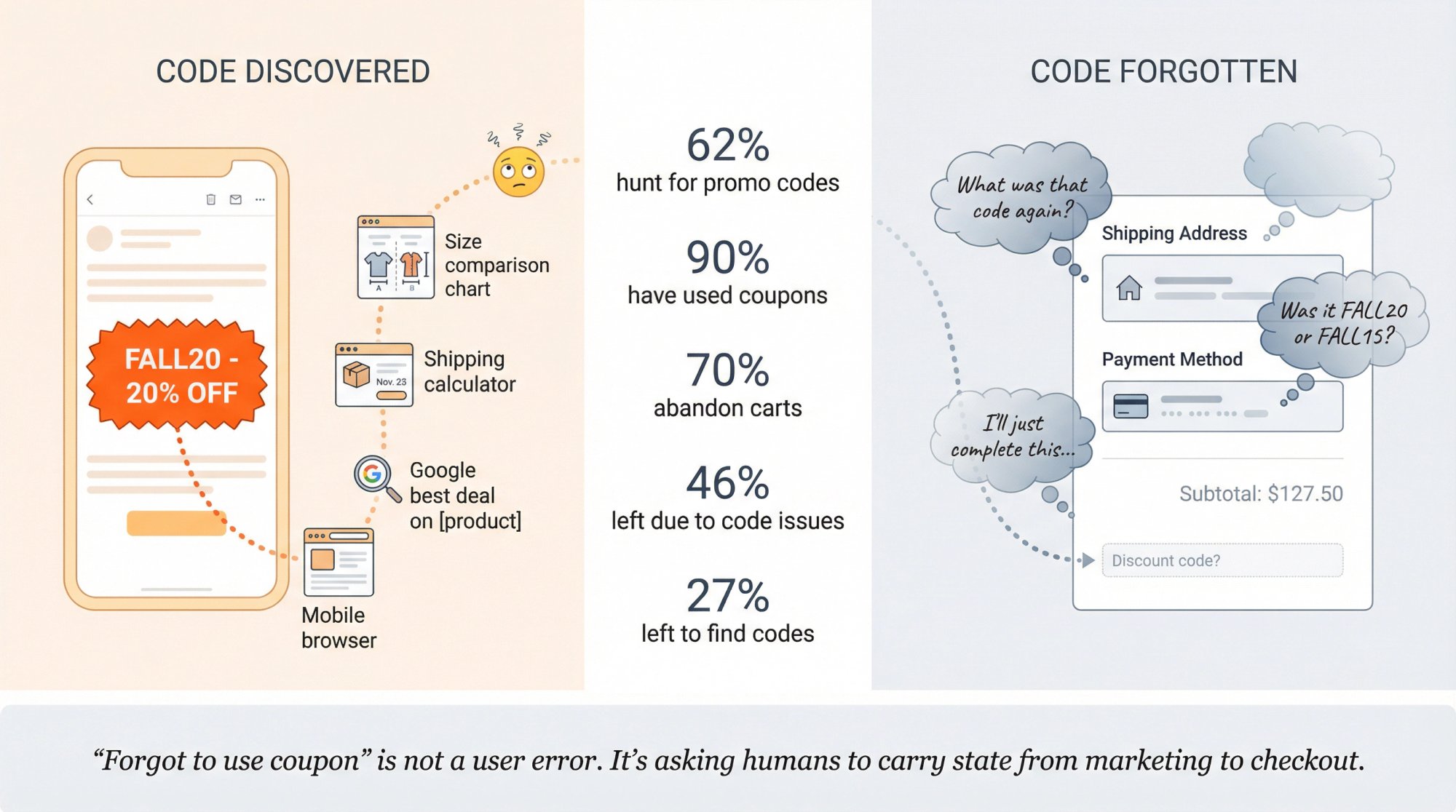
Some relevant 2024-2025 facts:
- Around 62 percent of US consumers actively look for promo codes when shopping online.
- Almost 90 percent of US consumers have used a coupon at some point.
- Global cart abandonment still sits near 70 percent.
- A 2025 report found that 46 percent of shoppers have abandoned their cart because a discount code didn’t work.
- Research indicates that 27 percent of shoppers abandoned carts to go look for a coupon. Two key conclusions:
Coupon hunting is now normal behavior, not an edge case. Customers feel almost foolish paying “full price” if there’s a code box on the page.
The classic “enter coupon at checkout” pattern is fragile by design. You show people a small text box at the exact moment they’re already overloaded with fields, totals, shipping, tax, and payment.
When a customer “forgets” to use the coupon, it’s often because you designed an experience that depended on their memory and self-control.
The rest of this guide is about how to be generous in the short term and smarter in the long term.
What to Do When a Customer Forgot Their Coupon Code
If you’re here because you have one specific customer waiting, start here.
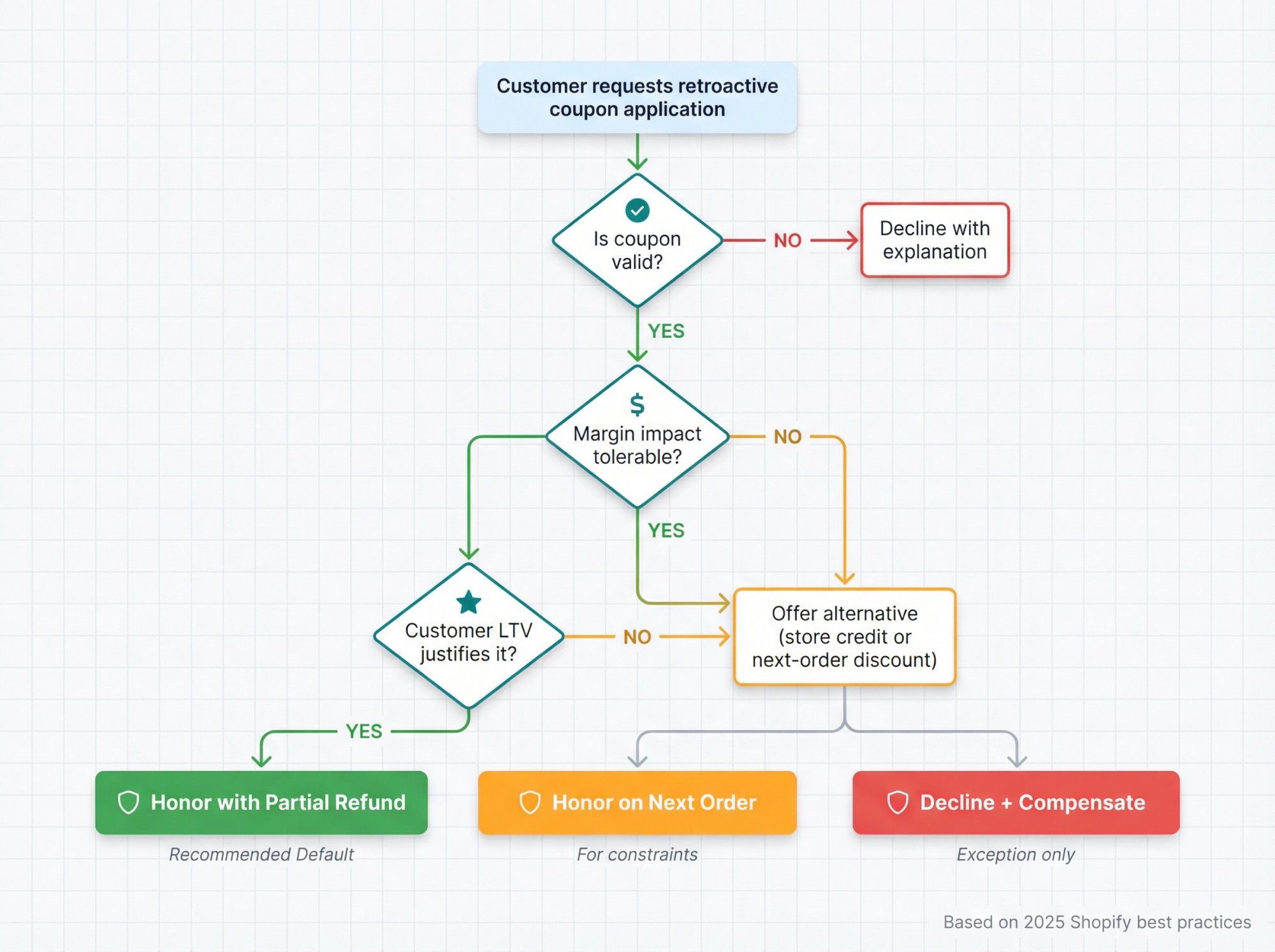
Step 1: Ask Three Questions
For the order in front of you:
Is the coupon still valid for this customer and this order?
→ Still within the date range?
→ Applies to these products or category?
→ Intended for this customer segment or channel?
What’s the impact on margin if you honor it?
Quick mental math example:
| Item | Amount |
|---|---|
| AOV | $60 |
| Gross margin | 50% |
| Profit before discount | $30 |
| 10% coupon | $6 off |
| Profit after discount | $24 |
You’re trading $6 of profit for an act of perceived fairness.
How big is the potential lifetime value of this customer?
- First time buyer from a high-intent channel?
- Existing VIP?
- Someone who typically orders once and churns? If the coupon is valid, the margin impact is tolerable, and the customer isn’t clearly abusing the system, it’s almost always rational to honor it once.
Step 2: Choose One of Three Responses
Option A: Honor it Retroactively (recommended default)
Mechanically, this usually means:
- Leave the order as is
- Issue a partial refund for the coupon amount via Shopify
- Add a note or tag for internal tracking More on exact Shopify steps in section 5.
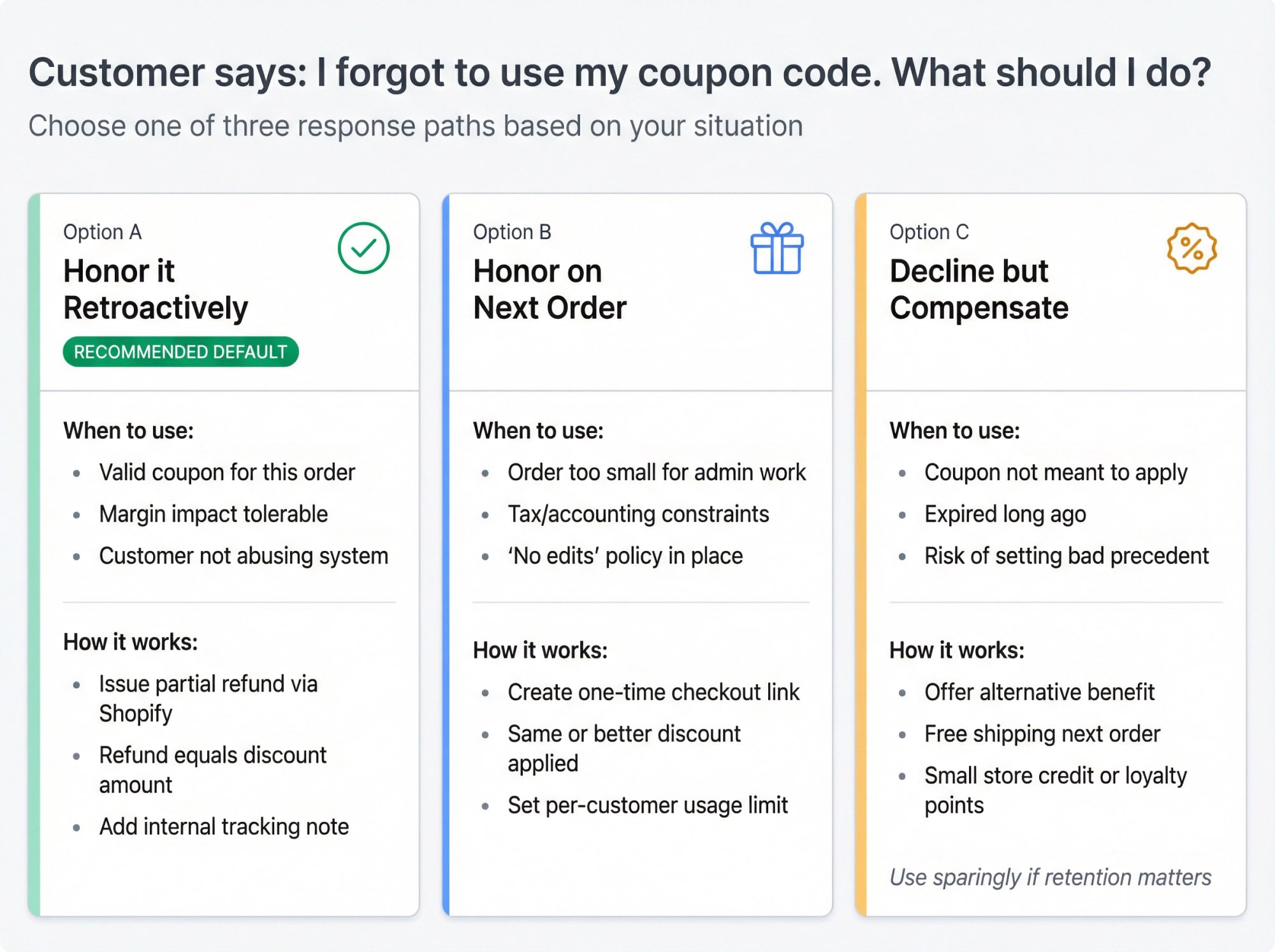
Option B: Honor it on the Next Order
Use this if:
- The order is small and the admin overhead isn’t worth it
- You’re constrained by tax or accounting rules
- Your policy is “no changes after purchase” but you still want to offer something Give them a one-time code or smart checkout link with an equivalent or slightly better discount, plus a usage limit so it can’t be abused.
Option C: Decline but Compensate Differently
Only if:
-
The coupon was clearly not meant to apply at all
-
It has expired long ago
-
There’s high risk of opening the floodgates if you grant it In that case, you might offer:
-
Free shipping on the next order
-
A small store credit
-
Bonus loyalty points But this should be the exception, not the default, if you care about retention.
Step 3: Reply Like a Human, Not a Policy Robot
Example responses you can adapt:
When you honor with a partial refund:
When you honor on the next order:
(That link can be created with the Order Discount feature and a per-customer usage limit so it behaves exactly that way.)
We’ll come back to support macros in section 8.
How to Create a “Forgot Coupon” Policy
Right now, many stores handle these tickets purely based on whoever opens the inbox.
That’s how you get:
- Inconsistent decisions
- Customers comparing stories
- Support teams giving away margin without guardrails You want a clear, written policy that support can follow without asking you each time.
How Other Brands Do It (2024-2025 snapshot)
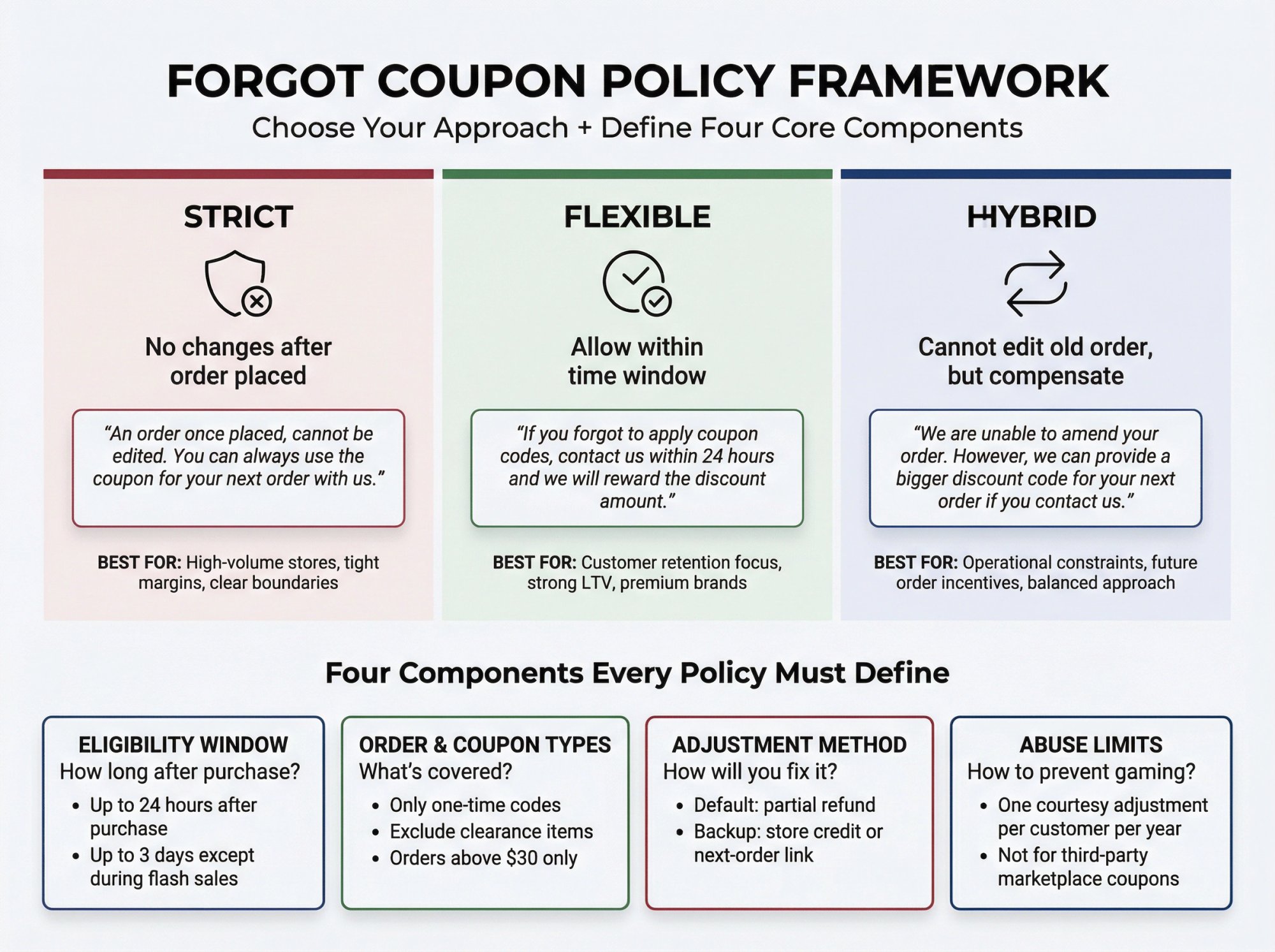
If you scan FAQs across retailers, you’ll see three main patterns:
| Policy Type | Approach | Example Language |
|---|---|---|
| Strict | No changes after order placed | “An order once placed, cannot be edited. You can always use the coupon for your next order with us.” |
| Flexible | Allow within time window | “If you forgot to apply coupon codes, contact us within 24 hours and we will reward the discount amount.” |
| Hybrid | Can’t edit old order, but compensate | “We are unable to amend your order. However, we can provide a bigger discount code for your next order if you contact us.” |
There’s no universal “correct” stance. There’s only:
- What your margin can support
- What your brand wants to be known for
- How much operational friction you’re willing to accept
Build Your Policy in Four Pieces
| Component | What to Define | Examples |
|---|---|---|
| Eligibility Window | How long after purchase | “We honor valid coupons up to 24 hours after purchase” or “Up to 3 days except during flash sales” |
| Order & Coupon Types | What’s covered | “Only one-time codes” or “Exclude clearance items” or “Orders above $30 only” |
| Adjustment Method | How you’ll fix it | “Default: partial refund” or “Backup: store credit or next-order link” |
| Abuse Limits | Prevent gaming | “One courtesy adjustment per customer per year” or “Not for third-party marketplace coupons” |
Write this down, socialize it internally, and then publish a cleaned-up version in your FAQ.
We’ll give you draft FAQ copy later.
How to Apply a Discount After Purchase in Shopify
Now the practical bit: what’s technically possible in Shopify, and what’s not.
Key Constraints You Need to Know
Shopify does not let you retroactively apply a discount code to an already completed order with one click. This is still true in 2024-2025. Shopify’s order editing API now supports adding discounts to existing line items for apps and custom tools, but most merchants will experience this through the admin UI, not custom GraphQL.
So your realistic options are:
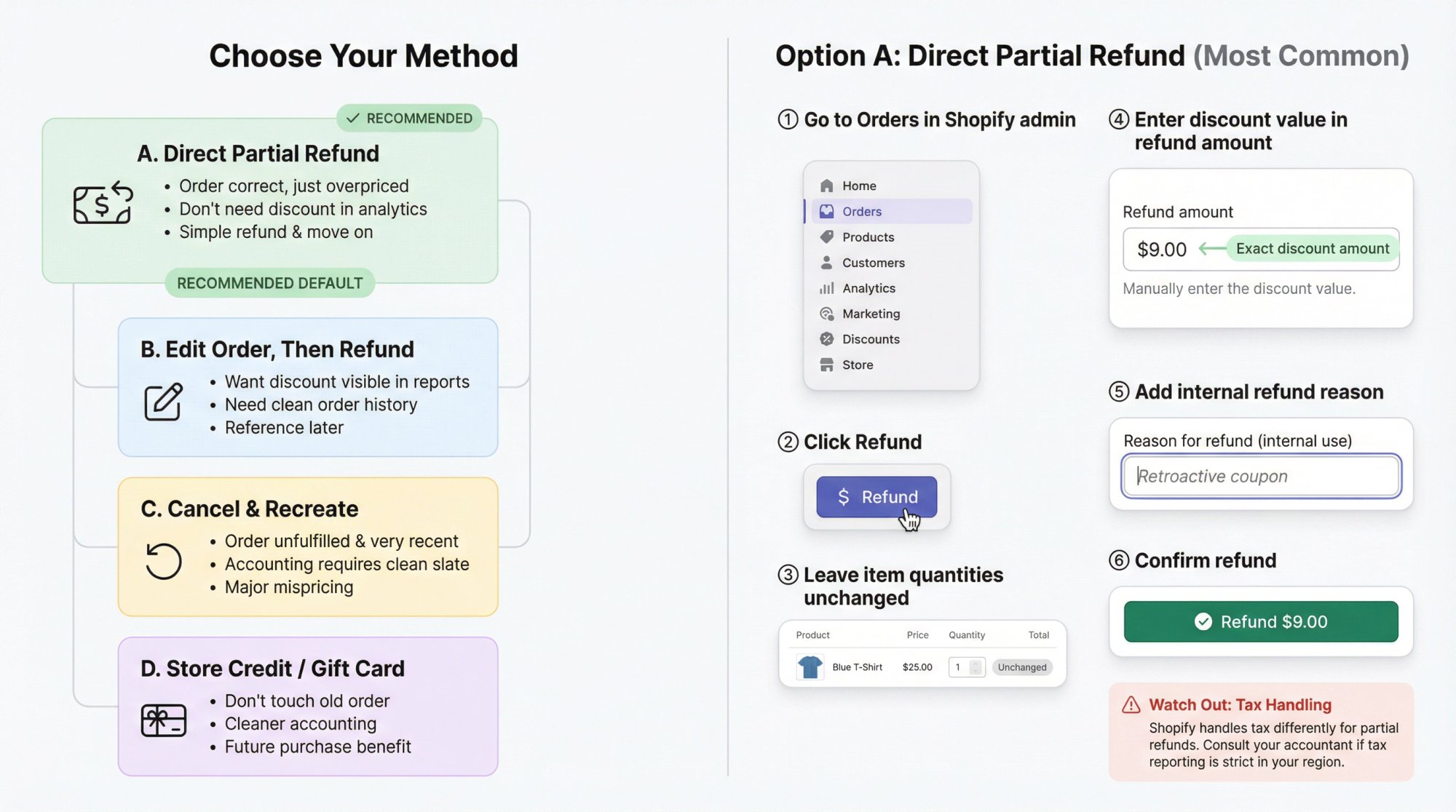
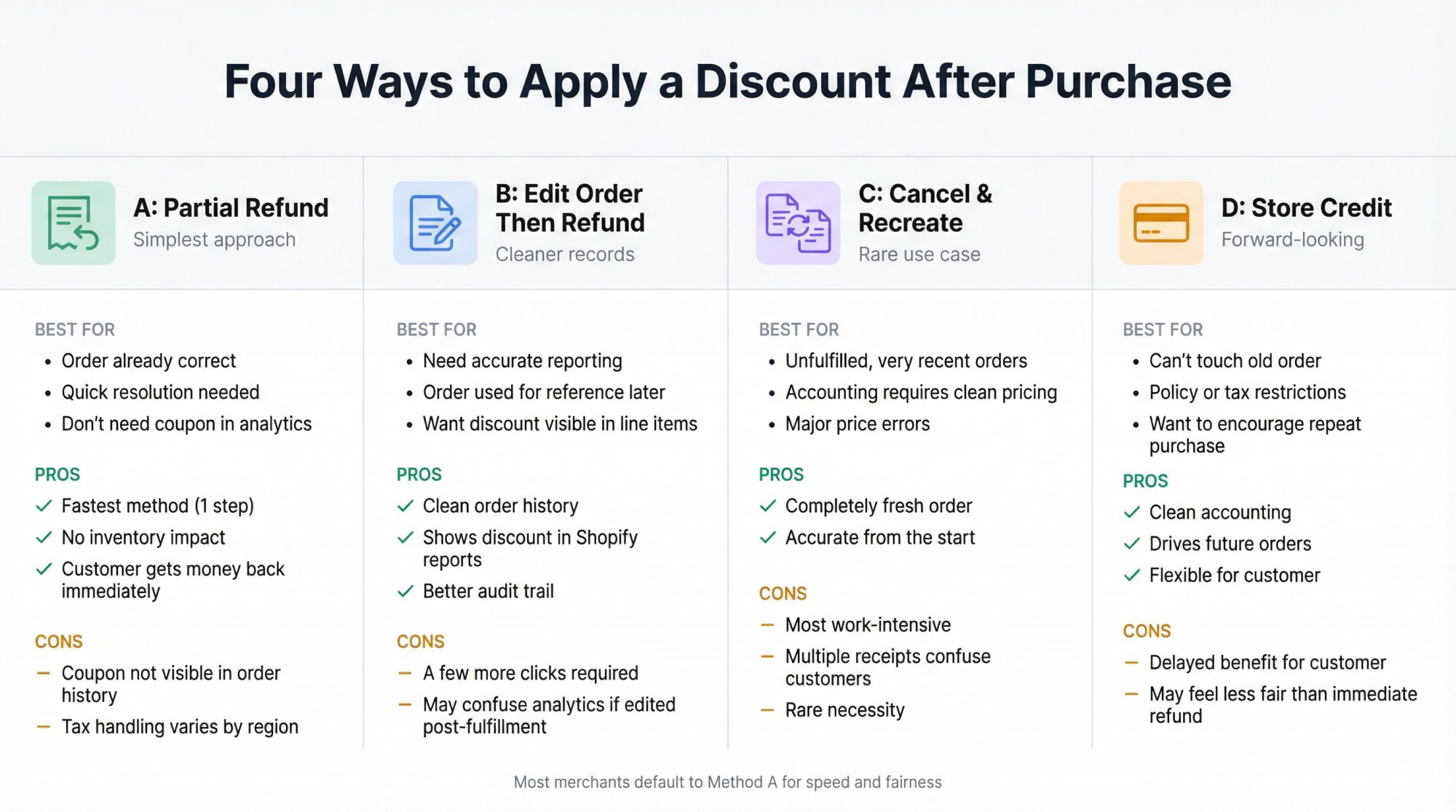
Option A: Direct Partial Refund (simplest)
Use this when:
- The order is already correct, just too expensive by the discount amount
- You don’t need your analytics to show the exact coupon on that order
- You’re fine with a “refund difference, move on” approach Steps in Shopify admin (desktop):
① Go to Orders in your Shopify admin.
② Click Refund.
③ Leave the item quantities unchanged.
④ In the refund amount area, enter exactly the discount value (for example 9 on a 10 percent discount for a 90 subtotal).
⑤ Optionally add an internal refund reason like “Retroactive coupon”.
⑥ Confirm the refund so payment is sent back to the customer.
This keeps inventory untouched and simply returns the difference.
Watch out for:
- Tax handling. Shopify handles tax in specific ways for partial refunds. If tax reporting is strict in your region, talk to your accountant about how you want to handle this.
Option B: Edit Order, Then Refund
Use this when:
- You want the order total and line item pricing to reflect reality for reporting purposes
- You may use this order as a reference later, so seeing the discount in line items matters High-level steps:
① Open the order in Shopify admin.
② Click Edit.
③ For each item, use Edit discount to apply a line item discount that simulates the coupon effect.
④ Save the order. Shopify will show that you now owe the customer money because the total decreased.
⑥ Click Refund and issue a refund for that difference.
This gives you cleaner order history at the cost of a couple more clicks.
Option C: Cancel and Recreate the Order
Use this rarely:
- When the order is unfulfilled and very recent
- When internal accounting insists on “no manual price corrections”
- Or when you truly mispriced something and want a clean replacement order with the correct pricing and coupon Steps:
① Cancel and refund the original order according to your normal policy.
② Create a draft order with the correct discount included (manual or code-based).
③ Send the customer an invoice link or mark it as paid depending on your workflow.
Downside: this is more work and may confuse customers with multiple receipts.
Option D: Store Credit or Gift Card
You can also skip touching the old order entirely and issue:
- A gift card of equivalent value
- Or a unique discount code for the same amount on a future order This keeps accounting cleaner but delays the benefit for the customer. It’s a decent middle ground when policy or systems make retroactive refunds painful.
Why Do Customers Keep Forgetting Coupon Codes?
Zoom out for a moment.
If 62 percent of shoppers actively hunt for promo codes, yet you still see “forgot my coupon” tickets, something is broken in the journey, not in the motivation.
The mechanics usually look like this:
Customer sees a promotion:
-
Email: “Use code FALL20 for 20 percent off”
-
Influencer story: “Use code JESSICA15 at checkout”
-
Packaging insert: “Scan this for $10 off” Time passes:
-
They browse on mobile, add items, compare sizes, check shipping
-
Maybe they go deal-hunting on Google or coupon sites At checkout:
-
They see a tiny coupon field surrounded by forms, totals, and pay buttons
-
They either forget the code, type it wrong, or find it doesn’t apply to the items they chose Emotionally:
-
They feel like they just overpaid relative to “savvier” shoppers
-
Or they feel tricked if the advertised promo has lots of exclusions Outcomes:
-
They complete the order, then email you for a fix
-
Or they abandon entirely because the code doesn’t work or they can’t find one We know from 2025 research:
-
About 46 percent of shoppers have abandoned a cart because a discount code didn’t work.
-
Around 70 percent of carts are abandoned overall, and checkout friction is a major driver.
-
UX studies show that long or complex checkouts push 18 percent of US shoppers to abandon.
-
UX research has also observed that the mere presence of a discount field can trigger FOMO and send people off-site to hunt codes, which increases abandonment. So:
-
The coupon field is not neutral
-
It actively shapes behavior and can cause both abandonment and “forgot coupon” complaints If you keep designing discounts as “codes customers must remember”, you’re fighting human psychology with policy instead of fixing the experience.
How to Stop Customers Forgetting Coupon Codes
Here are concrete patterns that reduce or nearly eliminate forgotten codes.
Use Auto-Applied Discounts Instead of Memory Tests
At a platform level, Shopify itself gives you tools for automatic discount application.
These are already better than “remember this code”.
But they have limits:
- Shopify’s native shareable links typically land shoppers on the homepage or a single product, not a fully curated cart or experience.
- You can’t easily combine:
- Prefilled multi-product carts
- Complex discount logic
- Per-customer limits
- Passcodes or scheduling
- Analytics at the link level This is where smart checkout links come in.
How We Replace “remember this code” with “tap this link”
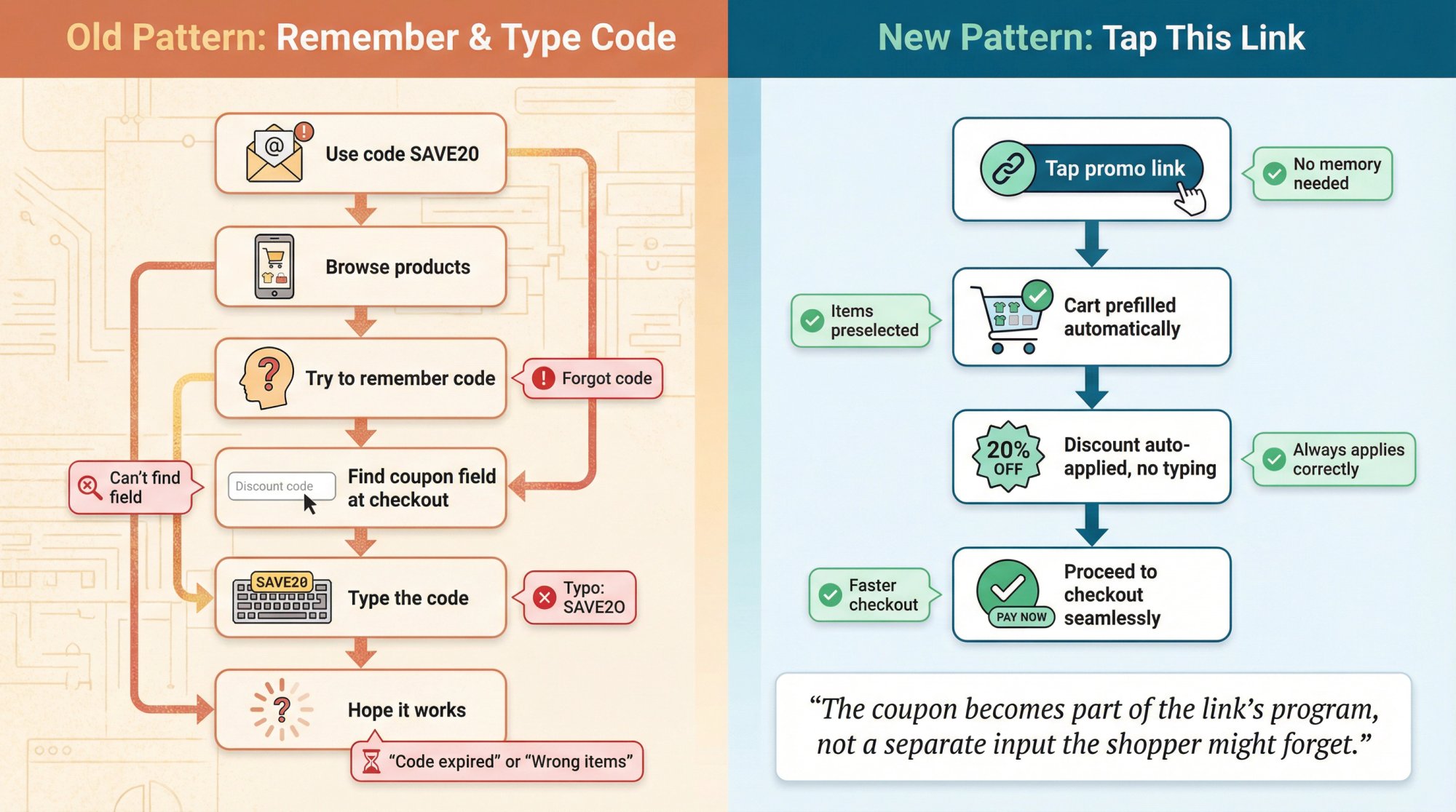
With Checkout Links, you can create a link that:
Prefills the cart with exactly the items you want
Learn more about cart configuration.
Applies either:
- An Order Discount (percent or fixed, scoped to specific items, collections, or entire cart)
- Or one or more attached discount codes from your Shopify admin Optionally adds free shipping or free gifts
Routes either straight to checkout or via a cart or landing page
You can share that link in:
- Email and SMS
- Social captions and bios
- Influencer campaigns
- QR codes in packaging, in-store, or at events For the shopper, there’s no “remember and type code” step. They tap. The discount is already applied, because it’s part of the URL’s logic.
This is the single most powerful way to reduce both coupon-related abandonment and “forgot my code” support tickets.
Make QR Codes and Physical Prompts Carry the Offer for You
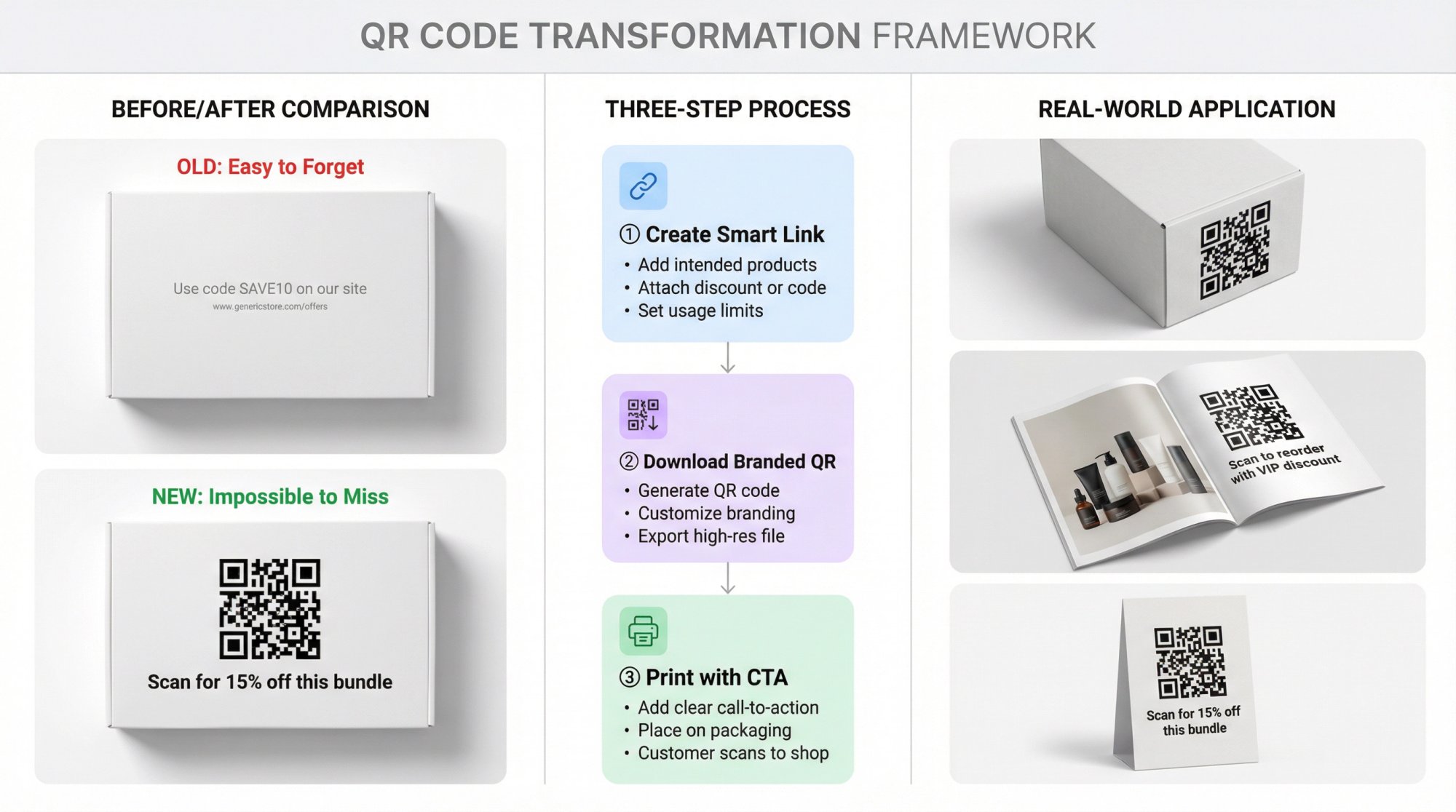
If you send paper inserts, print catalogs, or run events, the worst version is:
A better pattern:
① Create a smart checkout link with:
- The intended products
- The correct discount or code attached
- Optional usage limit per customer so it can’t be shared infinitely ② Download the branded QR code for that link.
③ Print it with a call to action like:
- “Scan for 15 percent off this bundle”
- “Scan to reorder with your VIP discount” Now “forgot to use coupon” can literally be replaced by “I forgot to scan the code”, which is less common because the code itself is the offer and the navigation path.
Soften the Classic Coupon Field
Sometimes you can’t avoid having a coupon field. Maybe partners expect a code. Maybe affiliates need it.
Even then, you can reduce problems:
- Hide the field behind text like “Have a discount code?” instead of showing a big empty box that screams “You might be overpaying.” UX research has shown that discount fields can trigger people to leave and look for codes.
- Avoid separate “Apply” buttons where possible. UX research shows that “Apply” buttons add unnecessary interaction and contribute to checkout abandonment, yet about 22 percent of sites still require them.
- Automatically apply codes from URLs where possible (for example, affiliate or email links that include the code in the URL) so the field only exists as a safety net, not as the primary interface.
Use Unique Codes and Segments Instead of Blasting the Same Code Everywhere
If you:
-
Generate unique codes per customer or per email campaign
-
Tie them to clear rules and expiry
-
Deliver them via channels like Klaviyo or Omnisend Then:
-
It’s easier to decide if a “forgot coupon” request is legitimate
-
You can safely issue a new unique code or smart link for the next order without worrying that it leaks to coupon sites With smart checkout links as the destination, you can go further:
-
Unique link per customer
-
Discount auto-applied
-
Prior purchase or abandoned cart prefilled using dynamic parameters When the link itself is personalized, forgetting a coupon becomes much less likely.
Shorten the Path from “saw offer” to “paid”
Every extra step between “I want this” and “I paid” is chance to forget a code.
UX studies consistently show that long and complex checkouts push people away.
Smart checkout links exist to remove steps:
- The link itself builds the cart, applies the discounts, and jumps straight into Shopify Checkout. The fewer pages between your promo and “thank you” page, the fewer chances people have to forget codes, mistype them, or go off-site hunting for alternatives.
Smart Checkout Links for “Forgot Coupon” Problems
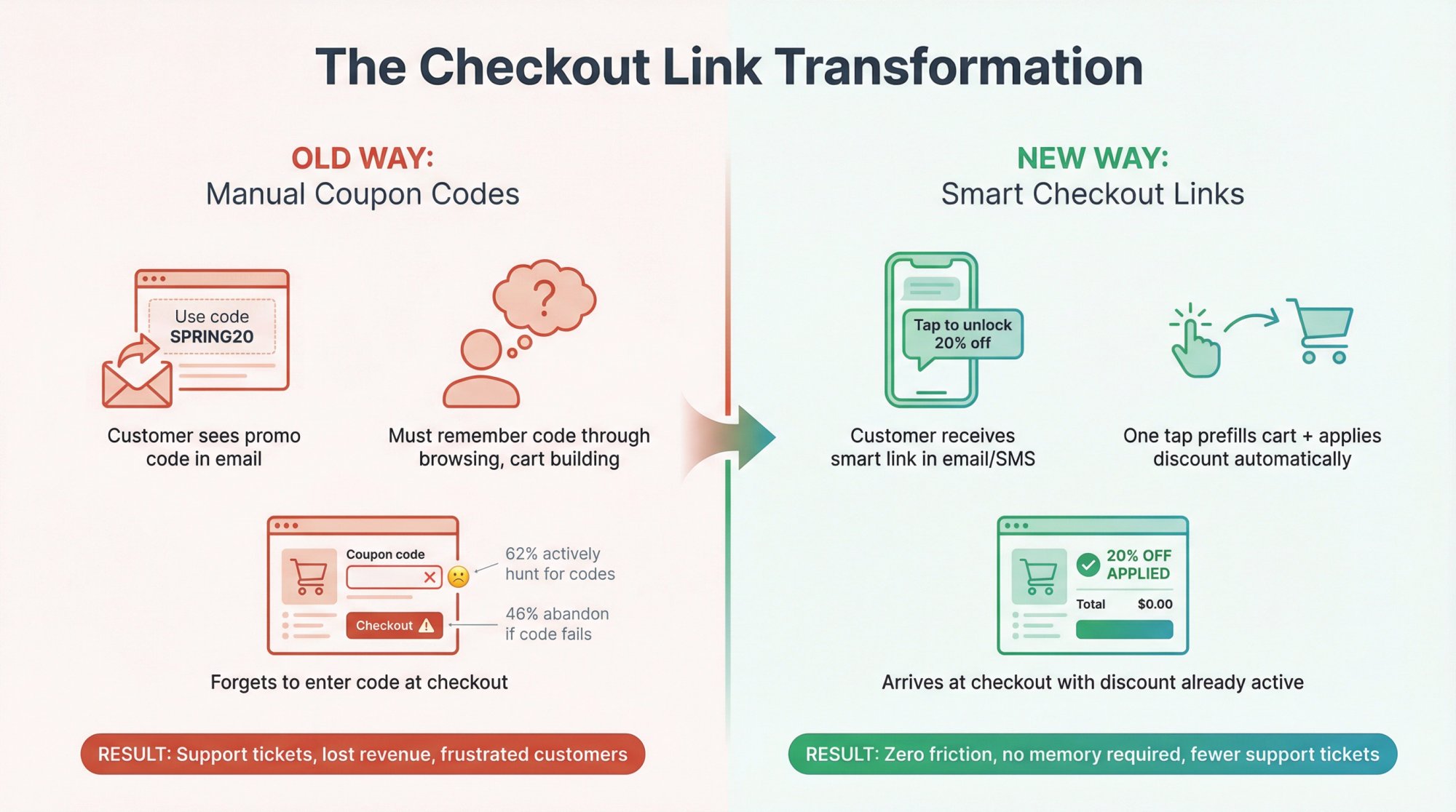
If you’re using Checkout Links, you can do more than just react to tickets. You can bake safety nets into your flows.
For New Campaigns: Never Ship a Code Without a Smart Link Behind It
Anytime you’re tempted to run:
Change it to:
Then:
① Create a link that:
- Prefills the intended products
- Uses the Order Discount card to apply 20 percent off scoped to those items or to the whole cart.
- Or attaches the specific Shopify discount code via the Discount Codes card if you rely on native codes for reporting. ② Set a usage limit per customer if needed, and an overall limit if this is a scarce promotion.
③ Use that link as the primary call to action in:
- Emails and flows
- SMS
- Paid ad destination URLs
- Social stories and posts Now “I forgot to use the coupon” becomes “I didn’t click the promo link”, which happens far less.
Turn “we can’t adjust this order” into a Personalized Next-Order Link
Sometimes, for regulatory, tax, or operational reasons, you genuinely can’t adjust the old order.
You can still turn that interaction into a retention moment:
① Clone your original promo as a new link.
② Add an Order Discount or Discount Code that matches (or slightly improves) the missed code.
③ Set:
- Usage limit = 1 per customer
- Expiry date (for example 14 days from now) ④ Reply to the customer with:
Internally, treat this as a defined play: “Next order recovery link”.
Use the Popup as Reassurance: “Your discount is active”
A Checkout Links popup opens over your store before checkout and shows the cart with the discount already applied. A callout in it can carry your own text and style.
You can use it to show messages like:
-
“You unlocked 15 percent off. It’s been applied at checkout.”
-
“Free shipping has been added to your cart.” That small piece of real-time reassurance can:
-
Reduce the urge to re-enter codes out of fear
-
Decrease support tickets like “it says free shipping, but I don’t see it”
Combine Recovery Flows with Automatic Discounts
Checkout Links integrates well with common recovery patterns:
Abandoned cart emails that include a link with:
- Abandoned items prefilled
- A small Order Discount or attached discount code
- Direct path to checkout Again, the principle is the same: the link is the coupon.
Measure the Impact with Built-In Analytics
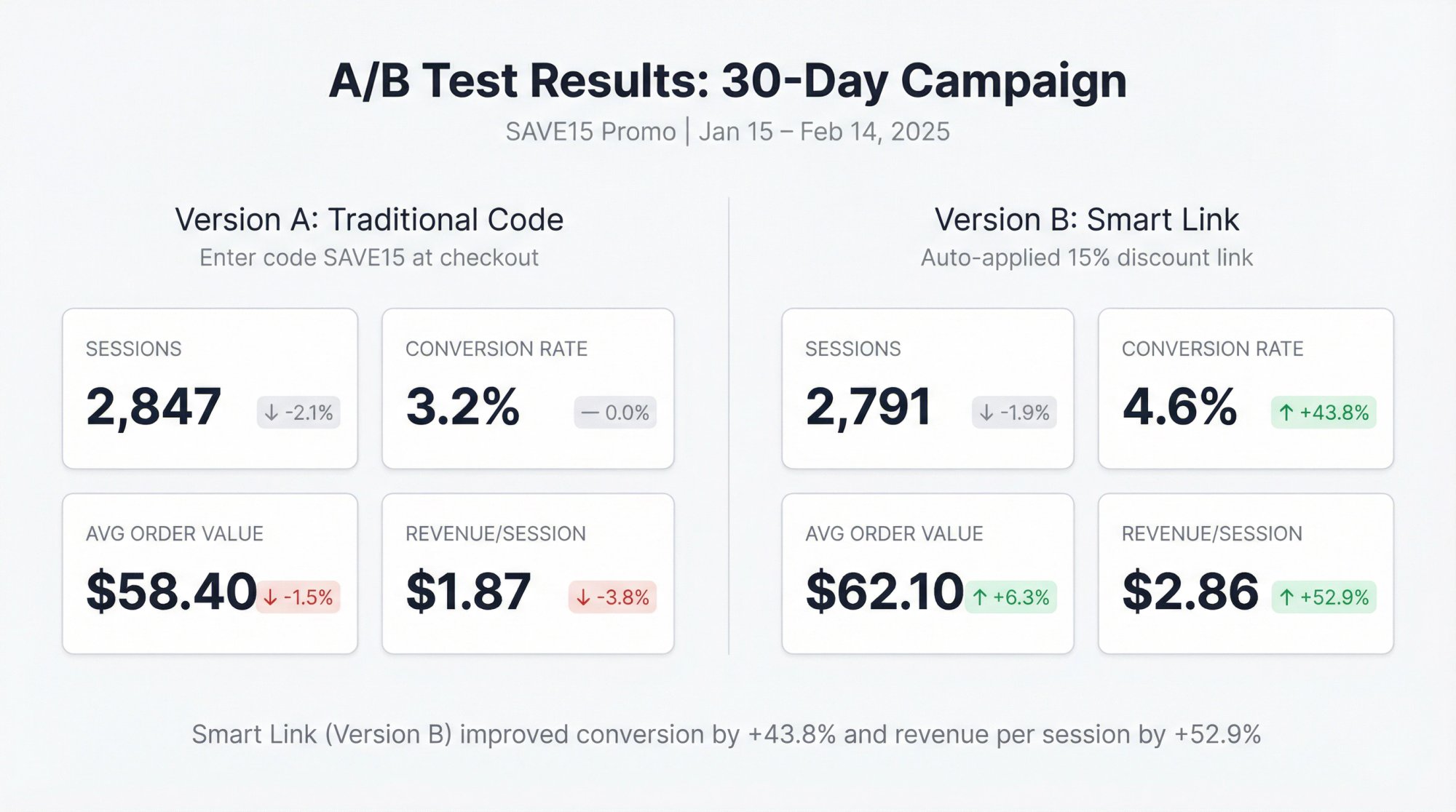
To prove that all of this is working, you can:
① Create two versions of a promo:
-
Version A: classic “Enter code SAVE15 at checkout”
-
Version B: “Tap to unlock 15 percent off” with a smart link that auto-applies the discount ② Use A/B testing and per-link analytics to compare:
-
Sessions
-
Conversion rate
-
Average order value
-
Revenue per session ③ Watch your support ticket volume for “forgot coupon” over the same period.
This turns “I think links are better” into “Links improved conversion by X percent and cut coupon tickets by Y percent”.
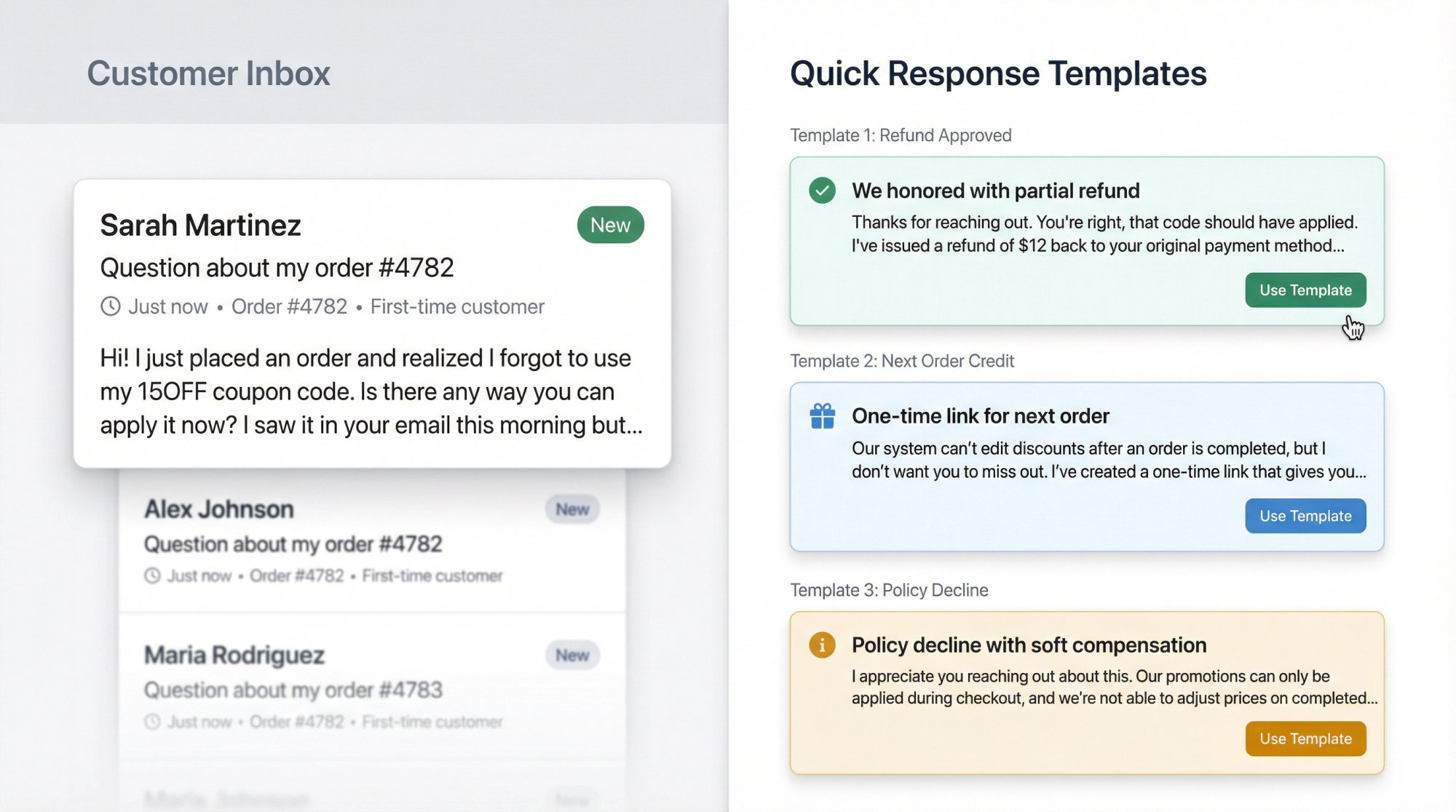
Support Scripts: What to Say When Customers Forget Coupons
Here are templates you can adapt so your team doesn’t reinvent this for every ticket.
Macro: We Honored the Coupon with a Refund
Macro: We Can’t Edit the Old Order, but Here’s a One-Time Link
(That link can be created with the Order Discount feature with a per-customer usage limit so it behaves exactly that way.)
Macro: Policy-Based Decline with Soft Landing
Suggested FAQ Entry for Your Store
Swap in your actual rules and your smart link flows.
Edge Cases: Abuse, Tax, and Operational Chaos
A few blind spots to watch for.
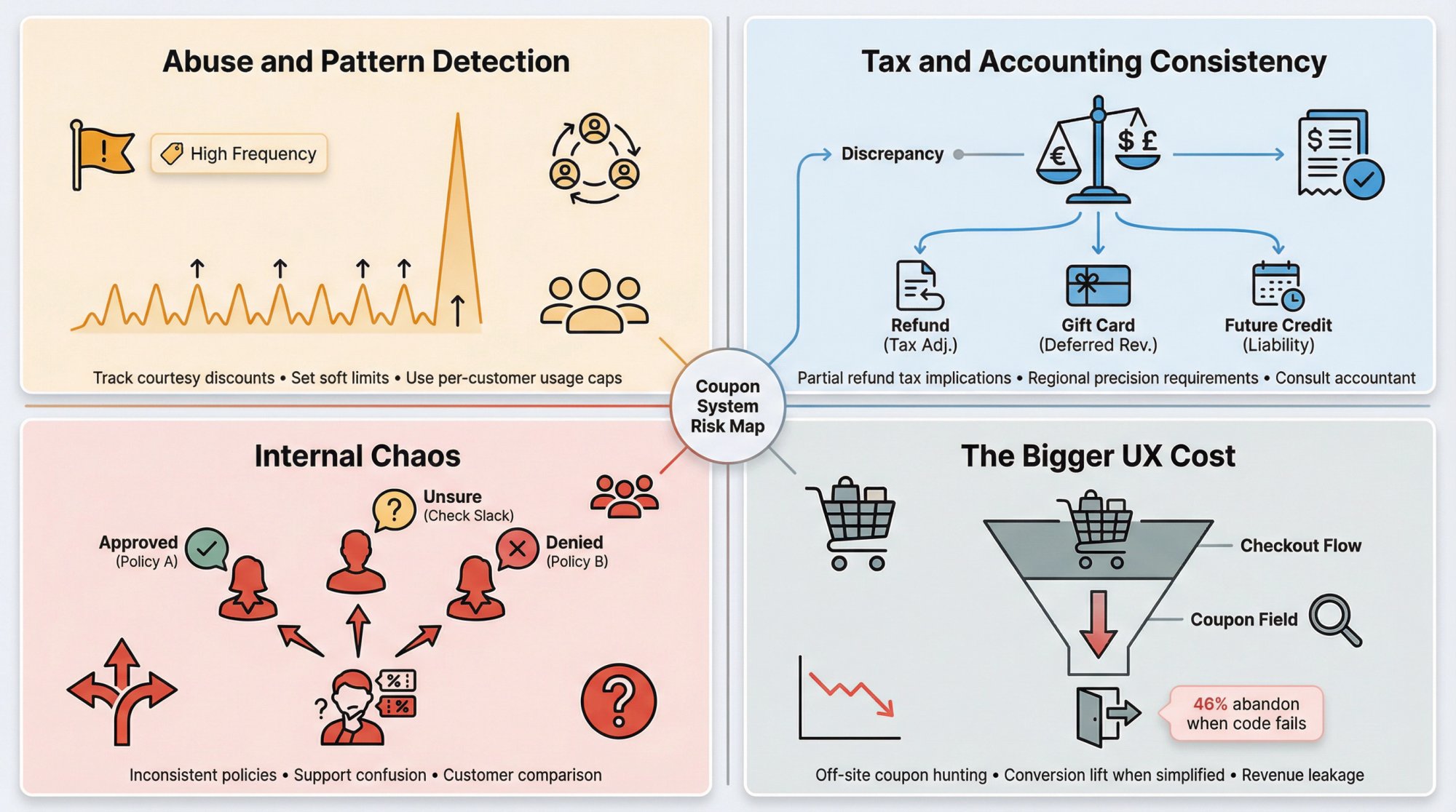
Abuse and Pattern Detection
If you’re generous, a small subset of customers will test the limits.
Mitigations:
- Track “courtesy discounts” in your help desk or CRM with a tag.
- Set a soft limit like “one courtesy adjustment per customer per year” and empower support to override only for clearly exceptional cases.
- Use per-customer usage limits so second-time “forgot coupon” can still use a link but not indefinitely.
Tax and Accounting Consistency
Partial refunds can interact with tax reporting in non-intuitive ways depending on your region.
Practical moves:
- Talk to your accountant about how you should handle price adjustments vs gift cards vs future order coupons.
- If tax precision is critical, you may prefer the “cancel and recreate” approach for larger adjustments, or the “future order” pattern to avoid re-opening the old order altogether.
Internal Chaos
If you don’t write your policy down:
-
One agent refunds everything
-
Another refuses everything
-
Customers get different answers depending on who they talk to Solving this is:
-
Cheap compared to the cost of confusion
-
As simple as pasting section 4 and 9 into your internal wiki and adjusting the numbers
The Bigger UX Cost of Coupon Fields
Focusing only on “forgot to use coupon” hides the bigger leak:
- Coupon fields cause people to go off-site searching for deals
- Some will never come back
- Others will find third-party codes that change how much you earn on the order UX studies and case studies have documented conversion lifts when the discount field is simplified, hidden until needed, or paired with auto-applied smart checkout links.
If you only solve the support ticket version of this problem, you’re leaving a lot of revenue on the table.
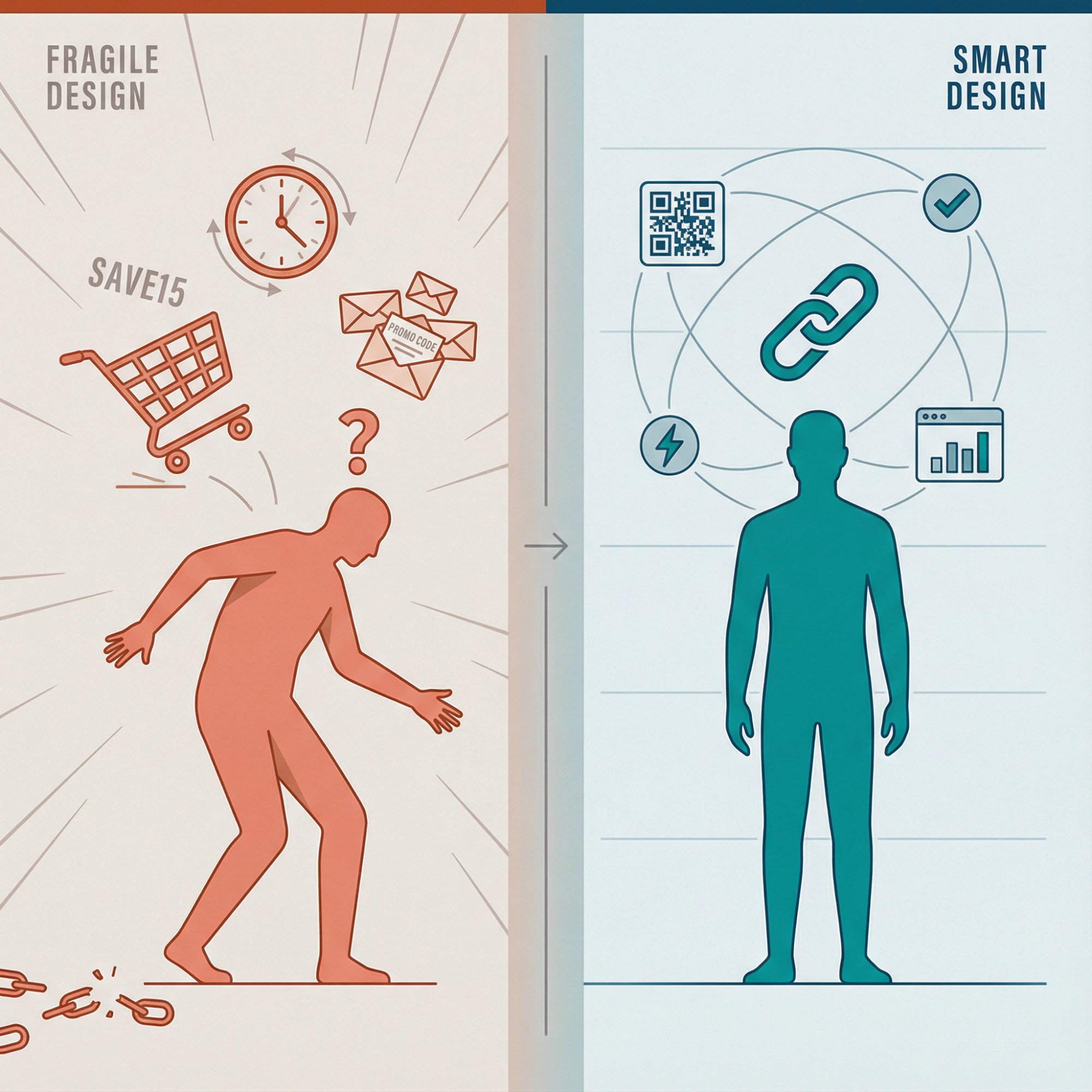
Stop Relying on Customer Memory: Recap
If you take nothing else from this guide, take this:
Practical next steps:
Document your policy
-
Choose an eligibility window, adjustment method, and limits
-
Train support and add FAQ copy Standardize your Shopify handling
-
Decide when you use partial refunds vs order edits vs future order credits
-
Write internal how-to’s using the steps in section 5 Replace codes in campaigns with links
-
Use Checkout Links to build offers that apply discounts automatically
-
Use those links everywhere you currently show raw codes Make physical touchpoints smart
-
Pair them with simple calls to action like “Scan for 15 percent off this set” Measure and iterate
-
Use analytics and Shopify’s reports to compare “manual code” vs “auto link” promos
-
Track support ticket volume for “forgot coupon” over time Handled well, this tiny-sounding issue becomes:
-
A way to show off your fairness as a brand
-
A forcing function to improve your checkout UX
-
A strong use case for link-based offers, QR flows, and smart checkout links in general All stats, platform behaviors, and examples in this guide are current as of 2025. Coupon behavior, consumer expectations, and Shopify’s capabilities will keep evolving, so revisit your policy and flows at least once a year.
If you do that, “I forgot to use my coupon code” will show up less and less in your inbox, and when it does, your team will know exactly what to do.