You searched “Discord merch store” for one of three reasons:
You want official Discord swag. Head to Discord’s official merch shop run by DOTEXE. They’ve got hoodies, plushies, and all the branded gear.
You’re trying to sell YOUR merch to YOUR Discord community. This guide is for you.
You’re confused about how Discord monetization fits with physical products. Also for you.
If you’re in the last two buckets, you’re about to learn how to turn your Discord server from a hangout spot into a legitimate sales channel. Not in a gross, spammy way. In a way that makes your community feel like insiders getting exclusive access.
What Is A Discord Merch Store (And What Isn’t It?)
Strip away the hype and you need five things to sell merch: Audience (people who care about your brand), Offer (something worth buying), Checkout (secure payment and shipping), Fulfilment (someone ships the hoodie), and Analytics (knowing what works).
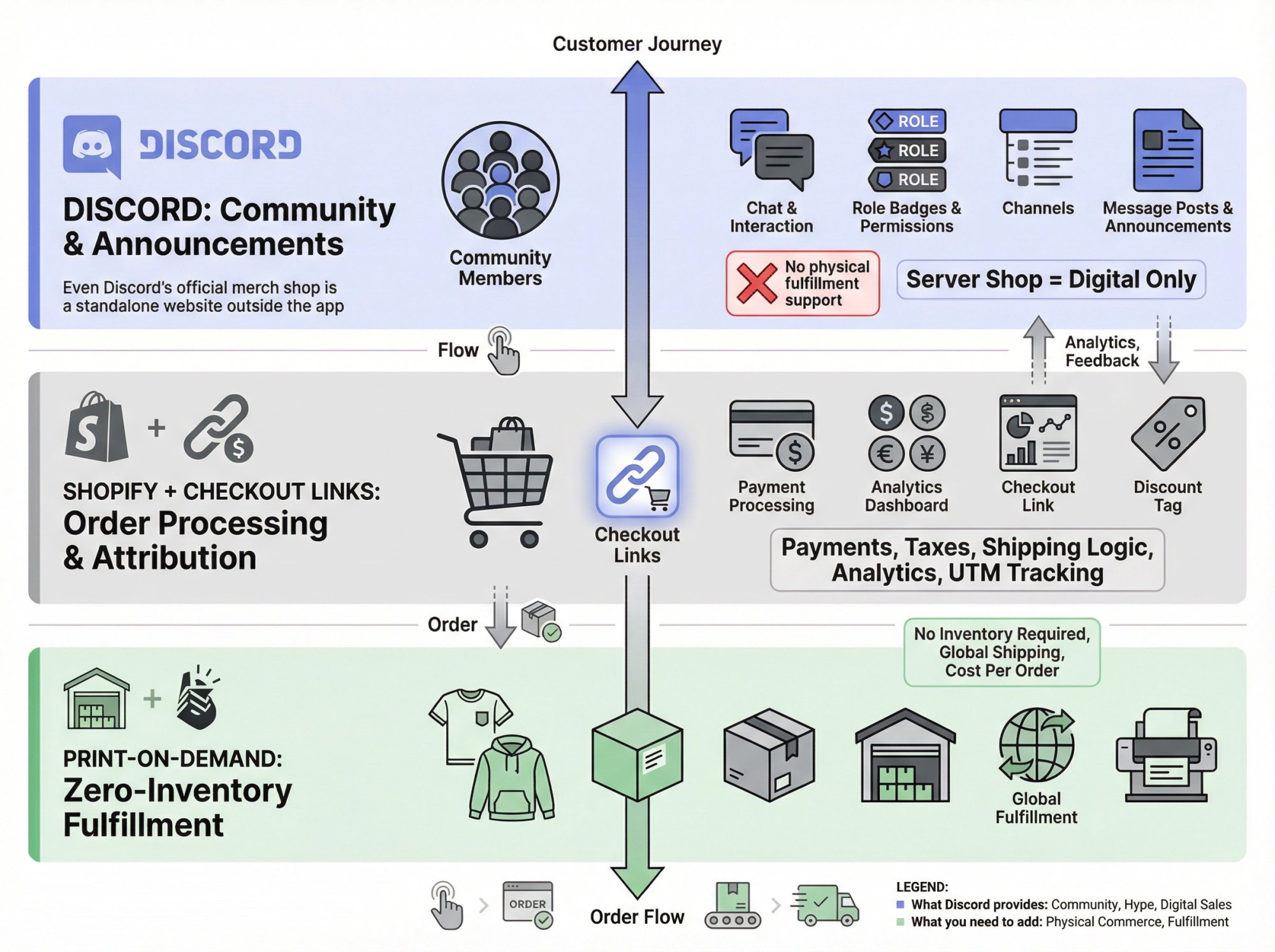
Discord gives you the audience and part of the offer surface. That’s it. Discord can’t handle physical product checkout, can’t ship anything, and barely tracks purchases.
So a “Discord merch store” isn’t really a store inside Discord. It’s Discord as your hype engine connected to proper ecommerce infrastructure that handles the boring (but critical) stuff like payments, taxes, and shipping.
The architecture looks like this:
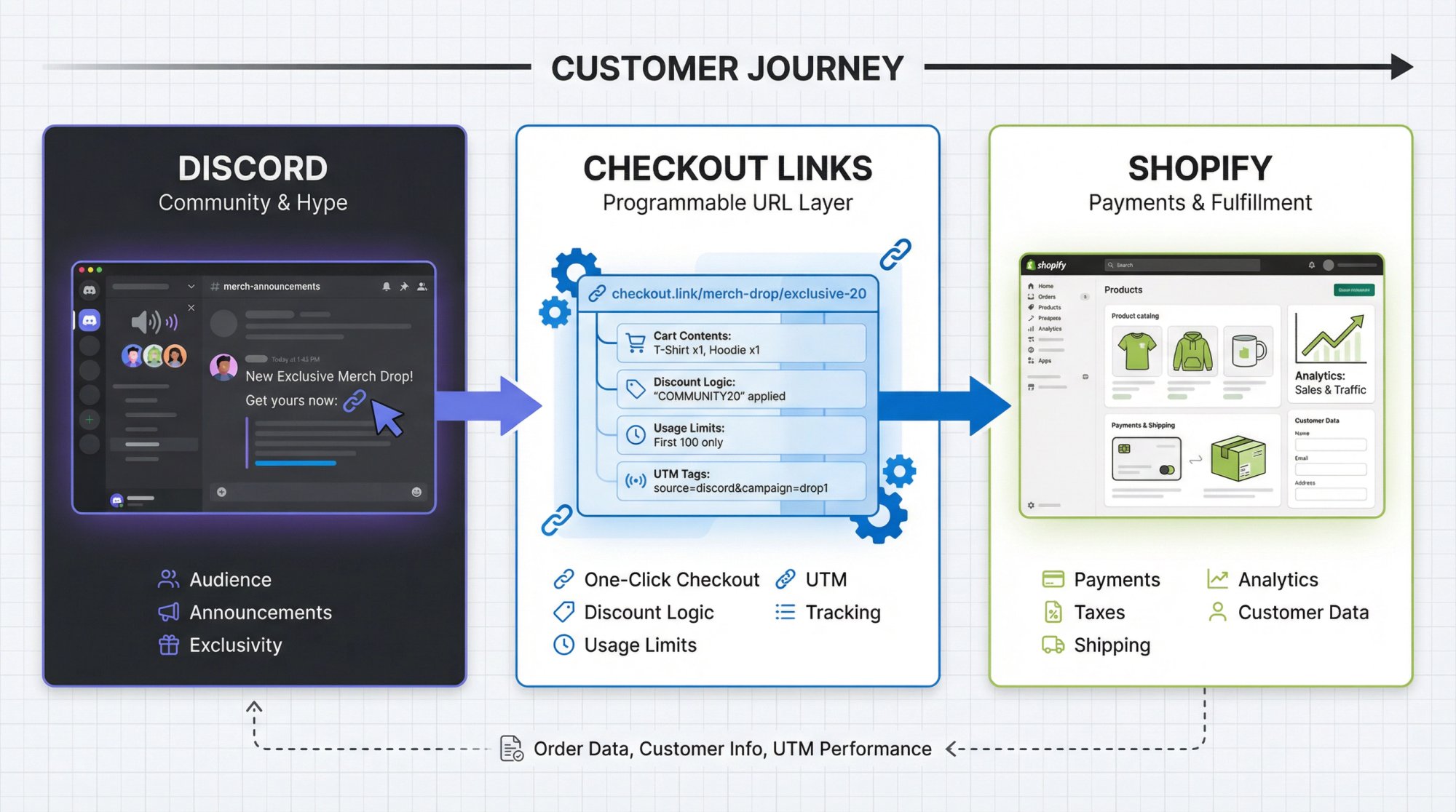
→ Discord = where your community lives, where exclusivity feels real, where drops get announced
→ Shopify = your product catalog, payments, shipping rules, customer data
→ Checkout Links = the programmable layer that turns a Discord message into a one-click checkout with discounts, limits, and tracking baked in
That’s the foundation. Everything else is implementation details.
Discord Commerce in 2026: What You Can and Can’t Do
You can’t build smart systems if you misunderstand what Discord can and can’t do.
Official Discord Merch
Discord runs its own merch shop powered by DOTEXE. It’s a standalone website, not built into the Discord app. Even Discord itself doesn’t try to cram a full ecommerce engine into chat windows.
That should tell you something.
Discord’s Built-In Monetization Tools
Discord has been expanding creator monetization aggressively since 2022:
• Server Subscriptions: recurring paid tiers that unlock roles, private channels, custom emoji
• Server Shop: one-time purchases for digital products like downloads, premium roles, event access
• Monetization policies: platform rules around eligibility and what you can sell
• Lower developer fees: Discord dropped platform cuts to 15% on the first million in app revenue
Here’s the critical part straight from Discord’s documentation:
Translation: if you want to ship hoodies, you need external ecommerce. Server Shop is perfect for PDF guides, wallpapers, event access, digital art. But physical merch? That requires Shopify or similar.
The sweet spot is hybrid:
- Physical merch through Shopify
- Digital perks through Discord Server Shop
- Everything coordinated from your Discord server
Why Discord Is Worth The Effort
This isn’t just another marketing channel.
Discord has roughly 150 million monthly active users across 19 million weekly active servers as of 2024. Platform revenue passed $1.3 billion in 2024, driven by Nitro, boosts, and new monetization features.
Social commerce research in 2025 shows that over two-thirds of internet users participate in online communities, with platforms like Discord powering private “group-based” commerce.
How Shopify, Checkout Links, and Discord Work Together
Let’s build this stack from first principles.
Shopify: Your Store Brain
Shopify handles:
- Product catalog and variants
- Payments, tax calculations, shipping logic, refunds
- App ecosystem for print-on-demand, subscriptions, loyalty programs
- Analytics, discount codes, customer accounts As of late 2025, Shopify pricing typically starts around $29/month on the Basic tier. Independent reviews still rank Shopify as one of the easiest ways to launch a professional store, especially for print-on-demand.
For Discord-based brands, Shopify is your source of truth for everything physical.
Print-on-Demand: Zero-Inventory Fulfilment
If you’re a creator or small brand, you probably don’t want to hold inventory on day one. Print-on-demand platforms like Printful and Printify plug into Shopify and only charge when someone actually buys.
Examples based on 2025 pricing (source):
| Platform | Base T-shirt Cost | Shipping From | Monthly Fee |
|---|---|---|---|
| Printful | ~$11.50 | ~$3.99 | Free (optional Growth plan ~$25/mo for discounts) |
| Printify | Similar | Similar | Free (optional paid tiers for better margins) |
This is perfect for Discord communities:
- No boxes of hoodies in your bedroom
- Global fulfilment through partner print shops
- Low-risk experiments for new designs
Checkout Links: Offer Logic In A URL
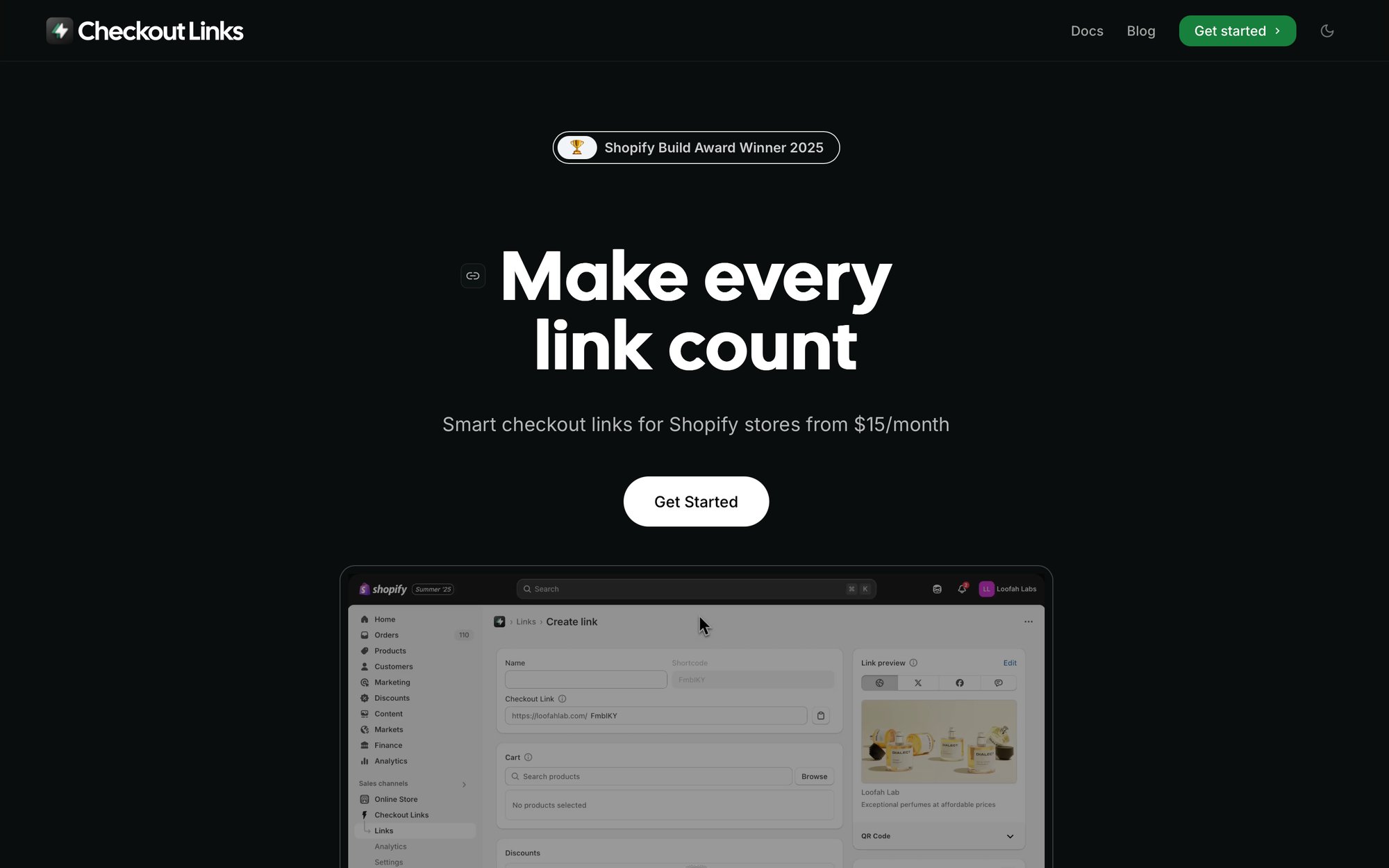
Checkout Links is a Shopify app that encodes an entire shopping experience inside a single URL:
• Which products and quantities go into the cart
• What discount or free gift gets applied automatically
• Whether shipping is free
• Whether the link requires a passcode or has usage limits
• Which UTM tags attach for analytics
When someone clicks your link, Checkout Links uses Shopify’s native systems to prebuild the cart, then hands the buyer into standard Shopify checkout. Payments, fraud checks, taxes, and shipping all run normally.
What this means for Discord:
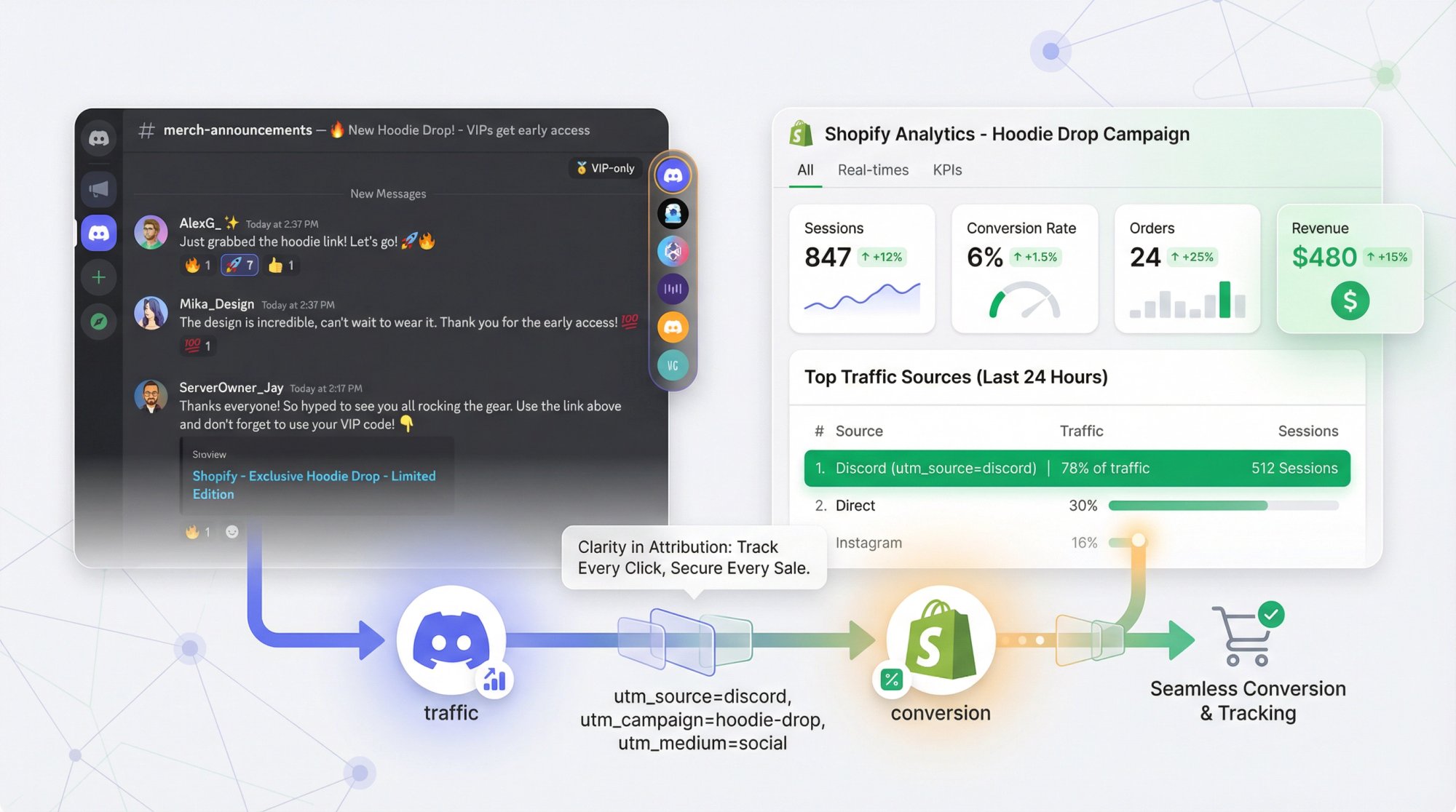
You can skip “browse the site” and send fans straight to checkout. You can set usage limits so “Discord-only” deals can’t be abused. You can attach UTM tags like utm_source=discord and utm_medium=community so every order gets attributed correctly in your Shopify analytics.
If Discord is your party, Checkout Links is your portable checkout kiosk you can drop into any channel.
What Success Looks Like for Discord Merch
Before we get tactical, define success in concrete terms.
For a healthy Discord merch setup, you want:
1. Clear, consistent offers
Members always know where to find current merch and what’s exclusive to Discord.
2. Low-friction purchase paths
One or two clicks from seeing an offer to hitting the payment screen.
3. Clean attribution
You know exactly how much revenue came from Discord vs email vs TikTok.
4. Healthy community vibes
Members feel insider access, not spammed or exploited.
5. A simple, repeatable playbook
New drops follow a pattern your team can execute without reinventing everything.
Everything else is detail.
How to Design Your Discord Merch Strategy
Decide What You’re Actually Selling
Start with a small product universe that fits your community.
Typical combinations:
Core merch: 1-3 hero products (hoodie, tee, sticker pack) with 1-2 evergreen designs that stay available
Limited drops: time-limited or quantity-limited items tied to events or inside jokes
Digital perks (via Server Shop): PDF guides, wallpapers, bonus content, one-time event access via premium roles
Resist the urge to dump your entire catalog in front of Discord on day one. Clutter kills action.
Map Offers To Roles And Channels
Discord is designed around roles and channels. Use that structure instead of fighting it.
Example channel setup:
| Channel | Purpose | Access |
|---|---|---|
| #merch-announcements | Official offers only | Read-only |
| #merch-chat | Questions, photos, feedback | Everyone |
| #vip-drops | Member-only deals | Paid roles only |
| #orders-help | Order issues | Everyone |
Then map your offers:
- Public offers →
#merch-announcements - Member-only discounts →
#vip-drops - Feedback and product ideas →
#merch-chatLater you can automate access with tools like Discord Gate, which connects Shopify and Discord for role-based discount verification.
Decide How Salesy You Want To Be
This is the blind spot most creators miss.
Discord isn’t Instagram. People sit in servers for hours. If every few minutes there’s another “BUY NOW” graphic, your core members will quietly mute channels or leave.
So:
Set a posting cadence
Example: 1-2 big promo posts per week, 1 reminder during active drops
Anchor promos to value
Behind-the-scenes photos, design polls where roles vote on next colorway, early access for subscribers
How to Build Your Discord Merch Store (Step-by-Step)
Now the fun part. Here’s the implementation blueprint.
Step 0: Reality Check (Are You Allowed To Monetize?)
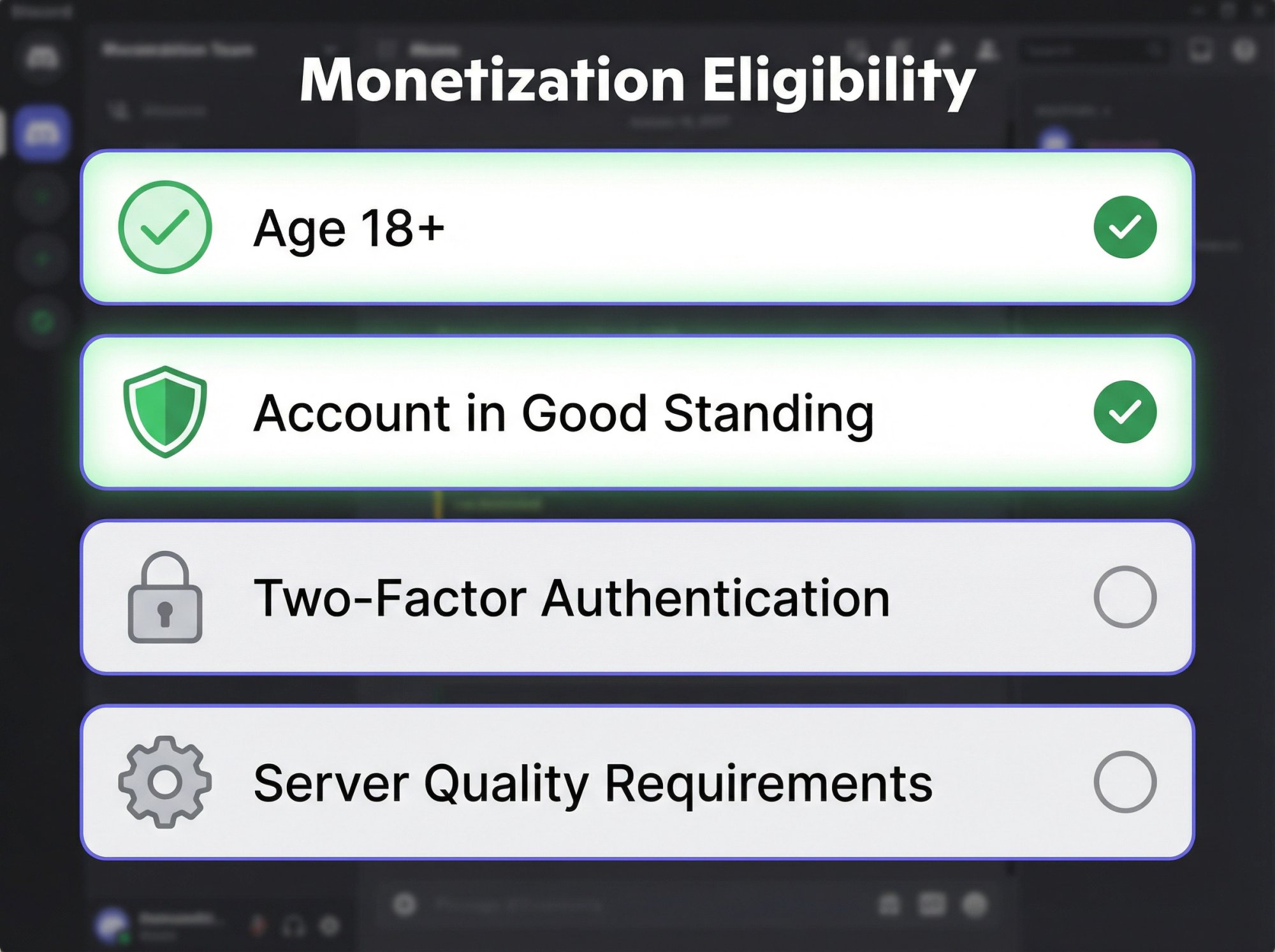
If you want to use Discord’s built-in monetization (Server Shop or Subscriptions), you must:
- Be at least 18 years old
- Have an account in good standing
- Enable two-factor authentication
- Meet several safety and server quality requirements You can still link to an external Shopify store without enabling Server Shop, but make sure your offers comply with Discord’s Community Guidelines and any regional laws around selling to minors, consumer rights, and taxes.
Step 1: Set Up Shopify And Products
If you already have a Shopify store, skim this section.
1. Create or configure your Shopify store
Choose a plan that matches your size. Many creators start on Basic tier around $29/month when billed annually. Turn on Shopify Payments if available in your region to avoid extra transaction fees.
2. Set up print-on-demand
Install a POD app like Printful or Printify from the Shopify App Store. Create 2-4 core products: hoodie, tee, mug, sticker sheet. Keep colorways simple at first (too many options cause choice paralysis).
3. Standardize your pricing
Using 2025 POD benchmarks:
- Suppose a hoodie costs you $30 all-in (product + fulfilment + average shipping)
- You want at least 40% margin (common POD recommendation)
- Retail price = cost ÷ (1 - margin) = 30 ÷ 0.6 = 50 That’s your rough starting point. Adjust by region and brand positioning.
4. Set up collections
Create a “Discord Exclusives” collection in Shopify. Tag any product that will be part of Discord-only drops.
This gives Checkout Links a clean surface to work with later.
Step 2: Install Checkout Links And Create Your First Offer
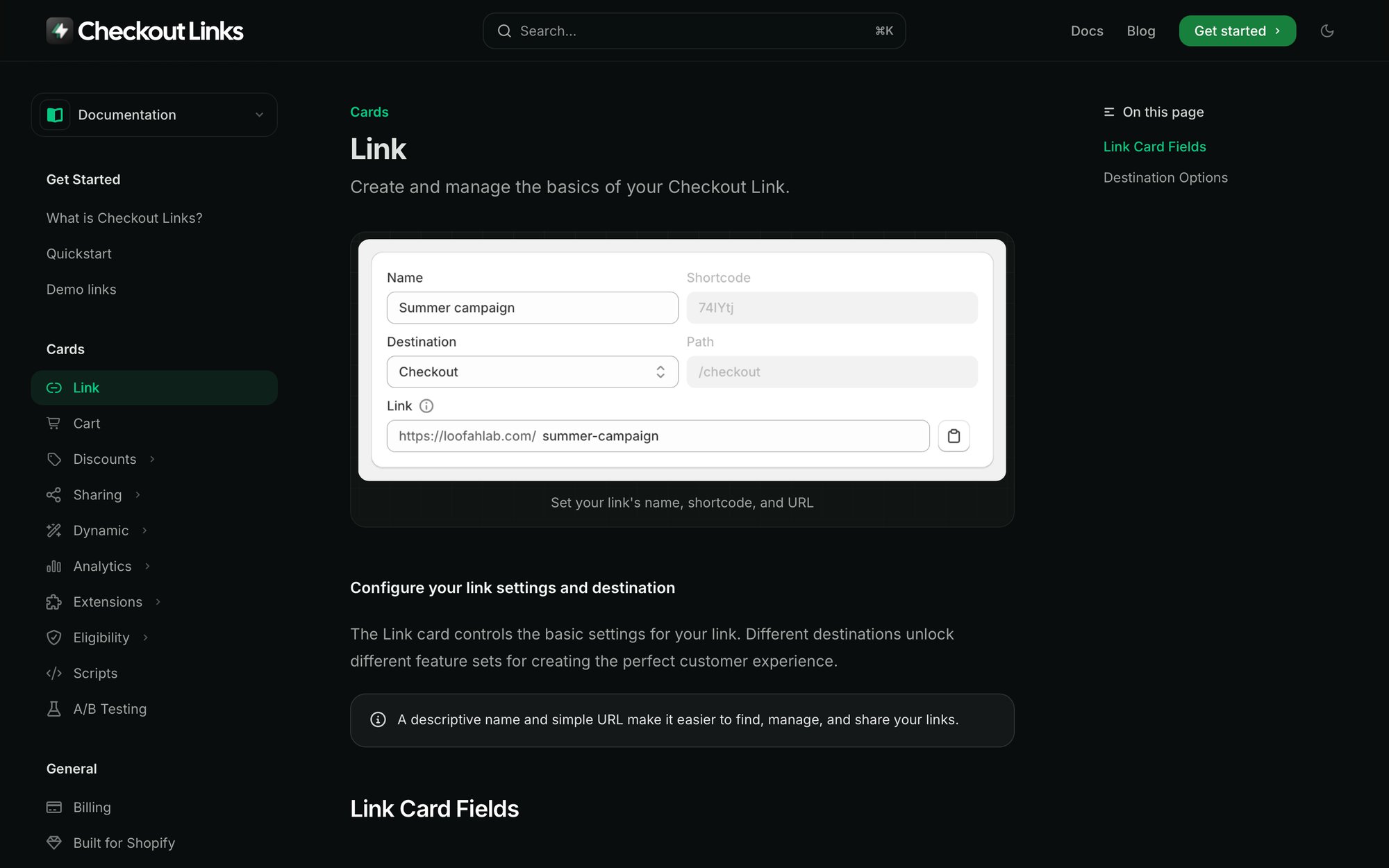
1. Install Checkout Links
Add Checkout Links as a sales channel from the Shopify App Store. Finish the initial onboarding to connect your store. Check out the quickstart guide if you need help getting started.
2. Create a simple direct-to-checkout link
Inside Checkout Links:
- Give it an internal name like “Discord - Welcome Hoodie”
- Destination: “Checkout” (minimal friction)
- Cart: add your hero hoodie, quantity 1
- Discount: optionally add 10% off for Discord, scoped to this product
- UTM tags:
utm_source=discordutm_medium=communityutm_campaign=welcome-hoodie-launch3. Turn on basic safeguards
Usage limit: If this is an evergreen welcome offer, set “once per customer” (enforced through Checkout validation rules in Shopify)
Scheduling: If this is a launch, set start and end dates so the link auto-expires after promo ends
4. Set the link preview
Upload a strong lifestyle image using Checkout Links’ link preview feature. Title like “Discord-only Hoodie Drop.” Description that explains the value in one sentence.
Now you have a single URL that:
- Prefills the right product and discount
- Tracks Discord as the source
- Has built-in guardrails
Step 3: Structure Your Discord Server Without Ruining It
1. Create or repurpose channels
#merch-announcements(read-only, staff can post)#merch-chat(where people react, flex pickups, ask about sizing)#vip-drops(locked to roles likeSupporter,Patreon,Subscriber)#orders-help(keeps order issues out of general chat) 2. Pin key messages
Pin one message in #merch-announcements that acts as a sticky “start here” for merch. Include a list of current live offers with their Checkout Links URLs.
3. Set expectations
In an announcement:
- Explain that merch is optional support, not mandatory
- Share how revenue will be used (paying mods, funding events, commissioning artists)
- Clarify where to ask order questions The meta game: make buying merch feel like joining a mission, not feeding an ad machine.
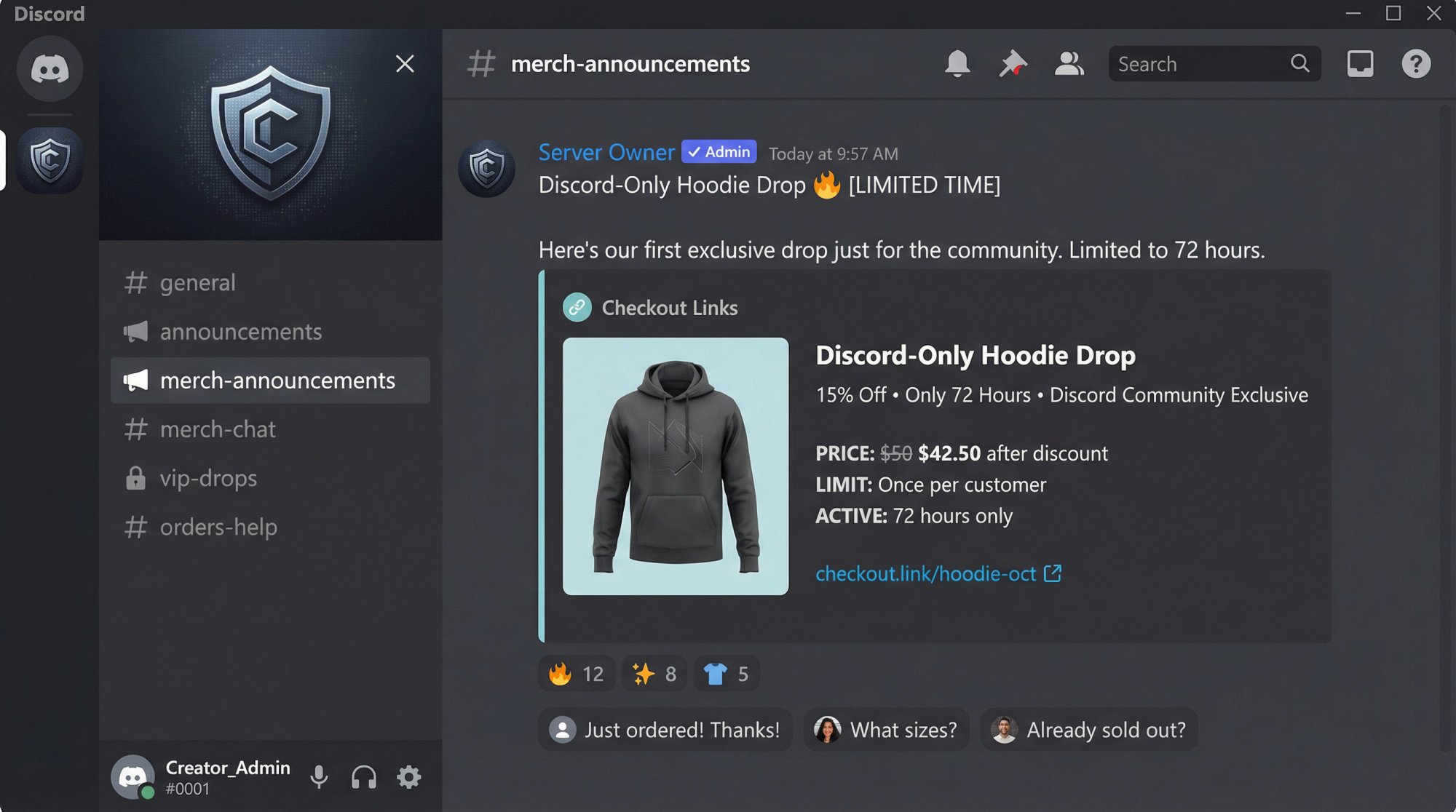
Step 4: Post Your First Merch Drop
Let’s run a simple “Discord-only hoodie drop” as your first real test.
1. Create a limited-time link in Checkout Links
- Products: main hoodie
- Discount: 15% off
- Usage limits:
- Once per customer
- Optional overall cap (first 100 redemptions)
- Schedule: active for 72 hours
- UTM tags:
utm_source=discordutm_medium=communityutm_campaign=hoodie-drop-oct-20252. Craft your Discord announcement
In #merch-announcements:
- Short story: why this hoodie exists
Step 3: Structure Your Discord Server Without Ruining It
1. Create or repurpose channels
#merch-announcements(read-only, staff can post)#merch-chat(where people react, flex pickups, ask about sizing)#vip-drops(locked to roles likeSupporter,Patreon,Subscriber)#orders-help(keeps order issues out of general chat) 2. Pin key messages
Pin one message in #merch-announcements that acts as a sticky “start here” for merch. Include a list of current live offers with their Checkout Links URLs.
3. Set expectations
In an announcement:
- Explain that merch is optional support, not mandatory
- Share how revenue will be used (paying mods, funding events, commissioning artists)
- Clarify where to ask order questions The meta game: make buying merch feel like joining a mission, not feeding an ad machine.
Step 4: Post Your First Merch Drop
Let’s run a simple “Discord-only hoodie drop” as your first real test.
1. Create a limited-time link in Checkout Links
- Products: main hoodie
- Discount: 15% off
- Usage limits:
- Once per customer
- Optional overall cap (first 100 redemptions)
- Schedule: active for 72 hours
- UTM tags:
utm_source=discordutm_medium=communityutm_campaign=hoodie-drop-oct-20252. Craft your Discord announcement
In #merch-announcements:
-
Short story: why this hoodie exists
-
Exact rules: time window, limit per person, any charity tie-in
-
Clear Checkout Links button (just paste the URL; Discord auto-previews)
-
Optional: show a small size chart image 3. Follow up with reminders
-
24 hours before end: “Last day” reminder with the same link
-
2 hours before end: one final ping in
#merch-announcementsonly 4. After the drop
Share a thank-you message with rough outcomes (units sold, what it funds). Invite people who missed it to react with an emoji if they want a rerun later.
Under the hood, every click and order is now tagged as Discord community traffic in your Shopify and Checkout Links analytics dashboards.
Step 5: Add VIP-Only Offers Using Roles + Passcodes
Once your first drop works, add basic segmentation.
1. Create a “Supporter” or “VIP” role
Grant it manually to Patreon supporters, top tippers, or high-tier subscribers. Lock #vip-drops so only that role and staff can view it.
2. Create a VIP-only Checkout Link
In Checkout Links:
- Offer: maybe a bundle (hoodie + sticker pack) at a better discount
- Access controls:
- Passcode: 4-digit, something fun your community will remember
- Usage limit: once per customer
- Don’t share this link outside
#vip-drops3. Announce to VIPs
Post the link only in #vip-drops. Share the passcode and remind them it’s not for public sharing.
If you later see abuse, you can rotate passcodes, adjust usage limits, or generate fresh VIP links. The access logic is in the URL, not your product catalog, which keeps Shopify clean.
Step 6: Layer In Automation (Optional, But Powerful)
Manual posting works fine for small servers. At some point you’ll want automation.
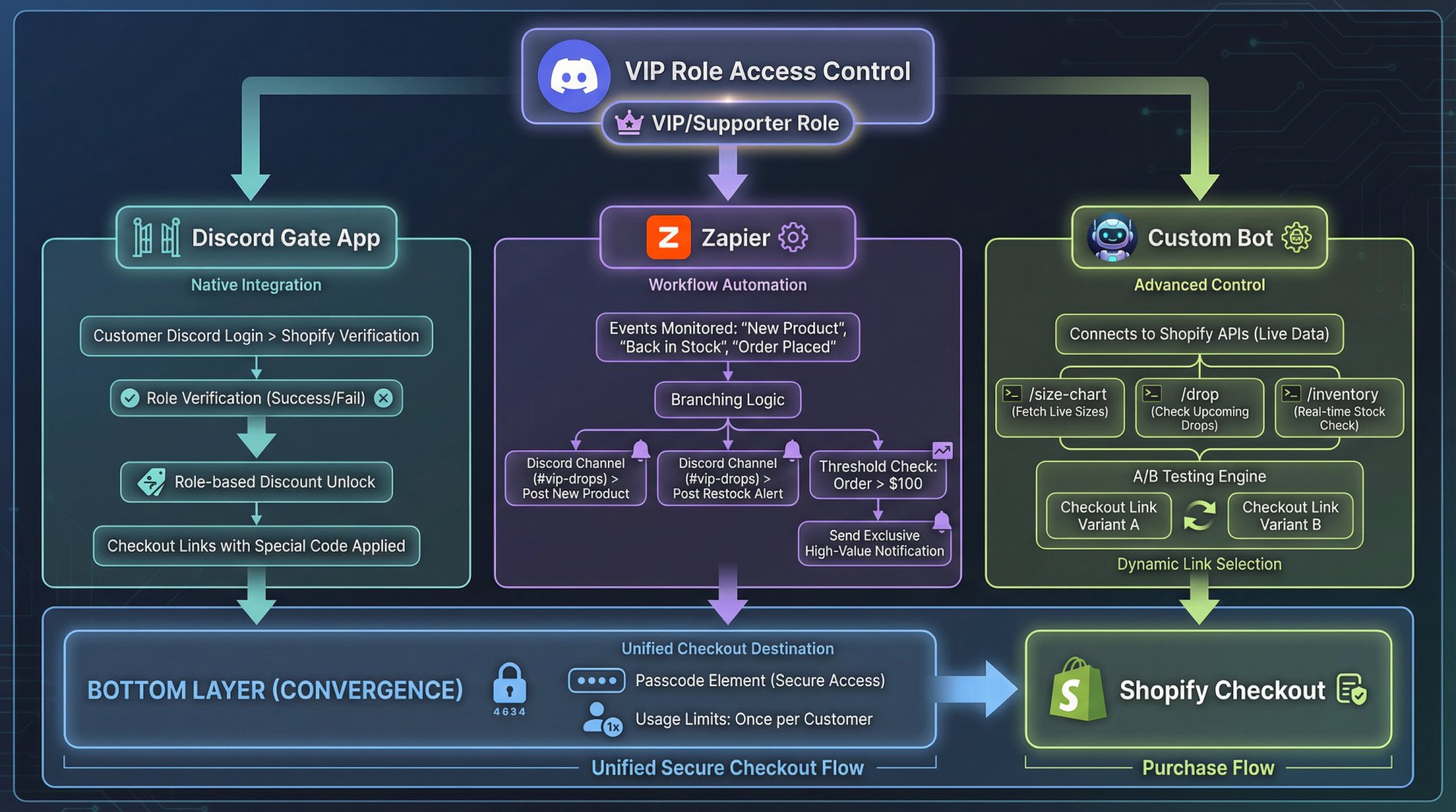
Role-based discounts via Shopify apps
Apps like Discord Gate connect Shopify and Discord so you can:
- Let customers log into your store with Discord
- Verify their roles on your server
- Unlock special discount codes or prices for certain roles Pair that with Checkout Links by creating a checkout link that requires a discount code, then using Discord Gate to show or apply that code only for certain roles.
Automations with Zapier
Zapier offers Discord-Shopify integration. You can post to a Discord channel automatically when:
- A new product is published
- A specific variant goes back in stock
- A big order is placed (for social proof in
#merch-chat) You don’t want every order announced, but you can set thresholds (only post if order total > $100, or only for “Discord Exclusives” collection).
Building your own Discord bot
If you have developer resources, you can:
- Have the bot fetch live inventory data from Shopify APIs
- Respond to commands like
/size-chart hoodieor/drop - Use a different Checkout Link for each campaign, with its own UTM parameters, so every sale is attributed Note that Discord has monetization rules for premium apps and will require you to route paid functionality through their monetization APIs at parity pricing (important if you plan to charge for the bot itself, not just sell external merch).
Using Discord Server Shop Alongside Shopify
Remember: Server Shop sells digital products, not physical hoodies.
You can combine both:
Digital perks in Server Shop
Examples of Server Products:
- Downloadable PDF zine, guide, or art book
- Wallpaper pack
- One-time “VIP for a day” premium role for events These are bought entirely inside Discord, using Discord’s own checkout and payout system. Creators keep 90% of revenue before payment processing costs.
Physical merch via Shopify + Checkout Links
The same members can buy hoodies, tees, stickers through your Shopify store using Checkout Links you drop into the same channels.
Hybrid examples
- Buy a hoodie (Shopify) and get a code that unlocks a premium role (Server Product) for behind-the-scenes access
- Sell a digital art pack in Server Shop and offer a limited physical print run only in Discord through Shopify Be careful not to violate Discord’s Monetization Policy (there’s a non-trivial list of prohibited content types like political fundraising, explicit sexual content, third-party marketing).
How to Track Discord Revenue (UTM Attribution)
If you can’t attribute, you’re guessing.
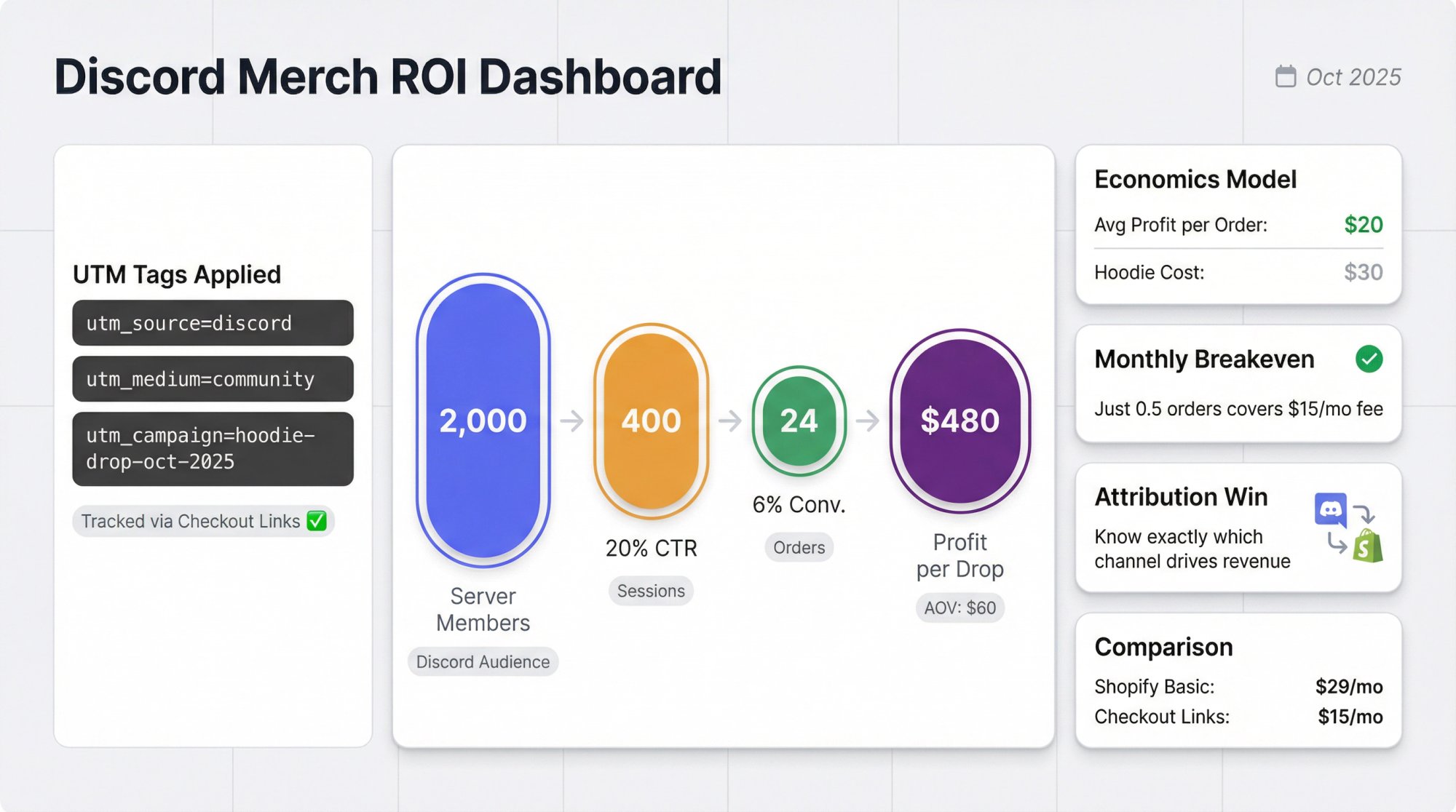
Use UTM tags religiously
Every Checkout Link you share in Discord should have:
utm_source=discordutm_medium=communityorutm_medium=organic-socialutm_campaign=named per drop (example:launch-hoodie-oct-2025) Checkout Links has a dedicated UTM analytics view that shows performance by source, medium, and campaign, and pipes the data into Shopify’s native reports.
That lets you answer:
• How many orders did we get from Discord vs email vs ads?
• Which drops had the highest conversion rate from click to purchase?
• Which campaign name patterns make reporting easier?
Track at link level, not just by channel
Spin up different Checkout Links for:
- Public channel vs VIP channel
- Variant A message vs Variant B message
- Role-gated drop vs open drop Each link has its own analytics, so you can compare like for like.
Sense check your economics
Rough example:
| Metric | Value |
|---|---|
| Discord server members | 2,000 |
| Drop announcement click-through | 400 sessions (20%) |
| Conversion rate (session to order) | 6% |
| Orders | 24 |
| Average profit per order | $20 |
| Profit from one drop | ~$480 |
Relative to:
- Shopify Basic plan: ~$29/month
- Checkout Links: $25/month You’re profitable if you run even modest drops consistently.
The point isn’t that this exact math will be yours, but that Discord doesn’t need to be massive to cover your tooling costs.
Common Discord Merch Mistakes (And How To Avoid Them)
Treating Discord like an ad network
If every second message is “New drop, buy now,” people tune out.
Fix:
- Limit pure promo posts
- Add behind-the-scenes content, polls, design feedback
- Let community members show off fits and unboxings
Trying to hack physical fulfilment into Discord itself
Some creators are tempted to take orders in DMs, accept PayPal manually, track everything in a spreadsheet. This is a compliance, tax, and customer service nightmare.
Fix:
- Use Shopify for all physical orders
- Use Discord for discovery and promotion only
- Use Server Shop for digital, where Discord is built to handle payouts
Ignoring platform rules
You can lose monetization or even your whole server if you break Discord’s Monetization Policy or Community Guidelines. That includes:
-
Selling sexually explicit material
-
Running political fundraising under the radar
-
Monetizing content you don’t have rights to Fix:
-
Read the Monetization Policy once end to end
-
Avoid gray areas unless you have legal counsel
-
When in doubt, err on the safer side
No attribution discipline
If you blast raw product URLs and random discount codes, you’ll never know if Discord is actually pulling its weight.
Fix:
- Use Checkout Links for any Discord offer
- Standardize UTM tags
- Review performance monthly and kill weak patterns
Overcomplicating your setup on day one
You don’t need a custom bot fleet, 25 roles, and wildly dynamic pricing.
You need:
- 1 store
- 1 or 2 solid offers
- 1 Discord channel structure
- 1 attribution scheme Then iterate.
7-Day Launch Plan for Your Discord Merch Store
Here’s a practical week-long plan that respects your time.
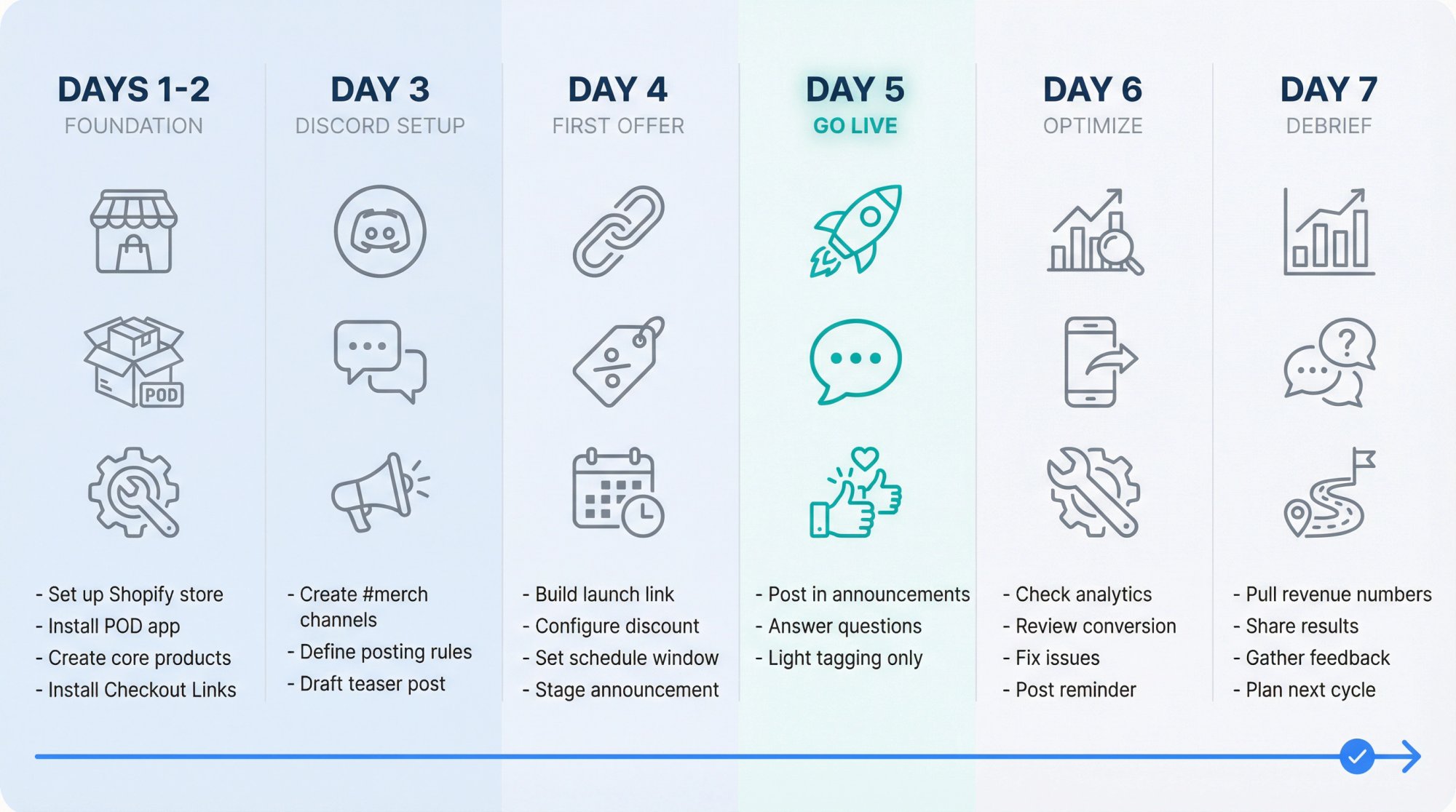
Day 1-2: Foundation
-
Set up or tidy your Shopify store
-
Install print-on-demand app
-
Create 2-3 core products
-
Install Checkout Links as a sales channel (use the quickstart guide if needed)
-
Create your first test checkout link with UTM tags Day 3: Discord Setup
-
Create
#merch-announcements,#merch-chat,#orders-help -
Define posting rules and pin them
-
Draft a “Merch is coming” teaser with no link yet Day 4: First Offer
-
Build a proper launch Checkout Link
-
Stage a launch announcement in Discord with images and FAQ Day 5: Go Live
-
Post the launch in
#merch-announcements -
Be present in
#merch-chatto answer sizing, shipping questions -
Tag people lightly (maybe one
@everyoneat launch, then stop) Day 6: Mid-drop optimization -
Check Checkout Links analytics
-
If clicks are high but conversion is low, check:
- Mobile checkout flow
- Shipping costs clarity
- Discount application
-
Fix obvious issues and post one reminder Day 7: Debrief And Plan Next
-
Pull Discord-sourced revenue numbers using UTM and link analytics
-
Share high-level results with the community
-
Ask for feedback on designs and what they want next
-
Plan a VIP-only or digital-plus-physical hybrid offer for the next cycle Rinse and refine.
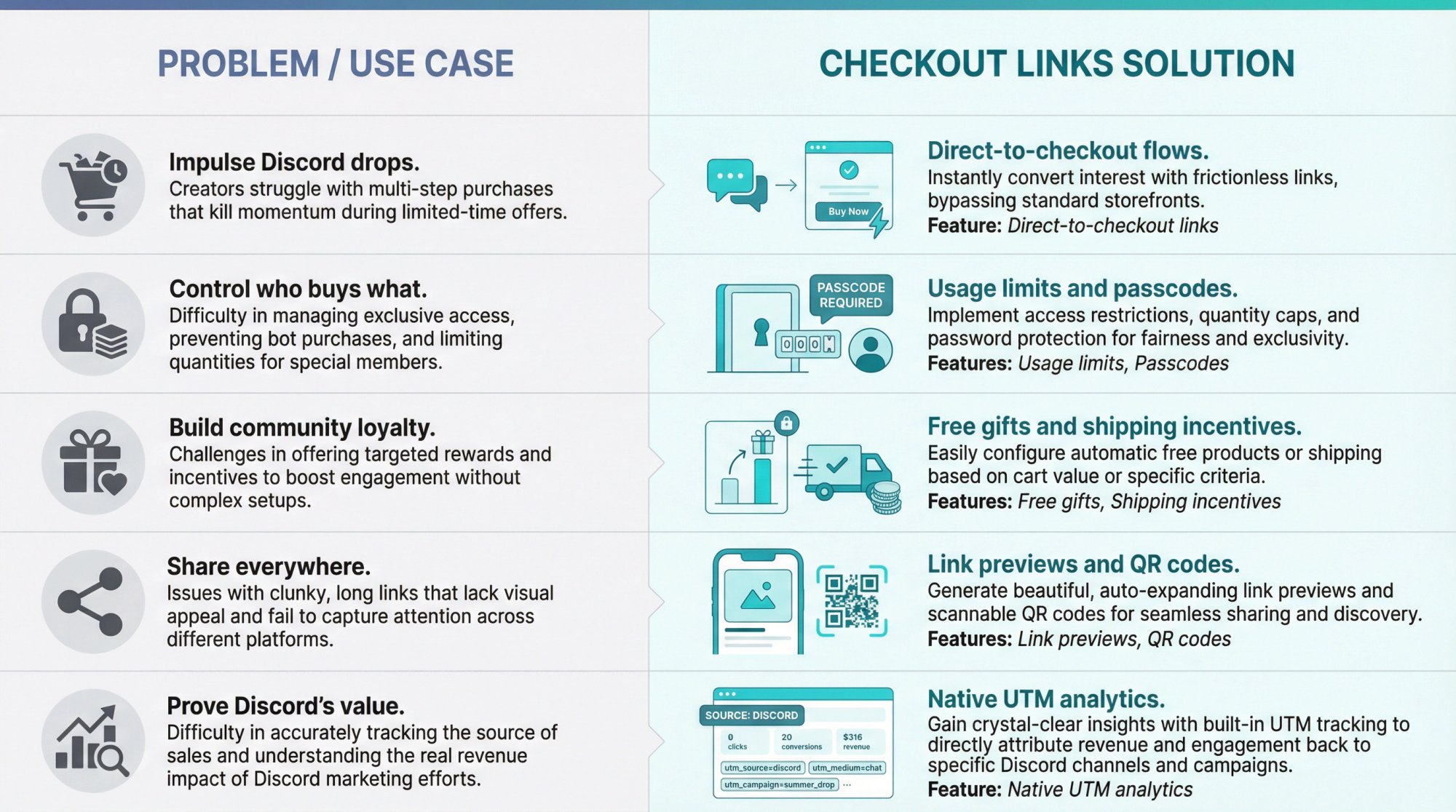
Why Checkout Links Works for Discord Merch
Because Checkout Links is built as a sales channel on Shopify, it plugs directly into your existing stack: checkout, analytics, and the order data your other tools and automations already read.
Some things uniquely useful for Discord:
Direct-to-checkout flows: Perfect for impulse-friendly Discord announcements
Usage limits and passcodes: Easy way to create “first 100 only” or “VIP-only” deals without weird code gymnastics
Free gifts and free shipping logic: “Buy any hoodie, get a free sticker pack” (ideal for reward-focused communities)
Branded link previews and QR codes: Nice in pinned messages, channel banners, and even live events where your Discord server is present offline
Native UTM analytics: So you can actually defend the channel’s performance to finance or your cofounder
If you want deeper dives on UTMs, community-driven retention, and campaign ideas, Checkout Links already has public guides on UTM tracking, email promotions, retention strategies, and customer segmentation that you can adapt directly to Discord-driven campaigns.
Turning Your Discord Server Into Revenue (Final Thoughts)
Discord is no longer “just for gamers.” It’s a serious monetization surface with:
- Built-in tools for digital products and subscriptions
- A huge global user base
- Support for private, high-trust communities where merch feels like belonging, not advertising But Discord is not (and in 2026 still can’t be) your full physical merch backend. That’s Shopify’s job. Tools like Checkout Links sit in between, letting you turn a single Discord message into a complete, governed purchase flow.
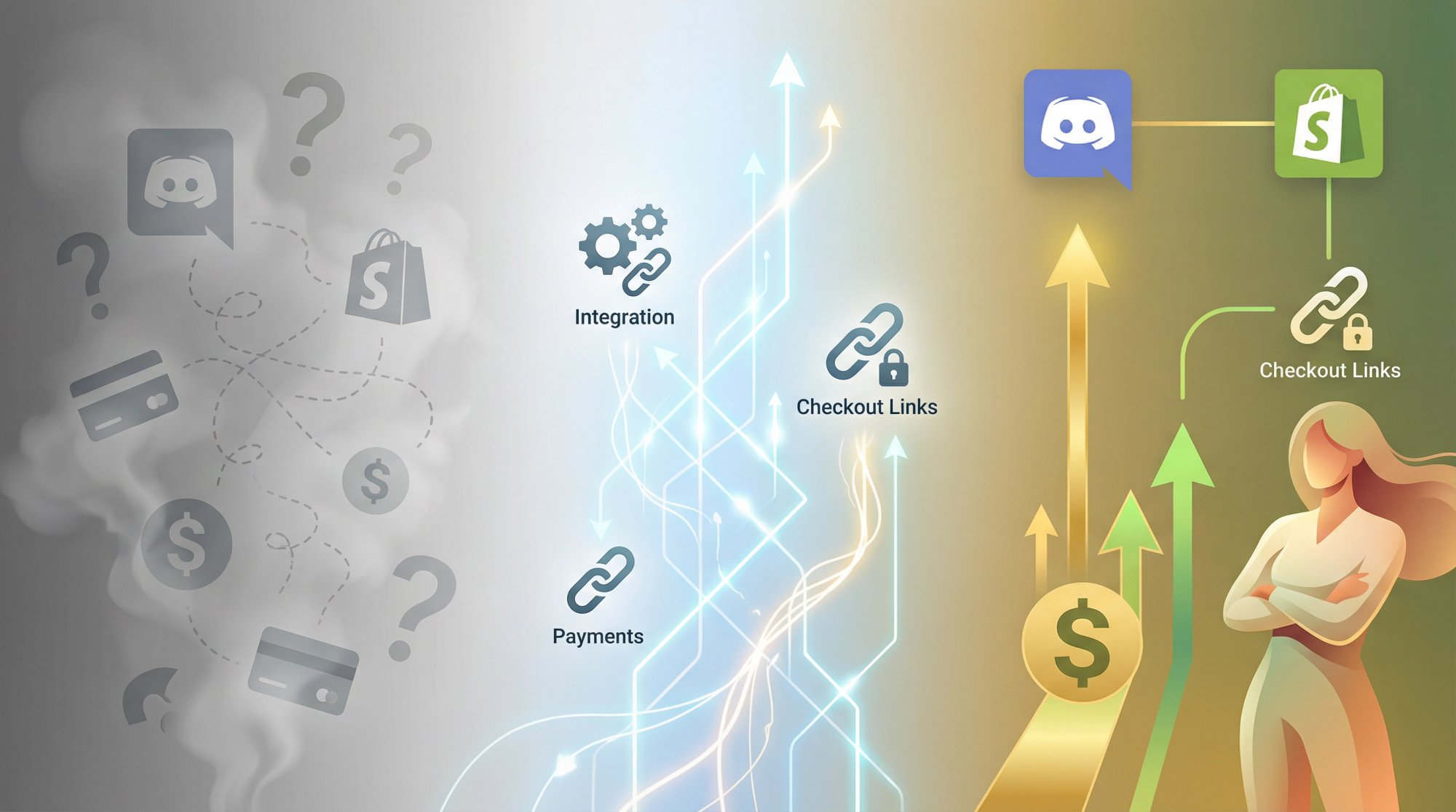
If you respect your community, keep your setup simple but intentional, track everything with UTMs, and use Checkout Links to shrink friction and add guardrails, your “Discord merch store” stops being a vague idea and becomes a measurable, scalable part of your ecommerce engine.
Learn more about what Checkout Links can do for your Shopify store, check out the pricing, or jump straight into the quickstart guide to get started today.
Data currency note: All platform features, policies, and pricing in this guide are based on sources published or updated in 2024 and 2025. Discord, Shopify, and print-on-demand platforms change fast, so you should always double-check specific fees, eligibility rules, and app pricing before committing to a new setup.


