If you’re typing “Linktree alternative for selling products” into Google right now, you’re not really looking for another cute bio link page.
You’re trying to solve a specific problem: People tap your bio link, but not enough of them actually buy. And the tools you’re using feel too limited, too expensive, or too fragile.
This guide cuts through the noise. We’ll show you what actually works in 2025, especially if you sell through Shopify and want your social traffic to convert into real revenue.
What You Really Want (Let’s Be Honest)
When merchants search for Linktree alternatives, they’re usually trying to solve one or more of these problems:
1. Too many friction points between “saw it on social” and “order placed”
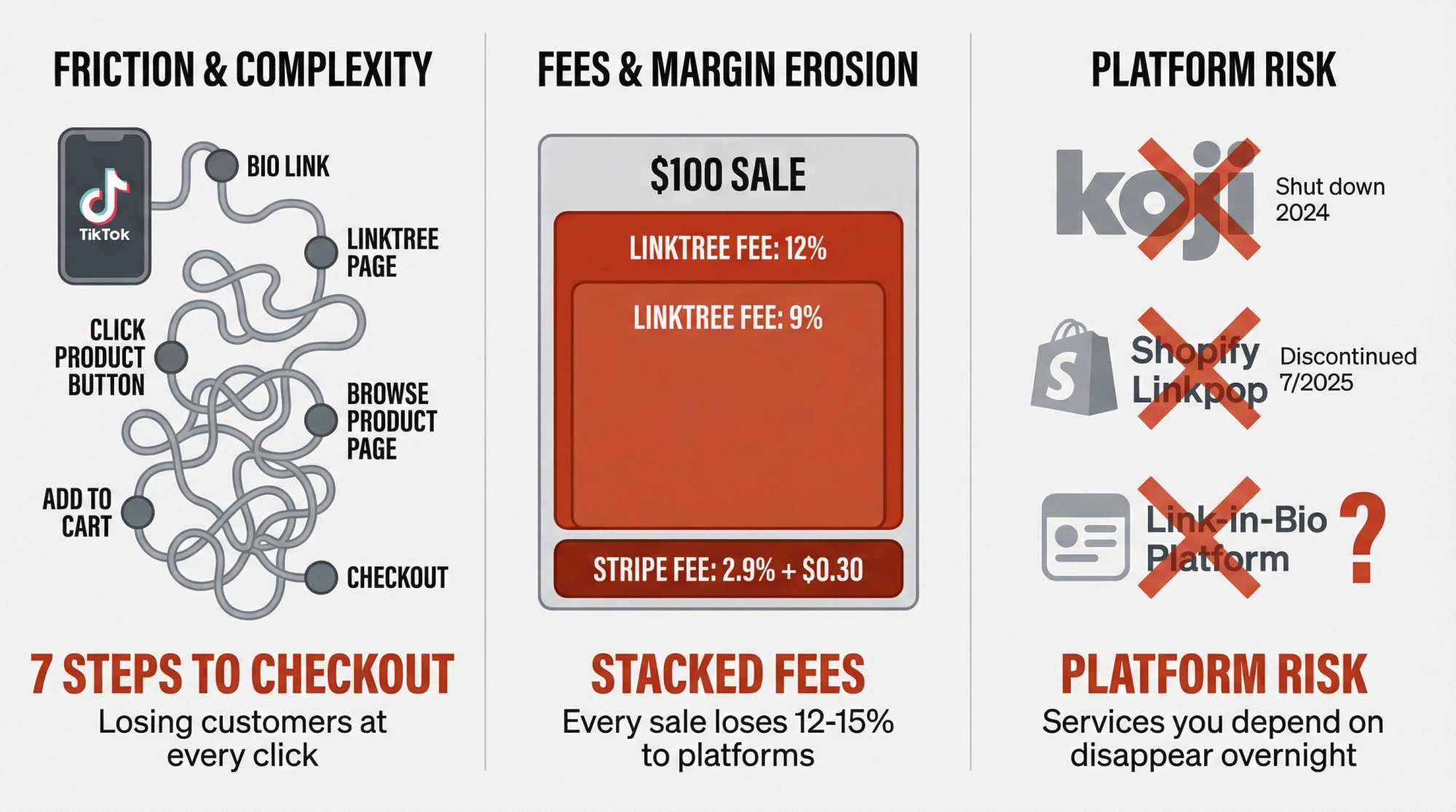
Right now, your customer journey probably looks like this:
→ See product on TikTok
→ Tap bio link
→ Land on Linktree
→ Click product button
→ Browse product page
→ Add to cart
→ Finally checkout
That’s way too many steps. You’re losing people at every click.
2. Platform fees are eating your margins
Link-in-bio tools typically charge high transaction fees:
• 12% per sale on free plans
• 9% per sale on mid-tier plans
• 0% only on premium tiers (highest subscription cost)
Plus you still pay Stripe fees on top of that (typically 2.9% + $0.30). Once you’re doing real volume, these percentages add up fast.
3. You want to sell like an actual business
Link-in-bio tools with bolt-on commerce features can handle a few digital downloads. But once you’re dealing with real inventory, variants (sizes, colors, bundles), tax compliance, refunds, and proper attribution, you need a real ecommerce platform.
4. Platform risk keeps you up at night
The last two years should’ve been a wake-up call:
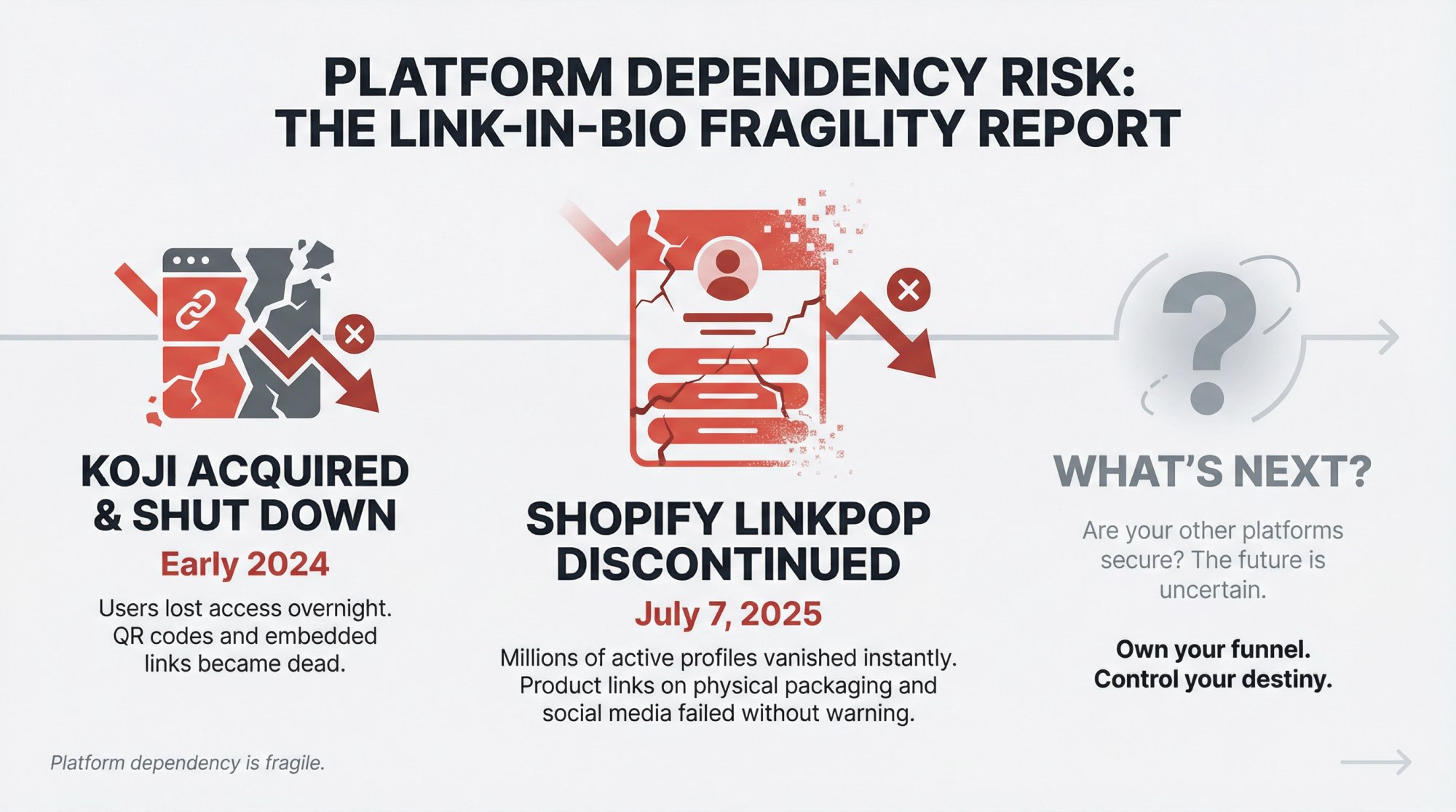
• Koji was acquired by Linktree and shut down in early 2024
• Shopify’s Linkpop was discontinued in July 2025
If your entire social funnel depends on someone else’s link-in-bio product, you’re gambling with infrastructure you don’t control.
5. You need real analytics, not vanity metrics
“Link clicks” don’t pay the bills. You want to know:
• Which posts actually drive orders (not just clicks)
• Which offers convert best
• How much revenue your bio link generates
• Attribution that connects to your real business data
How Selling from Bio Links Actually Works
Most articles about Linktree alternatives just list tools. That’s not helpful.
Let’s break down what’s actually happening when someone buys from a “link in bio”. There are five layers:
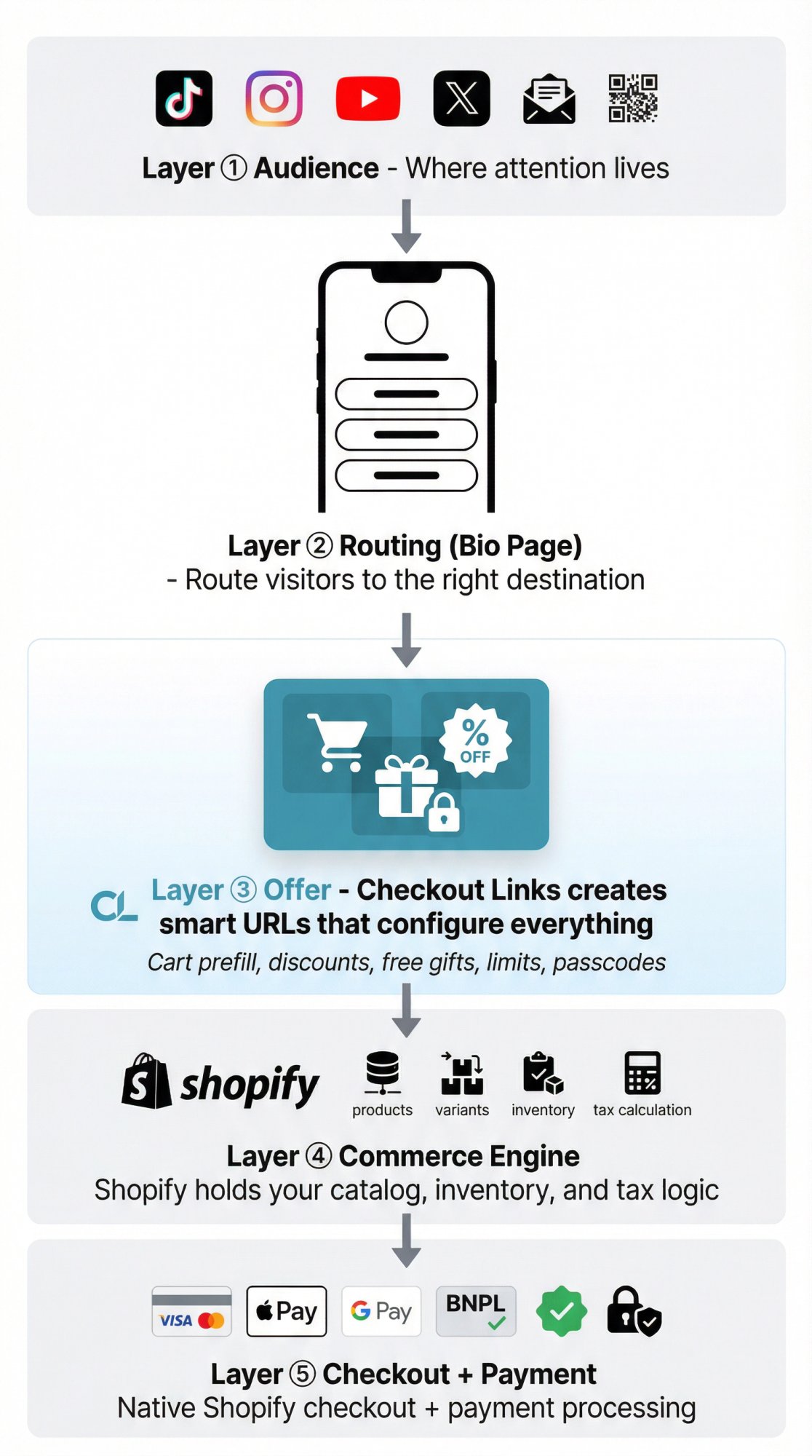
① Audience
Where attention lives. TikTok, Instagram, YouTube, X, email, QR codes on your packaging.
② Routing (Bio Page)
Tools like Linktree and similar services decide “which page do we show when someone taps this URL?”
③ Offer
What you’re actually proposing:
• A specific product
• A bundle with a discount
• Free gift above a threshold
• VIP-only drop with passcode (great for Discord merch store drops gated to server members)
This is where we come in. Checkout Links lets Shopify merchants create smart URLs that prefill carts, apply discounts, enforce limits, and send shoppers straight to checkout.
④ Commerce Engine
The system that holds products, inventory, pricing, taxes, customers. For you, that’s Shopify.
⑤ Checkout + Payment
Credit cards, wallets, BNPL, risk checks, tax calculation. Shopify handles this.
Here’s the thing: Most “Linktree alternative” guides only talk about Layer 2 (the bio page).
If you actually care about selling, you need to think about all five layers, especially the offer layer and your commerce engine.
When Linktree Works (And When It Doesn’t)
What Linktree Does Well
Linktree is genuinely good as a link router. One memorable URL, unlimited links on free plan, fast setup, basic analytics and templates. For pure content creators and affiliates, that’s often enough.
What Changes When You Sell Real Products
The pain points show up fast:
Commerce is bolted on, not native. Linktree lets you sell digital products through their platform. Payments run through Stripe, products are delivered as downloads, and you’re fully responsible for taxes and compliance. That works for a few ebooks. It doesn’t scale when you’re selling physical goods with inventory, complex bundles and variants, or subscription products.
Fees compound quickly. Transaction fees on link-in-bio platforms are 12% per sale on Free, 9% per sale on Starter/Pro, and 0% only at Premium. Plus Stripe fees on top of that. Independent reviews consistently cite these fees as the main reason merchants start looking for alternatives once they have real volume.
Limited domain control. Your public URL is linktr.ee/username by default. There’s no native custom domain option. You can forward your domain to Linktree, but you don’t truly own that URL.
Analytics fragmentation. Sales through third-party digital checkouts don’t flow into your Shopify analytics. You now have yet another dashboard to reconcile with your real business data.
Once you see it that way, the question becomes: “How do I keep the simplicity of a bio link but plug it into a real commerce engine?”
Link-in-Bio Tools for Selling Products in 2025
The market shifted dramatically in 2024-2025. Here’s what’s available now.
“All-in-One” Creator Storefronts
These give you a hosted mini-store plus link-in-bio:
| Platform | Pricing Model | Transaction Fees | Best For |
|---|---|---|---|
| Platform A | Free plan or paid ($25-30/mo) | 9% on free plan, 0% on paid | Creators with no existing store |
| Platform B | Creator (29/mo) or Pro (99/mo) | 5% on Creator plan, 0% on Pro | Digital products & coaching |
| Platform C | Varies by tier | Percentage-based on lower tiers | Memberships & courses |
Good for: Creators who don’t have Shopify and primarily sell digital products.
Not ideal for: Merchants who already run a serious ecommerce business and don’t want to split their catalog, accounting, or tax footprint across multiple systems.
Generic Link-in-Bio Tools
This includes Linktree, Taplink, Milkshake, and others that focus on routing and presentation. Sometimes they have payment buttons, but your product and checkout logic lives elsewhere. Fine as routing layers. Not commerce platforms.
Shopify-Native Link-in-Bio Apps
If you run Shopify, this category matters. Several Shopify apps offer bio page builders that integrate directly with your store. These solve Layer 2 (bio page) and live close to your Shopify domain.
Why Shopify’s Linkpop No Longer Exists
Older guides say “Just use Shopify’s free Linkpop.” That’s no longer an option. Shopify shut down Linkpop on July 7, 2025. Existing users lost access overnight. QR codes on packaging became dead links. Merchants scrambled to replace printed materials.
This should change how you think about link-in-bio tooling:
External services can and do shut down. Anything printed with their URLs is fragile.
Owning more of your funnel isn’t a nice-to-have. It’s risk management.
What Shopify Merchants Already Have
If you already run a Shopify store, you don’t need another “shop platform.”
You already have:
• Products, variants, collections
• Inventory management
• Tax calculation and compliance
• Battle-tested checkout
• Analytics and attribution
The missing pieces are:
1. A bio-friendly landing page (routing layer)
Solve this with either a simple “Links” page built in your Shopify theme, or a dedicated bio app that gives you no-code editor and in-page cart (on your domain).
2. A better offer engine (so each link does more than open a generic product page)
This is where Checkout Links comes in.
How Checkout Links Works as Your Linktree Alternative
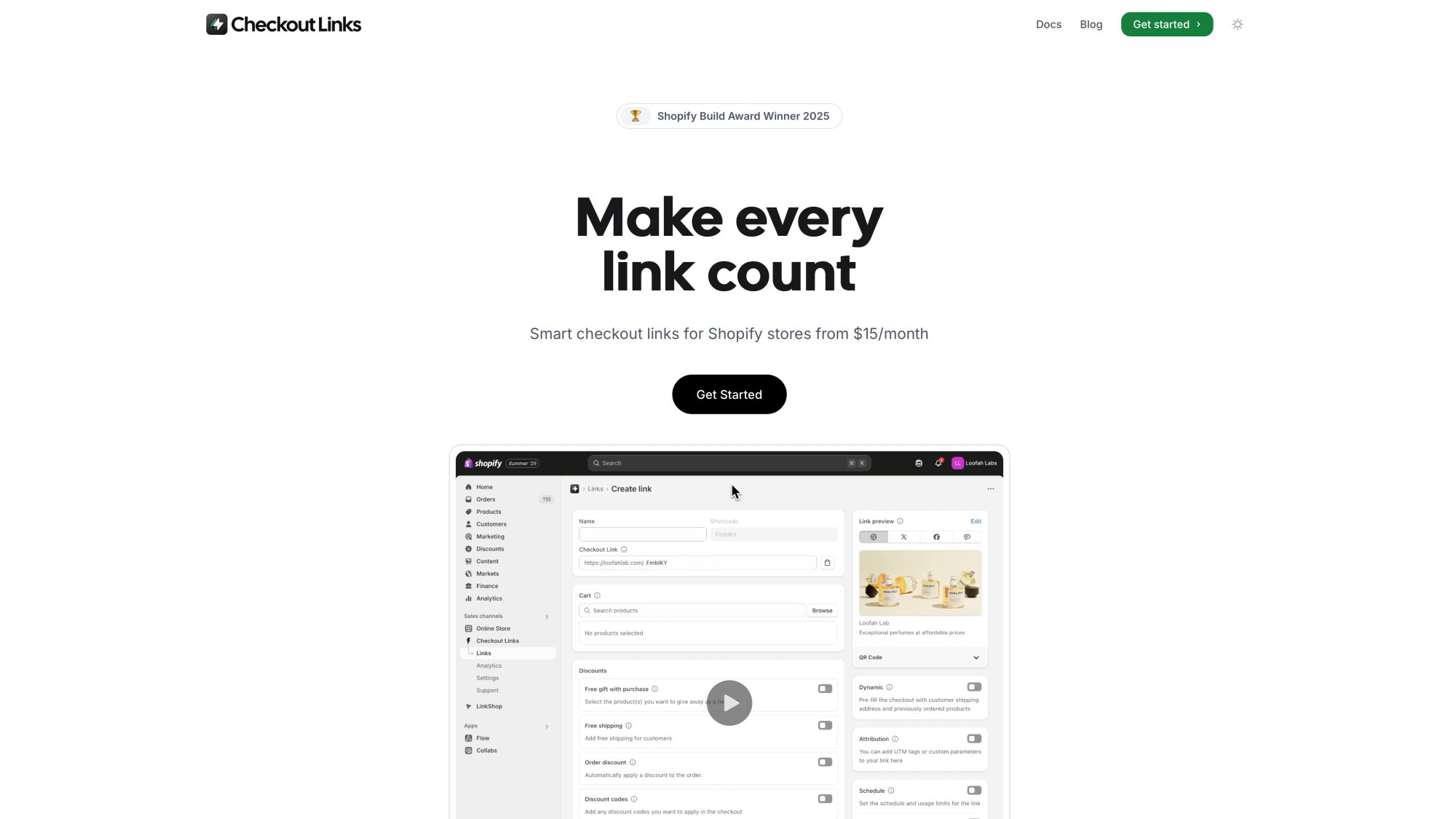
Checkout Links is a Shopify app that creates smart checkout URLs. Each link can:
• Prefill carts with precise products and quantities
• Apply discounts (percentage or fixed amount, with thresholds)
• Add free gifts (simple or threshold-based)
• Enforce limits (per-link or per-customer usage caps)
• Require passcodes for VIP drops
• Attach UTM parameters for attribution
• Route to checkout, cart, or custom paths
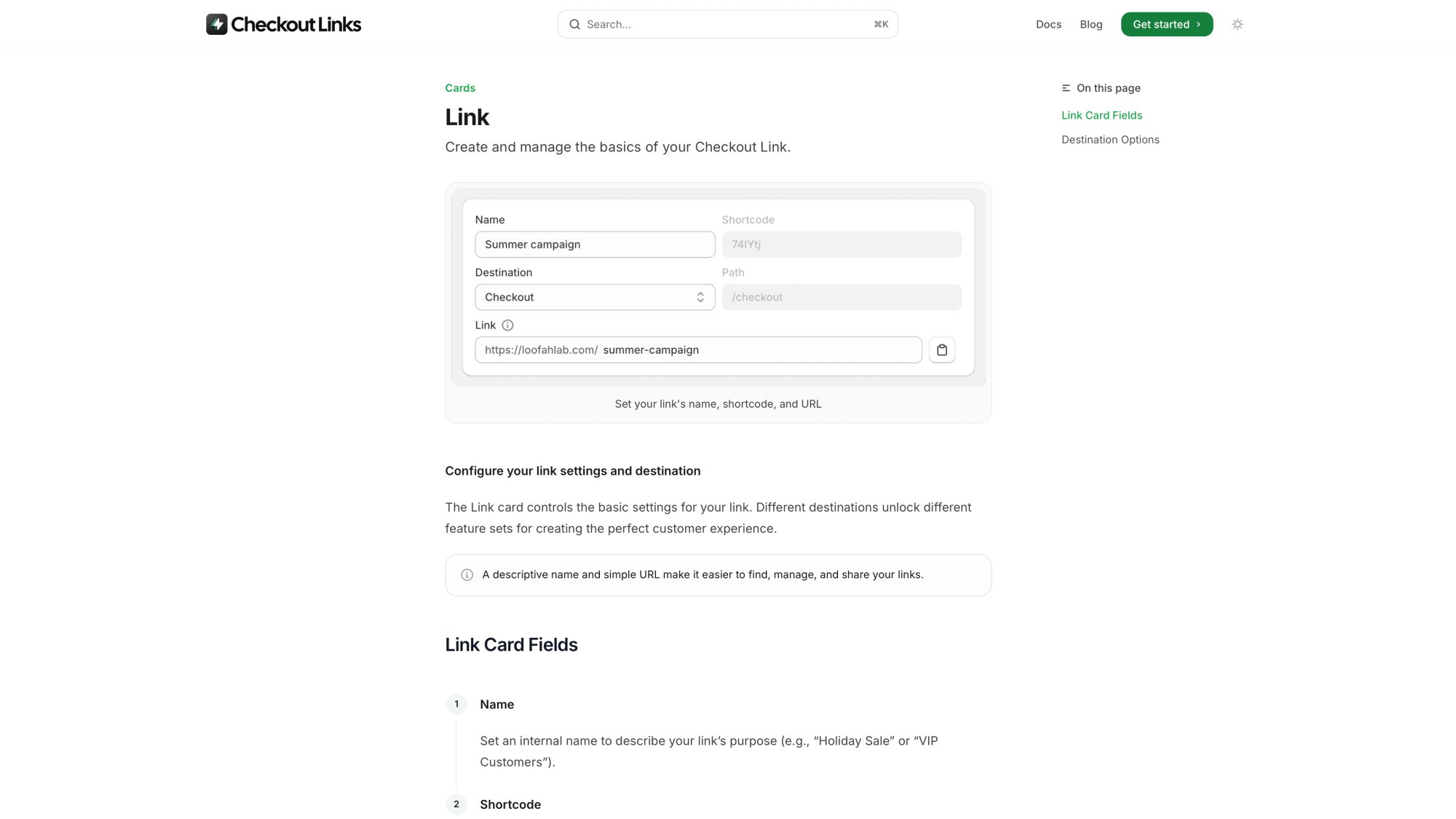
Every link you create is a small “program” that configures Shopify’s cart and checkout exactly how you want, then hands off to native Shopify checkout.
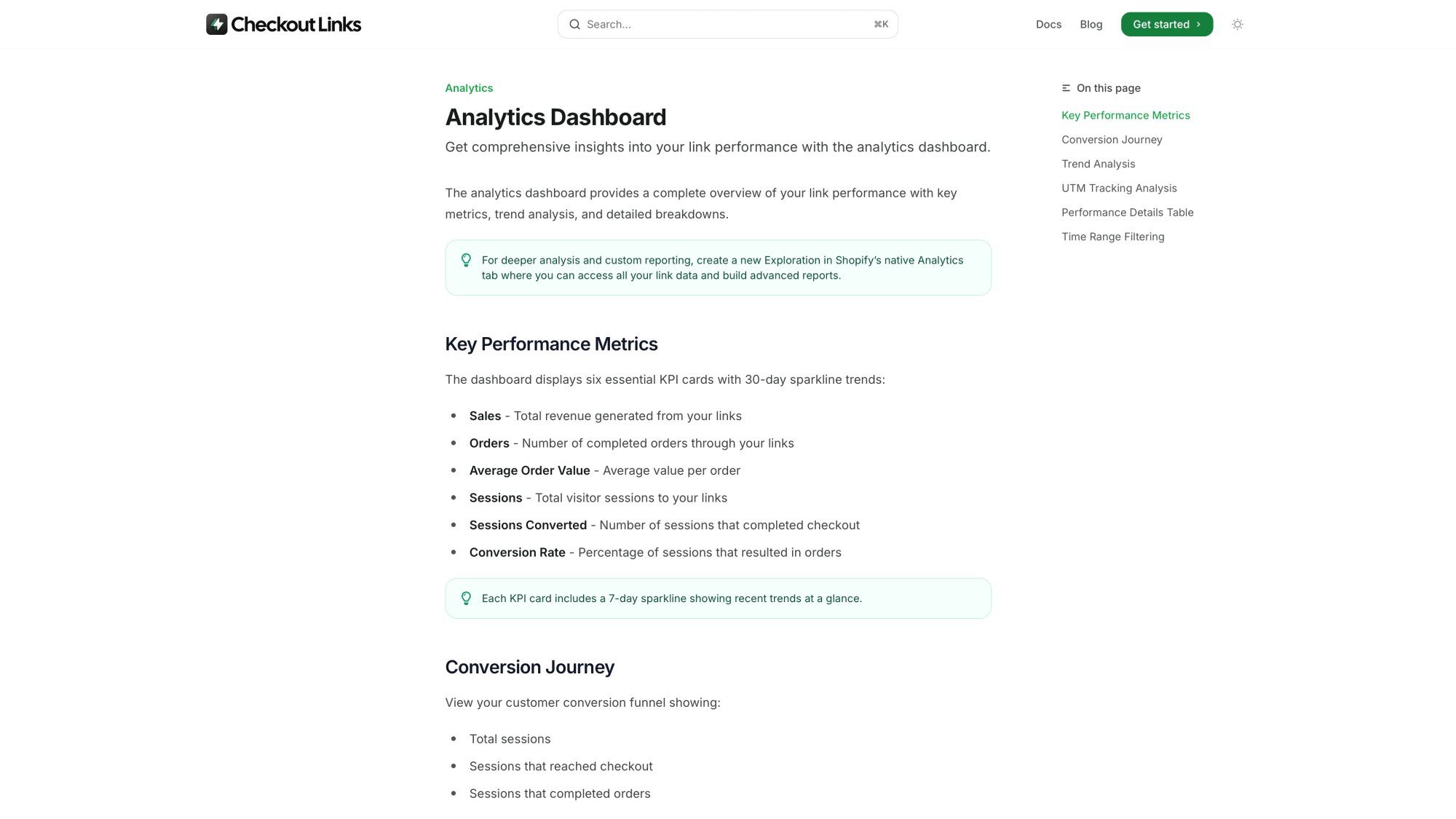
Pricing Comparison: No Hidden Fees
As of late 2025:
| Plan | Price | Transaction Fees |
|---|---|---|
| Checkout Links | $25/month | 0% |
| Checkout Links Plus (Shopify Plus) | $30/month | 0% |
| Trial | 7 days free | N/A |
You pay your normal Shopify payment processing fees. But we don’t take a percentage cut on top.
Compare that with typical “sell from bio” platforms:
| Platform | Monthly Fee | Transaction Fees |
|---|---|---|
| Linktree Free | $0 | 12% |
| Linktree Starter/Pro | Varies | 9% |
| Linktree Premium | Highest tier | 0% |
| Platform A Free | $0 | 9% |
| Platform B Creator | $29 | ~5% |
| Platform B Pro | $99 | 0% |
If you’re already paying for Shopify, piling 5-12% platform fees on the same revenue is expensive.
How Checkout Links Acts Like a “Power Linktree” for Selling
Instead of one generic bio page pointing to product pages, design your funnel like this:
1. Routing layer on your own domain
A bio app page on links.yourbrand.com, or a “Start Here” page in your theme.
2. Each button powered by a Checkout Link
Each tile doesn’t just “go to product X.” It creates a pre-configured flow:
Example tiles:
• “Starter Bundle” → Checkout Link that preloads three bestsellers with 15% bundle discount + free shipping
• “VIP Restock” → Link requiring a passcode, limited to one use per customer
• “Recover Cart” in email → Dynamic link that rebuilds each customer’s abandoned cart with targeted incentive
3. Checkout + analytics stay in Shopify
All orders run through Shopify checkout. No split reporting. No extra dashboard.
Old flow:
New flow:
Fewer steps. More control. No double fees.
Real Examples: How to Use Your Bio Link as a Sales Channel
Let’s walk through specific scenarios merchants usually try to solve with Linktree alternatives.
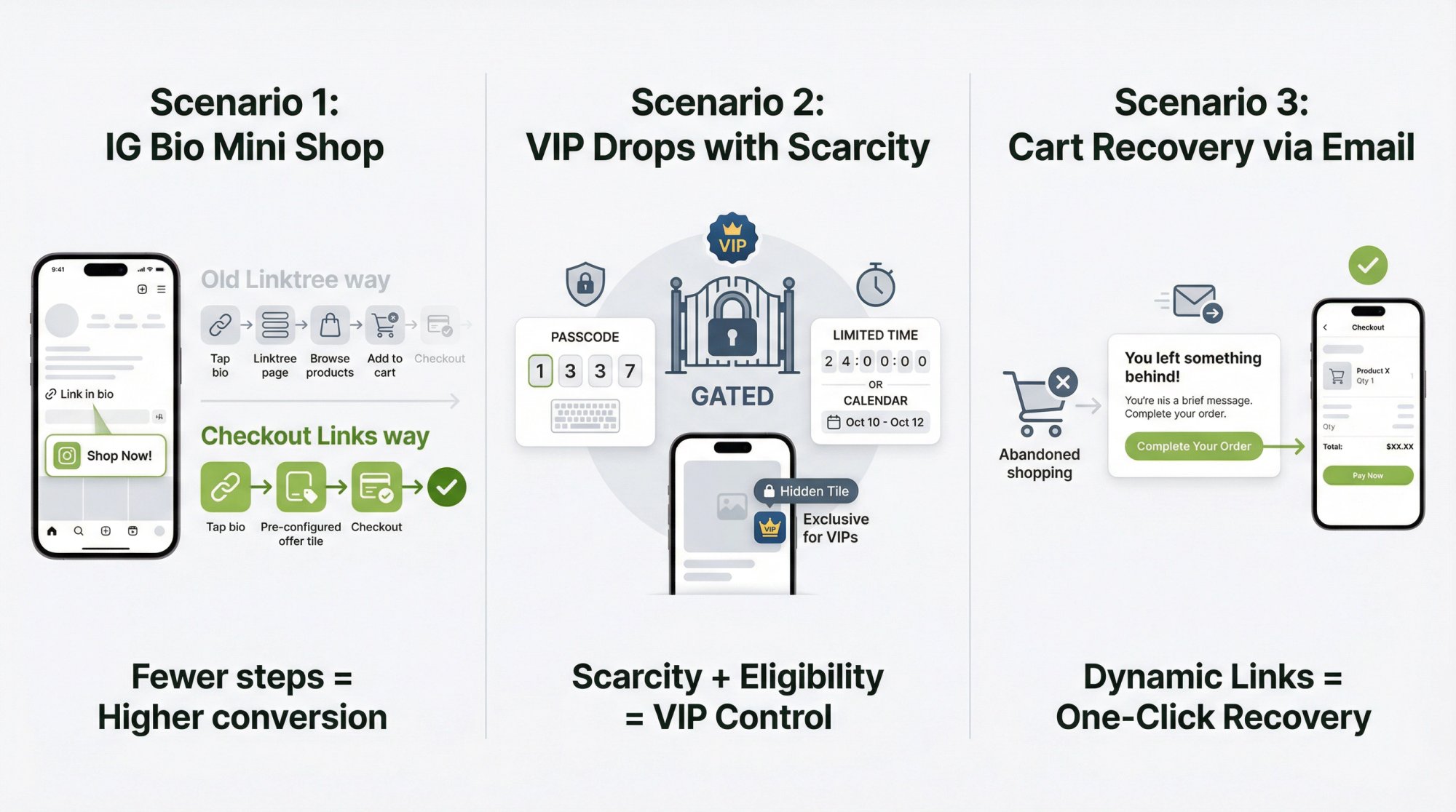
Scenario 1: How to Feature a Mini Shop in Your IG Bio
The Linktree way: One Linktree page with each button going to a product page. Buyer browses, adds to cart, checks out. Or use Linktree digital products (but then inventory, tax, and analytics live outside Shopify, and you pay platform fees on top of Stripe).
The Shopify + Checkout Links way: Use a Shopify-native bio app for a page on your domain that syncs products from Shopify. For each tile, plug in a Checkout Links URL that preselects variants and quantities, adds bundle discounts or free gifts, and skips the cart to go straight to checkout.
Result: Your follower taps one tile and lands on a nearly complete order.
Scenario 2: How to Sell Limited Drops to VIPs Without Public Links
With Checkout Links, you can create a link for a specific drop product, set start/end times (schedule), require a 4-digit passcode, and limit to one use per customer (with checkout validation enabled).
Surface the link in a hidden tile on your bio page, direct URL in VIP SMS/email, or QR code inside physical packaging. You get all the layout flexibility of a bio page, but scarcity and eligibility are baked into the offer.
Scenario 3: How to Recover Instagram & TikTok Traffic That Bounced
Checkout Links can generate dynamic links that rebuild a customer’s abandoned cart, apply targeted incentives, and send them straight to checkout.
Connect that to Klaviyo or another email tool, and now your bio traffic feeds a proper recovery loop you can measure in Shopify analytics.
Linktree Alternative Comparison Table
Here’s how different approaches stack up for actually selling products from your bio.
Note: Pricing and features change. Always check official pages before committing.
| Question | Linktree (Digital Products) | Creator Storefronts | Shopify Bio Apps | Checkout Links |
|---|---|---|---|---|
| Where does checkout happen? | Stripe inside Linktree | Platform’s own checkout | Shopify checkout | Shopify checkout |
| Who owns product catalog? | Linktree (separate from Shopify) | Platform’s system | Shopify | Shopify |
| Extra fees on sales | 12% Free, 9% Starter/Pro, 0% Premium + Stripe | Often 5-10% on lower tiers | No platform fee beyond Shopify | 0% platform fee |
| Domain control | linktr.ee/username, no native custom domain | Custom domain on paid plans | Your domain/subdomain | Your Shopify domain |
| Best for | Light digital products, no store | All-in-one hosted storefront | Shoppable bio pages for Shopify | Shopify merchants who want optimized offers |
| Dynamic, per-customer offers? | No | Usually no | Mostly no (page layout focus) | Yes (reorders, abandoned cart rebuild, thresholds, passcodes, limits) |
For a Shopify merchant, the right “Linktree alternative” is rarely another generic bio tool. It’s usually:
How to Switch from Linktree to Shopify + Checkout Links
Here’s a practical, low-risk plan with measurable wins.
Step 1: Calculate What Linktree Actually Costs You
If you sell digital products via Linktree:
1. Pull last 3 months revenue from your platform dashboard
2. Apply their fee schedule:• Free: multiply by 12%• Starter/Pro: multiply by 9%• Premium: 0% (but you pay subscription)
3. Add Stripe fees (~2.9% + $0.30 per transaction)
You’ll often find that platform fees + Stripe feels fine at low volume, but becomes painful at scale.
Compare with:
• Your existing Shopify fees
• Zero extra platform tax per sale
Even at a few thousand dollars monthly in bio-driven revenue, the math usually favors Shopify.
Step 2: Decide What Your Bio Page Should Do
Most brands blindly rebuild a Linktree lookalike. Don’t do that.
Instead, write down the top 3 actions you want from bio visitors: Buy hero product, grab starter bundle, join email/SMS list.
Design your routing around those goals, not “infinite links.”
For Shopify merchants, two good options:
• Simple native page – Use your theme or page builder for a mobile-optimized “Start here” page with 3-5 big tiles
• Dedicated bio app – Install a Shopify-native bio app for an interactive page with in-page cart and analytics (on your domain)
Step 3: Install Checkout Links and Build Your First 3 Offers
From a sales perspective, you usually need only a handful of “workhorse” offers:
Offer 1: Hero Product / Bestseller
Preloads right variant and quantity. Optional: free shipping above threshold
Offer 2: Starter Bundle
2-4 curated products with bundle discount built into the link. Optional: free gift if cart crosses threshold
Offer 3: Welcome / VIP Offer
One-time discount enforced with single use per customer (with Checkout Links validation + Shopify checkout rules)
Attach those three links to your bio tiles, email welcome flow, or ads.
Step 4: Replace Your Linktree URL Everywhere
Replace linktr.ee/yourname with your new bio URL:
• Instagram, TikTok, X, YouTube bios
• Email signatures
• “Link in bio” overlays on content
• New printed assets and packaging
For existing QR codes: Set up your own short domain and redirect traffic. Use Checkout Links’ branded QR codes for future campaigns (so you can reroute if you change apps later).
Step 5: Measure Before & After Results
Use Shopify analytics and UTM parameters (which Checkout Links supports on each link) to compare:
• Conversion rate from session to order
• AOV per click source
• Revenue by link vs. historical performance
You should see fewer steps, better conversion, and no platform percentage eating margin.
If results aren’t better, you can iterate on the offers, not the platform.
Common Assumptions to Challenge
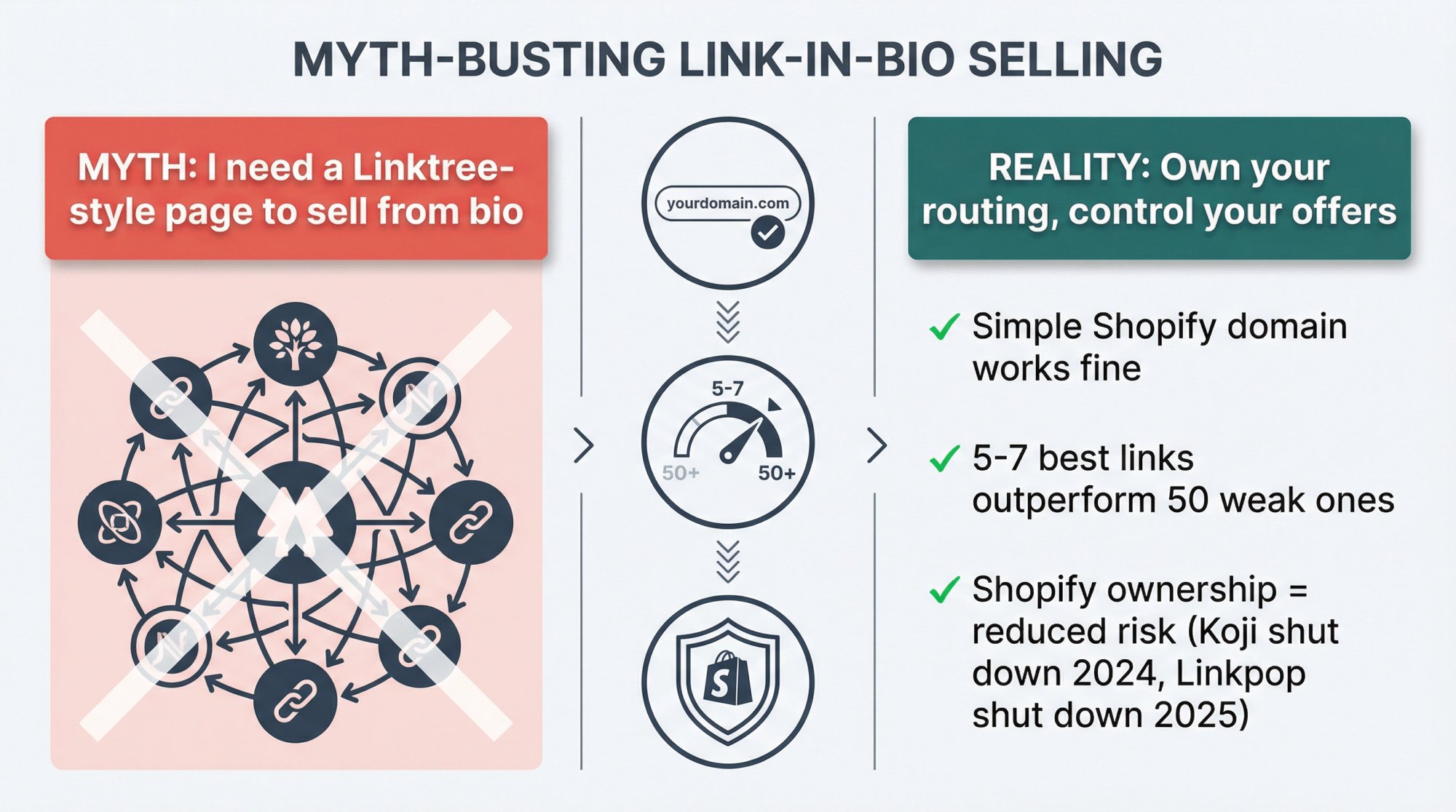
Assumption 1: “I Need a Linktree-Style Page to Sell from Bio”
You only need one URL that’s easy to remember and a way to route visitors to a clear next step. That can absolutely be a simple Shopify landing page or a Shopify-native bio app on your domain.
You don’t need a third-party domain to accomplish this.
Assumption 2: “More Links = Better”
Beyond 5-7 options, clickthrough rates per item usually tank. The point of a bio page is to reduce choice into paths that make money or deepen relationships.
Use analytics to prune ruthlessly. If a tile hasn’t driven meaningful orders in 30 days, improve the offer or remove it.
Assumption 3: “Switching Platforms Is Too Risky”
You’ve already seen what “platform risk” looks like with Koji’s shutdown in 2024 and Linkpop’s retirement in 2025.
The real risk is building your funnel on infrastructure you don’t control.
Using Shopify + Checkout Links reduces risk. Even if you swap bio apps later, your checkout URLs and analytics stay inside Shopify.
When Non-Shopify Alternatives Still Make Sense
We’d be dishonest to pretend Checkout Links is right for everyone.
Stick with creator-focused tools if:
• You sell only a couple low-priced digital products (no expansion plans)
• You don’t want to run a full ecommerce stack
• Your buyers never expect a branded site
In that case, standalone creator storefronts are fine options. Just use them consciously as rented infrastructure, with a plan for when pricing changes or a tool sunsets.
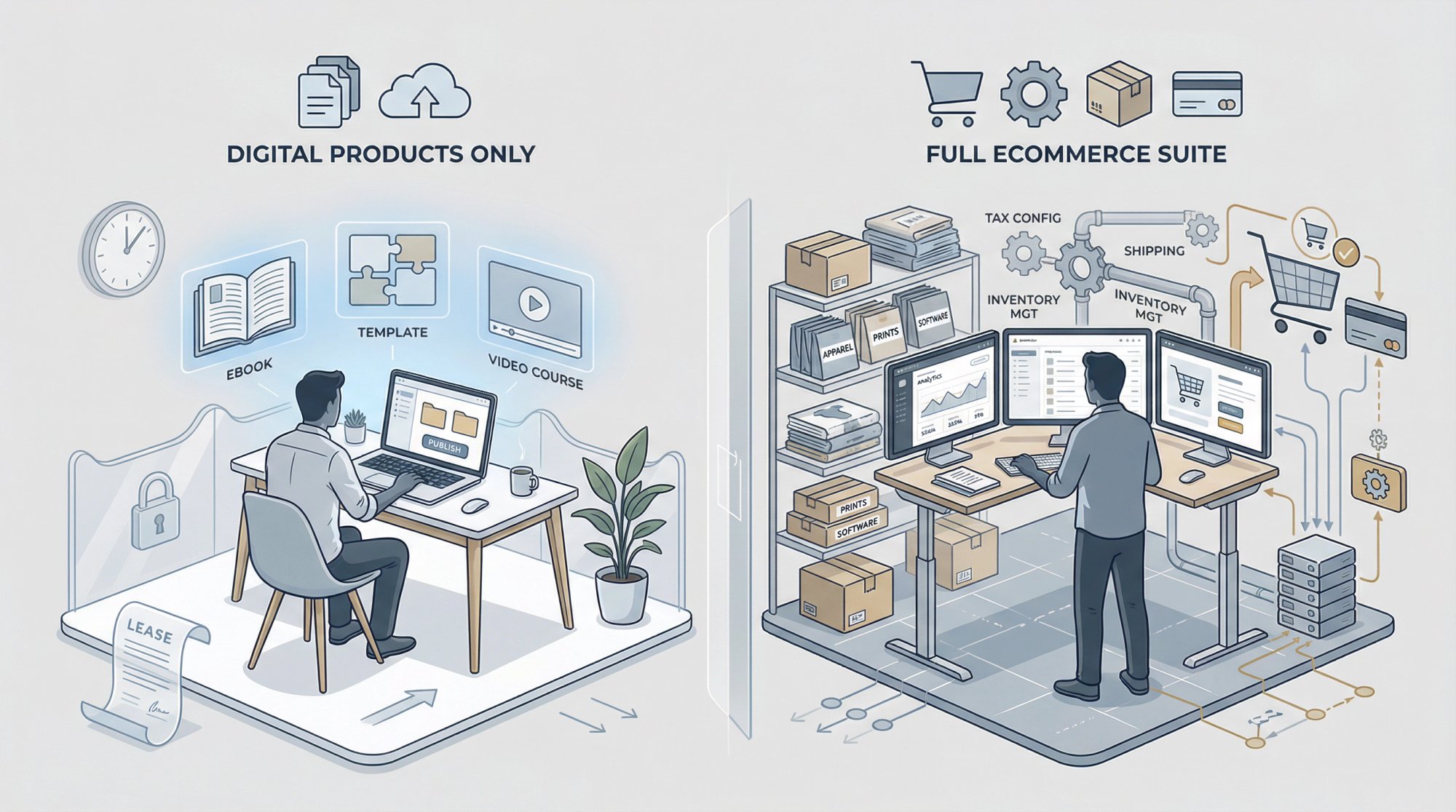
If you already run Shopify or plan to, investing there instead of layering another “pseudo store” on top usually makes more sense.
How Checkout Links Fits Your Broader Shopify Stack
For Shopify merchants, Checkout Links isn’t a storefront replacement. It’s a programmable offer layer built on Shopify primitives.
What matters:
• It’s a Built for Shopify app that runs on your domain and uses native checkout, discount functions, Flow, and metaobjects
• Performance data flows directly into Shopify analytics (no separate dashboard)
• Flat monthly fee instead of revenue percentage (scales better)
It plays nicely with Shopify-native bio products.
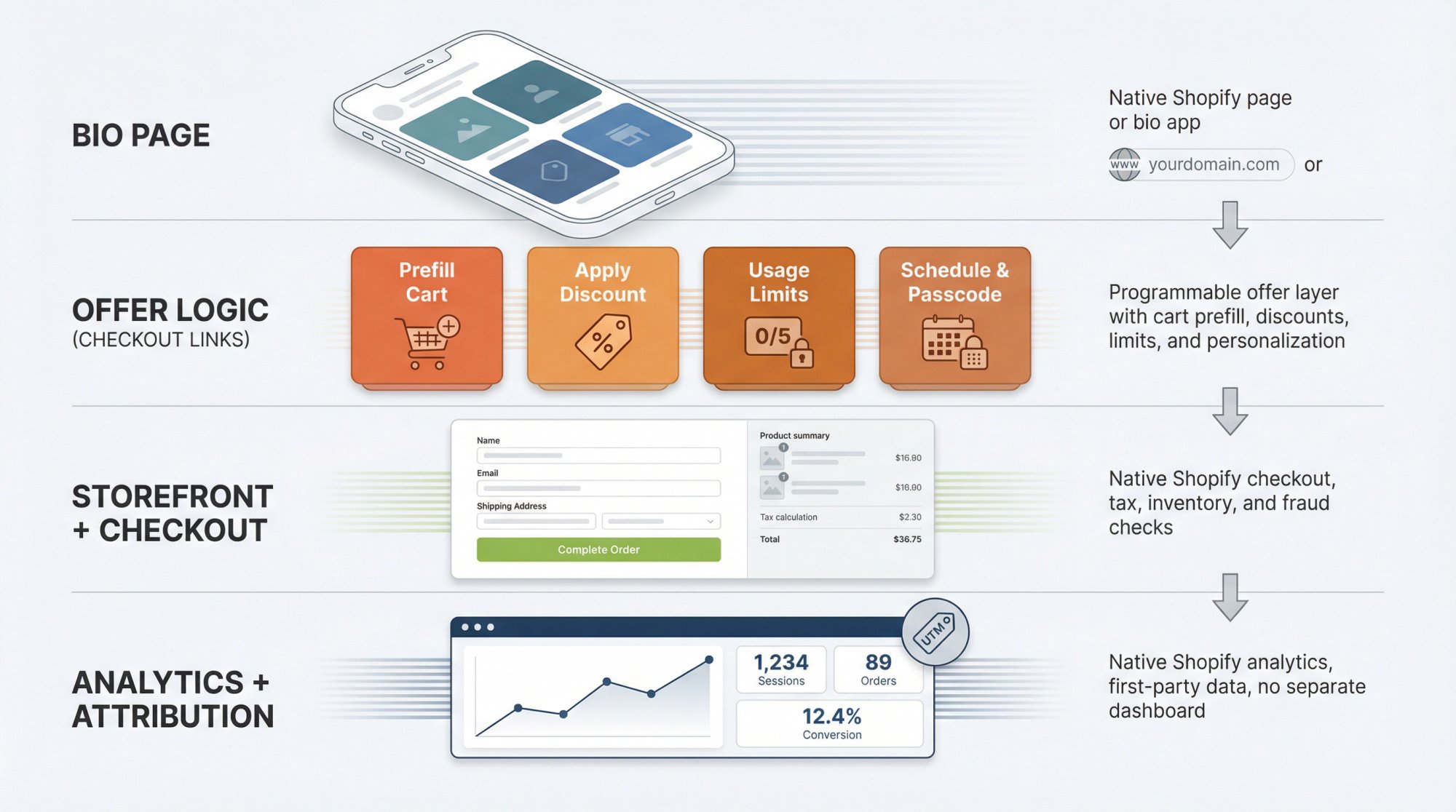
Think of your architecture like this:
• Bio page – Native Shopify page or bio app
• Offer logic – Checkout Links
• Storefront + checkout – Shopify
• Analytics + attribution – Shopify analytics + your existing stack
No extra creator platform. No extra percentage cut.
Make This Actually Worth $10k to You
Information is only valuable when it changes behavior.
If you want this article to be worth serious money, treat it as a 7-day checklist:
Day 1-2: Audit your current setup
• Where does your bio link go?
• How many steps from tap to checkout?
• What percentage of social traffic converts?
• How much platform tax are you paying?
Day 3: Decide your bucket
• Pure creator with a few digital products? Choose a platform deliberately.
• Shopify merchant? Stop treating Linktree as your commerce engine.
Day 4: Design ideal flow
On a whiteboard:
• Which tiles on bio page?
• Which Checkout Links power each tile?
• Where does Shopify take over?
Day 5-6: Implement one high-leverage offer
Example: Starter bundle link tied to your bio and top Reel/TikTok. Measure results over 7-14 days vs. your prior flow.
Day 7: Prune and refine
• Remove low-performing tiles
• Test variations with Checkout Links’ analytics
If you actually do this, the payoff will likely exceed a “$10k link-in-bio strategy project” because you’re redesigning the system at the level that matters: how offers, routing, and checkout interact.
Where to Go Next
Want to keep going?
• Read “What is Checkout Links?” for a technical overview
• Check the Quickstart guide to build your first production link
• Explore the feature cards to see all capabilities
• Review case studies from successful Shopify merchants
Used together with a Shopify-native bio page, they let you sell from your bio without handing over a percentage of every sale to a third-party tool, and without gambling your funnel on services that might quietly disappear in the next product cycle.