If you’re running a Shopify store, you’ve probably thought about this. You want buyers to go from “clicked your link” to “order placed” with as little friction as possible. Fewer steps. Less typing. Basically, Amazon’s one-click buying experience but for your Shopify checkout.
That’s what we’re solving today.
This guide will show you what one-click checkout actually means on Shopify (spoiler: it’s not quite what the marketing promises), which features you should activate first, and how to build checkout flows that feel genuinely fast. We’ll also show you how Checkout Links fits into this picture, because we built it specifically to handle the parts Shopify leaves to merchants.
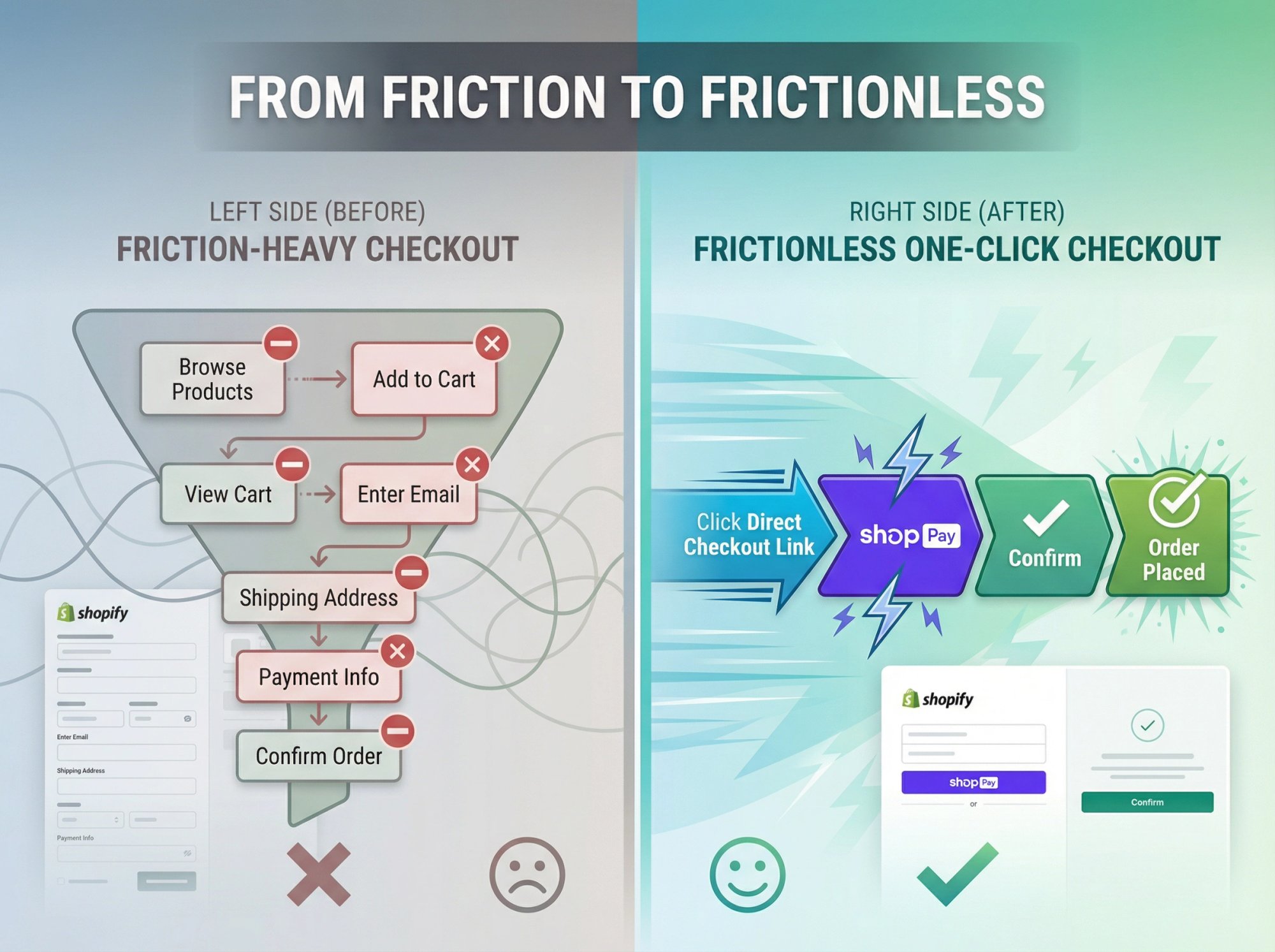
The short answer: Shopify has no single “one-click checkout” switch. You get there by combining two things: an accelerated wallet such as Shop Pay, Apple Pay or Google Pay, which stores the buyer’s payment and shipping details, and a checkout link that puts the right products in the cart and opens checkout directly. Shopify’s own cart permalinks do the link part for free. Apps such as Checkout Links build the same kind of link in an editor and add automatic discounts, usage limits and per-link reporting.
What Is One Click Checkout on Shopify?
You typed “one click checkout Shopify” into search, so you’re probably trying to solve one of these problems:
→ You want fewer drop-offs between your ads and actual orders
→ You want to turn email clicks into purchases, not just product page views
→ You want returning customers to buy in seconds
→ You want abandoned cart recovery that actually works
Here’s the truth about what’s actually possible. True one-click buying (like Amazon’s patented system from the 90s) requires the buyer to have payment and shipping details already stored. According to Wikipedia, that patent expired in 2017, which is why you see one-click patterns everywhere now.
On Shopify in 2025, “one click checkout” typically means:
• A direct checkout link from your marketing channel (email, SMS, ad, QR code)
• Straight to checkout with products and discounts already configured
• Plus an express payment option like Shop Pay or Apple Pay
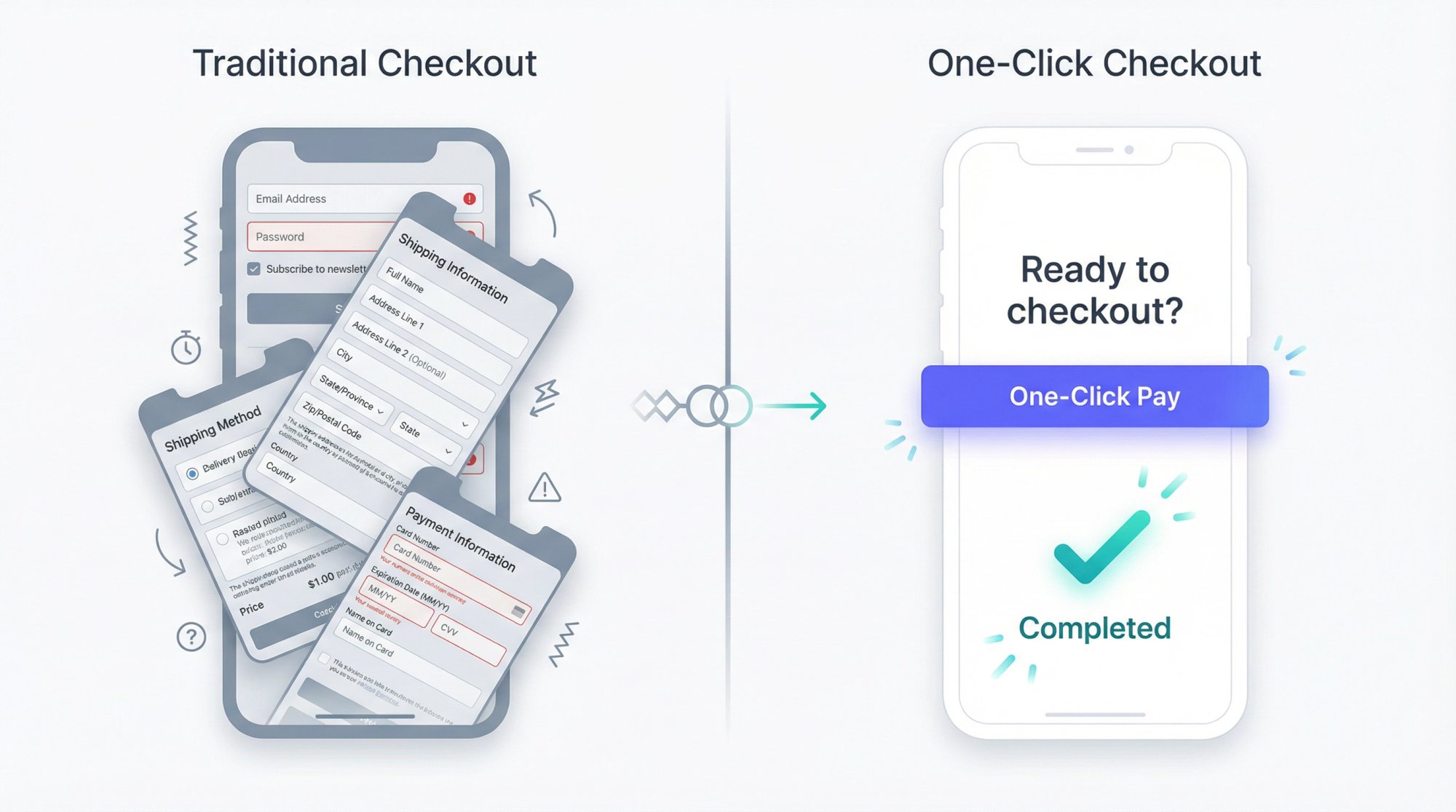
From the buyer’s perspective, it feels like: Click link → Tap Shop Pay → Done.
Technically that’s two taps. But psychologically, it’s one decision.
Why One Click Checkout Matters for Conversion
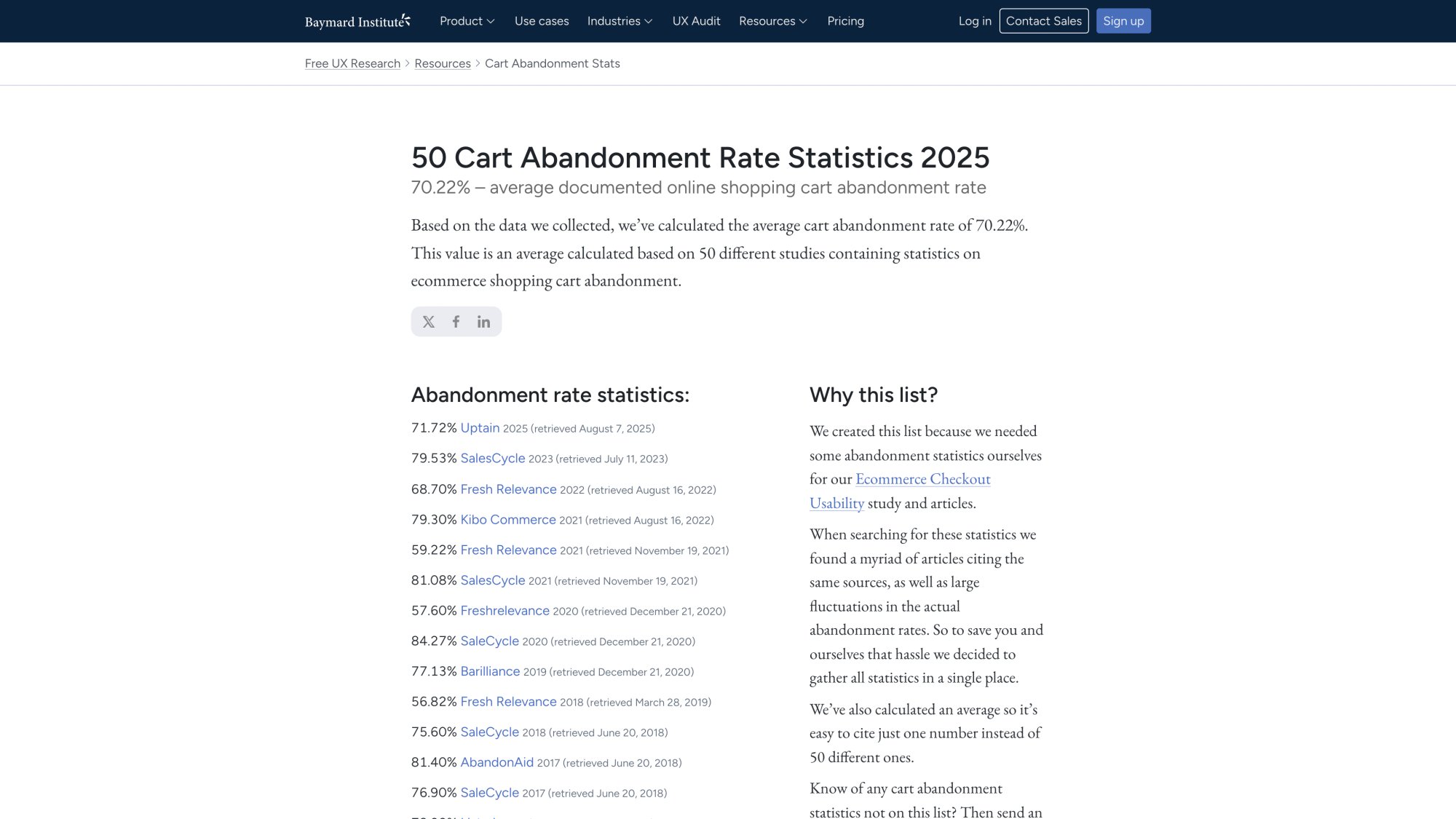
Baymard Institute analyzed 50 studies and found that the average cart abandonment rate in 2025 is about 70.22%. When they asked shoppers why they abandoned, 18% said the checkout was too long or complicated.
So when you search “one click checkout Shopify”, you’re really asking:
That’s what we’re fixing.
How Does Shopify Checkout Work?
To design fast checkout flows properly, you need to understand what Shopify does when someone buys from your store.
How Shopify Checkout Functions Work
Think of Shopify checkout as a function that takes in:
Cart state: products, quantities, pricing
Buyer details: email, shipping address, payment method
Rules: discounts, shipping zones, tax calculations, fraud checks
And outputs:
An order (or a failure if something breaks)
Analytics events for tracking
Inventory updates and customer records
No matter what any app promises, if you’re using Shopify Payments or most third-party gateways, the actual payment must go through Shopify’s checkout layer. That’s for PCI compliance, fraud protection, and platform security.
So the game isn’t “replace checkout.”
The game is configure everything before checkout so that:
- The cart is already filled with the right products
- Buyer details are prefilled when possible
- Payment can use saved credentials (Shop Pay, Apple Pay, etc.)
- The buyer never has to browse your store first
One Page Checkout vs One Click Checkout
Since September 2023, all Shopify plans can use a one-page checkout layout. According to Shopify, this collapses shipping, information, and payment into a single screen instead of multiple pages.
A one-page layout:
- Reduces page loads
- Makes the flow more obvious on mobile
- Cuts context switching But it doesn’t automatically prefill payment or skip checkout entirely. It’s the foundation, not the complete solution.
Some blogs casually call one-page checkout “one click checkout,” which creates confusion. Keep them separate in your head:
| Feature | What It Does |
|---|---|
| One-page checkout | Fewer screens to navigate |
| One-click checkout | Fewer decisions and less data entry |
How to Use Accelerated Checkout Options
Shopify has a category called accelerated or express checkouts. Shopify’s Help Center defines these as methods that save customer payment and shipping info so returning customers can complete purchases faster.
Common options in 2025:
① Shop Pay (the purple button)
② Apple Pay
③ Google Pay
④ PayPal Express
Here’s how it works:
• First purchase: buyer enters everything once
• Later purchases: their data autofills across any Shopify store
• Checkout becomes: “tap Shop Pay, confirm, done”
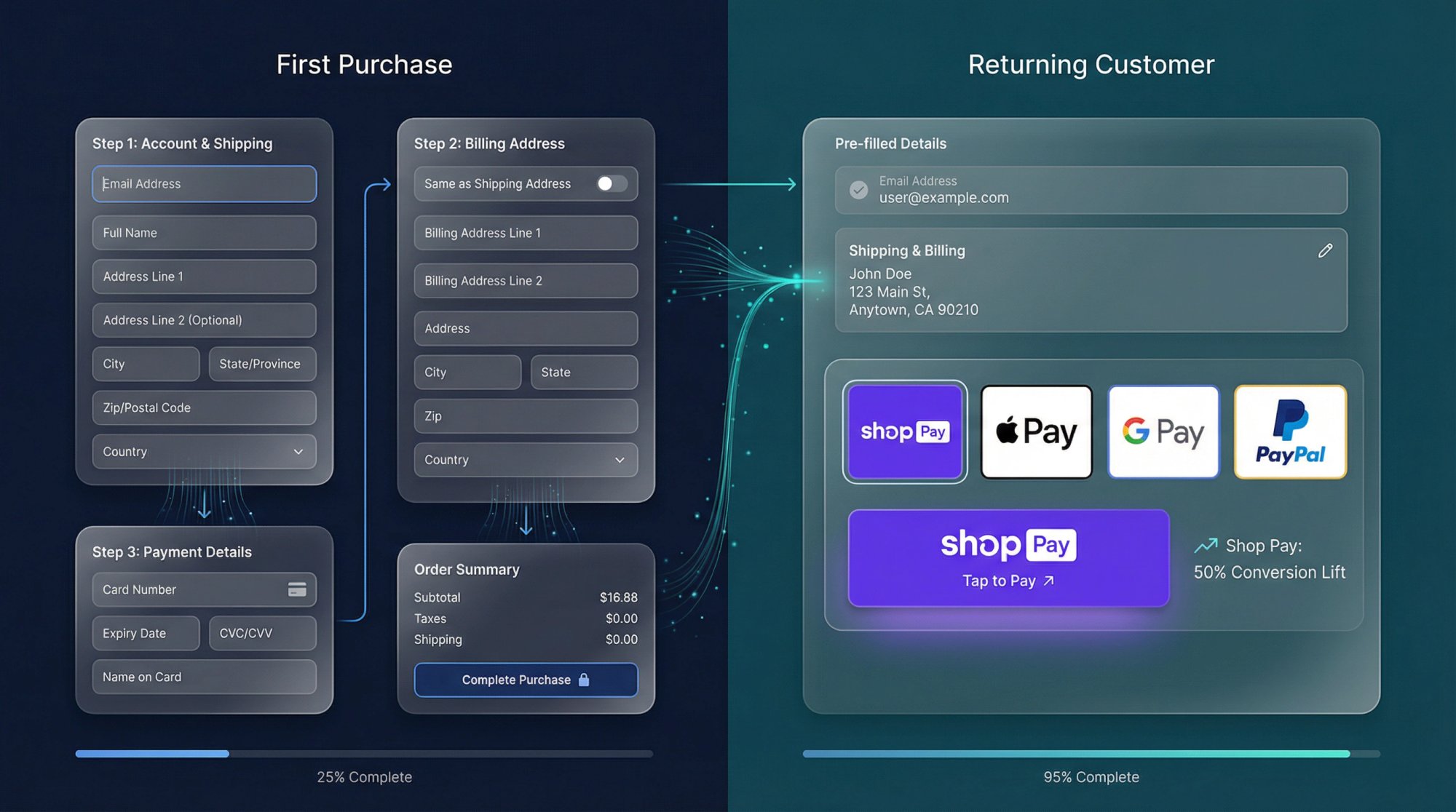
Shopify commissioned a study that found Shop Pay can lift conversion by up to 50% compared to guest checkout, and outperforms other accelerated methods by at least 10%.
That stat is from 2023 but continues to be referenced in 2024 and 2025 materials, so it’s still the benchmark.
4 Levels of Fast Checkout You Can Implement
Think of checkout speed as a ladder with four rungs. This framework helps you understand what you’re actually building.
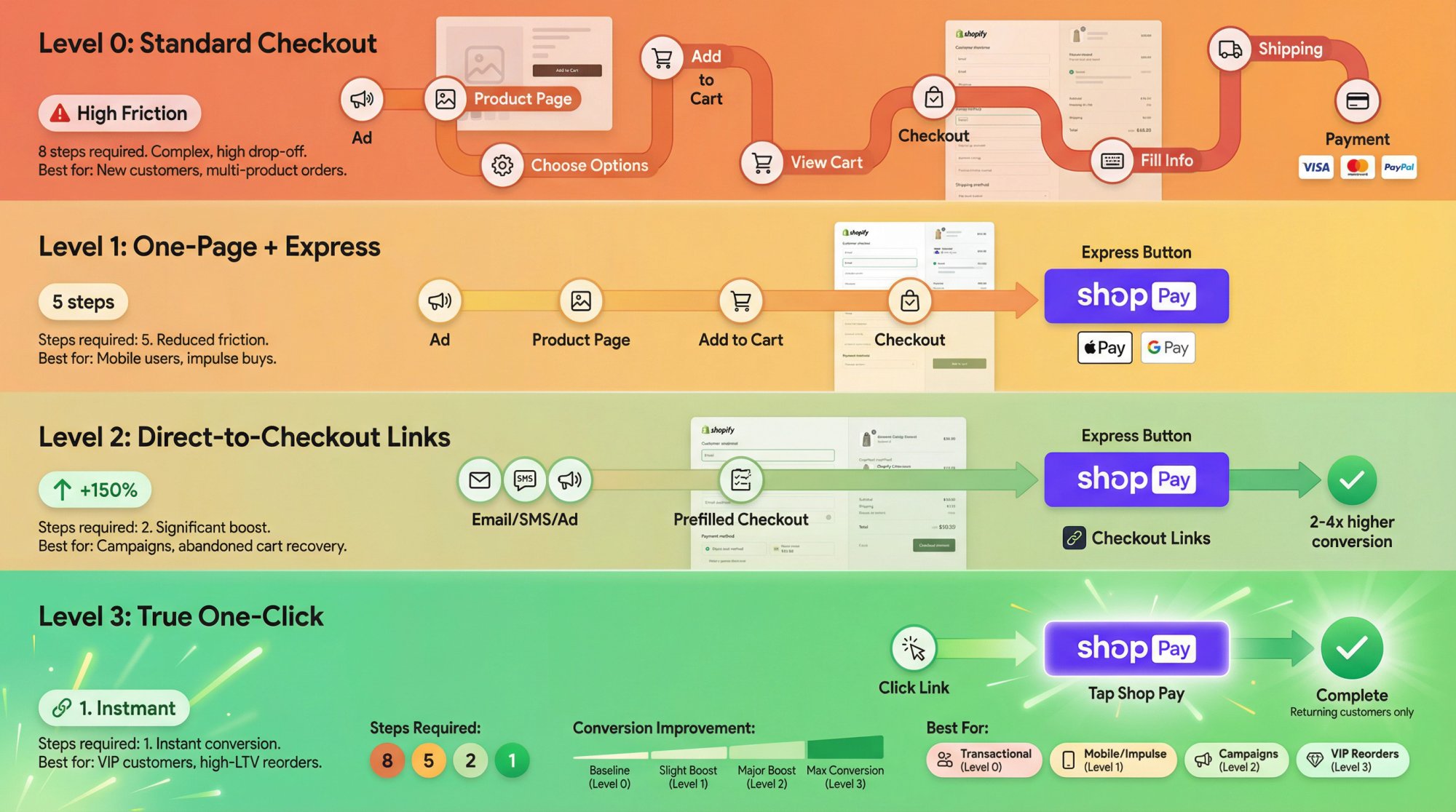
Level 0: Standard Checkout Flow (Why It Fails)
Path looks like:
Every step is a chance to lose the buyer. Baymard’s research shows 18% of shoppers abandon specifically because the checkout was too long.
Level 1: One-Page Checkout with Express Buttons
You enable:
One-page checkout layout
Express payment buttons (Shop Pay, Apple Pay, Google Pay)
Path becomes:
Still multiple screens, but the last mile is faster. For returning Shop Pay users, checkout is often just a tap or two.
Level 2: Direct-to-Checkout Links That Skip Steps
This is where you start doing what you actually had in mind:
Replace “view product, add to cart, go to cart” with a direct checkout link that encodes products, quantities, and discounts.
Path becomes:
From the shopper’s perspective: Click once to see payment, tap once to pay.
This is where Checkout Links operates.
Research shows that direct checkout links are especially powerful for social media and SMS, with stores often seeing 2-4x higher conversion than flows that send traffic to product pages first.
Level 3: True One Click Checkout for Returning Customers
This is the combination of:
① A direct checkout link that reconstructs the exact cart
② A buyer whose payment is already saved in Shop Pay or Apple Pay
For that buyer, the journey is:
The only thing they’re really doing is confirming consent. Everything else is automated.
Important: You can’t ethically or legally make this happen for new customers with no saved data. Anyone promising “true one click for first-time buyers” is either using loose language or doing something you probably don’t want near your compliance scope.
Shopify Checkout Features to Enable First
Before you touch any apps, fix the foundation.
1. How to Enable One-Page Checkout
If you’re still on the old multi-step layout, you’re leaving easy wins on the table.
Shopify rolled one-page checkout to all plans in late 2023. You can enable it in:
This doesn’t make you “one click” by itself, but it reduces friction and pairs perfectly with everything else in this guide.
2. How to Set Up Accelerated Checkout Methods
From Shopify’s documentation:
Inside Settings → Payments:
→ Activate Shopify Payments if you can
→ Turn on Shop Pay and Shop Pay Installments where available
→ Enable Apple Pay, Google Pay, and PayPal Express for your markets
This is your “express payment” layer. Without it, you’ll never reach true one-tap buying.
URL: Shop Pay checkout experience (requires live transaction)Location: Accelerated Checkout sectionInstructions: This screenshot requires an active checkout session. To capture:
- Create a test order on a Shop Pay-enabled Shopify store
- Proceed to checkout
- Resize browser to 1920x1080 or use mobile device (430x932)
- Capture the checkout page showing Shop Pay button prominently
- Ensure payment details are not visible
- Use the capture command documented in web-screenshots/captures/SC-03.mdAlt text: “Shopify checkout page showing Shop Pay express payment button with one-tap purchase option”Purpose: Demonstrates the Shop Pay button in context during checkout, showing how it enables one-tap payments for returning customers
3. How to Create Native Shopify Checkout Links
Even if you’re planning to use Checkout Links, it’s worth knowing Shopify’s built-in version.
① Go to Products in your admin
② Open a product
③ Click “More actions” → Create checkout link
④ Copy the URL
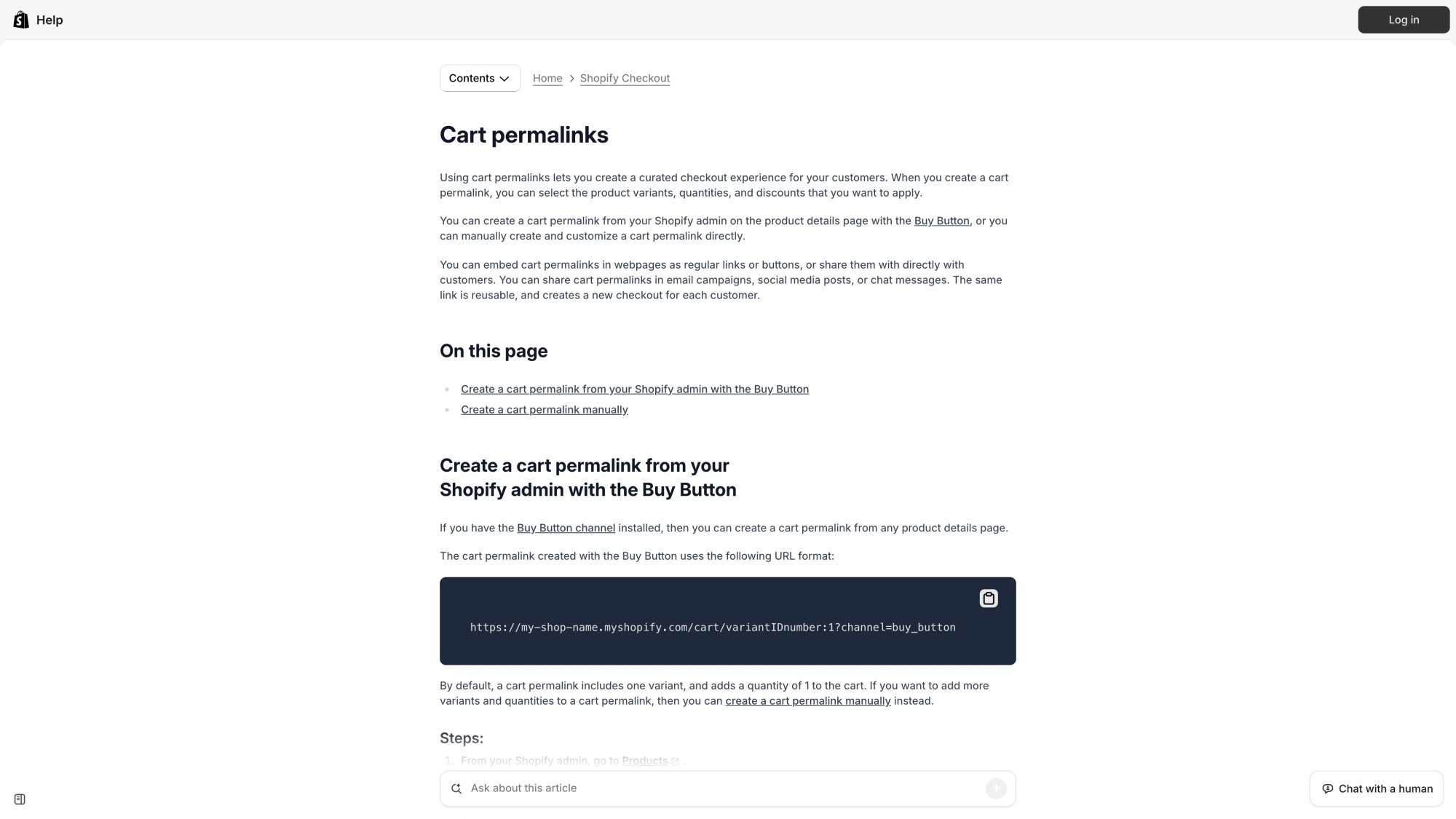
That URL is a cart permalink. It proves two things:
Shopify officially supports deep-linking into checkout
The concept of “checkout links” isn’t a hack, it’s a feature
What tools like Checkout Links do is turn that primitive into a programmable system with dynamic behavior, analytics, and campaign-level controls.
Why Direct Checkout Links Drive More Sales
So far we’ve talked about what happens inside checkout. But when you searched “one click checkout Shopify”, your pain was probably before that:
• Email clicks that never convert
• SMS campaigns that die on the product page
• Influencer links that send people to your cluttered homepage
• Support agents going back and forth just to collect payment
What Are Direct Checkout Links?
Some guides call these “one-click checkout links,” “buy-now links,” or “skip-cart links.” They’re all the same thing: a Shopify checkout link that drops the customer one tap away from paying.
If that link lands on a one-page checkout and the buyer uses Shop Pay, you get an experience that’s genuinely close to “click once, confirm once.”
Why Direct Checkout Links Convert Better
Each extra step has a cost:
→ Extra page = more load time, more distraction
→ Extra decision = “do I really want this now?”
→ Extra field = micro-friction and error risk
Baymard’s research shows complicated checkout flows are a direct abandonment driver.
Direct checkout links effectively delete half the funnel:
| Flow Type | Path |
|---|---|
| Traditional | Ad → product page → browsing → add to cart → cart → checkout |
| Direct link | Ad → checkout |
Research shows stores using direct checkout links on social media seeing 2-4x higher conversion than flows that send traffic to product pages first.
Best Use Cases for Direct Checkout Links
Email campaigns
Launch announcements, abandoned cart recovery, VIP early access
SMS and WhatsApp
Recover abandoned carts with prefilled links, power “reorder this” experiences, enable in-chat selling
Social and influencer traffic
TikTok bio links to best-seller bundles, unique creator links for tracking and revenue share
Offline to online
QR codes on packaging that open reorder checkouts, event signage that sells bundles instantly
The pattern is always the same: move the decision to the earlier touchpoint, then let checkout execute it.
How to Set Up One-Click Checkout Flows
Direct checkout links can be hand-built using Shopify’s cart permalinks and manual URL parameters. But that gets brittle fast, especially when you’re running dozens of campaigns.
Checkout Links is a Shopify app we built to turn this into a real workflow:
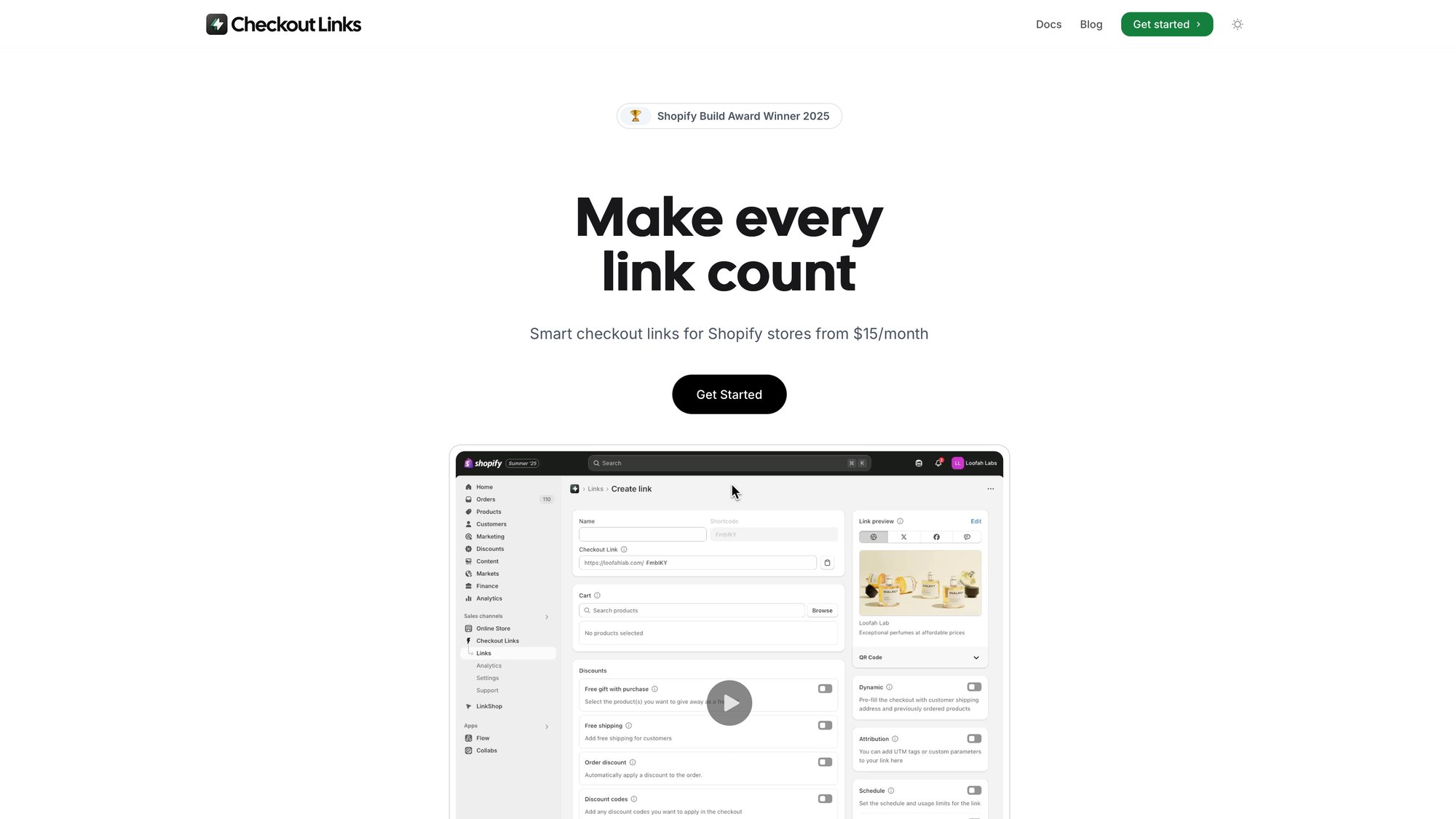
• Each link is stored as a structured object with destination, products, discounts, personalization, access controls, and analytics
• When someone clicks, we assemble the cart and hand off to native Shopify checkout so payments, tax, and fraud checks run normally
As of late 2025:
| Plan | Price | What You Get |
|---|---|---|
| Standard | $25/month | Full link features, analytics, 7-day trial |
| Plus | $30/month | Checkout extensions for Shopify Plus stores |
Let’s walk through three concrete flows.
How to Set Up One-Click Buy Now Links
Goal: Shopper clicks your campaign button and lands on checkout with products, discounts, and shipping already configured.
Step 1: Create a direct-to-checkout link
In Checkout Links:
-
Create a new link
-
Set destination to checkout
-
Add the product or bundle (variants and quantities)
-
Attach an order discount or free shipping if needed Step 2: Configure incentives and limits
-
Add a threshold if you want (“Spend $60, get free gift”)
-
Set a usage limit per customer (once per customer) to prevent abuse This uses Shopify’s validation rules so it works even with express checkouts.
Step 3: Add UTM tracking
- Drop in
utm_source,utm_medium,utm_campaignright in the link config - All sales from this link will show up correctly in Shopify analytics Step 4: Use the link
Drop it into your email CTA, SMS, ad, or bio link.
From the shopper’s view:
How to Enable One-Click Reorder for VIP Customers
Goal: Make your best customers reorder in seconds.
Step 1: Enable dynamic customer links
Checkout Links has a Customer card that uses a ?c=customer_id parameter.
With this on:
• The link prefills checkout with that customer’s last order
• Shipping details prefill too, so all they choose is payment
Step 2: Build a reorder link
① Create a link with Customer dynamic enabled
② Set destination to checkout
③ Add a small VIP discount or free shipping
④ Set a per-customer usage limit
Step 3: Wire to your email provider
In Klaviyo or your ESP, include the link with ?c={{ customer.id }} in the URL.
For a returning Shop Pay user:
You just turned reorder friction into a pure retention lever.
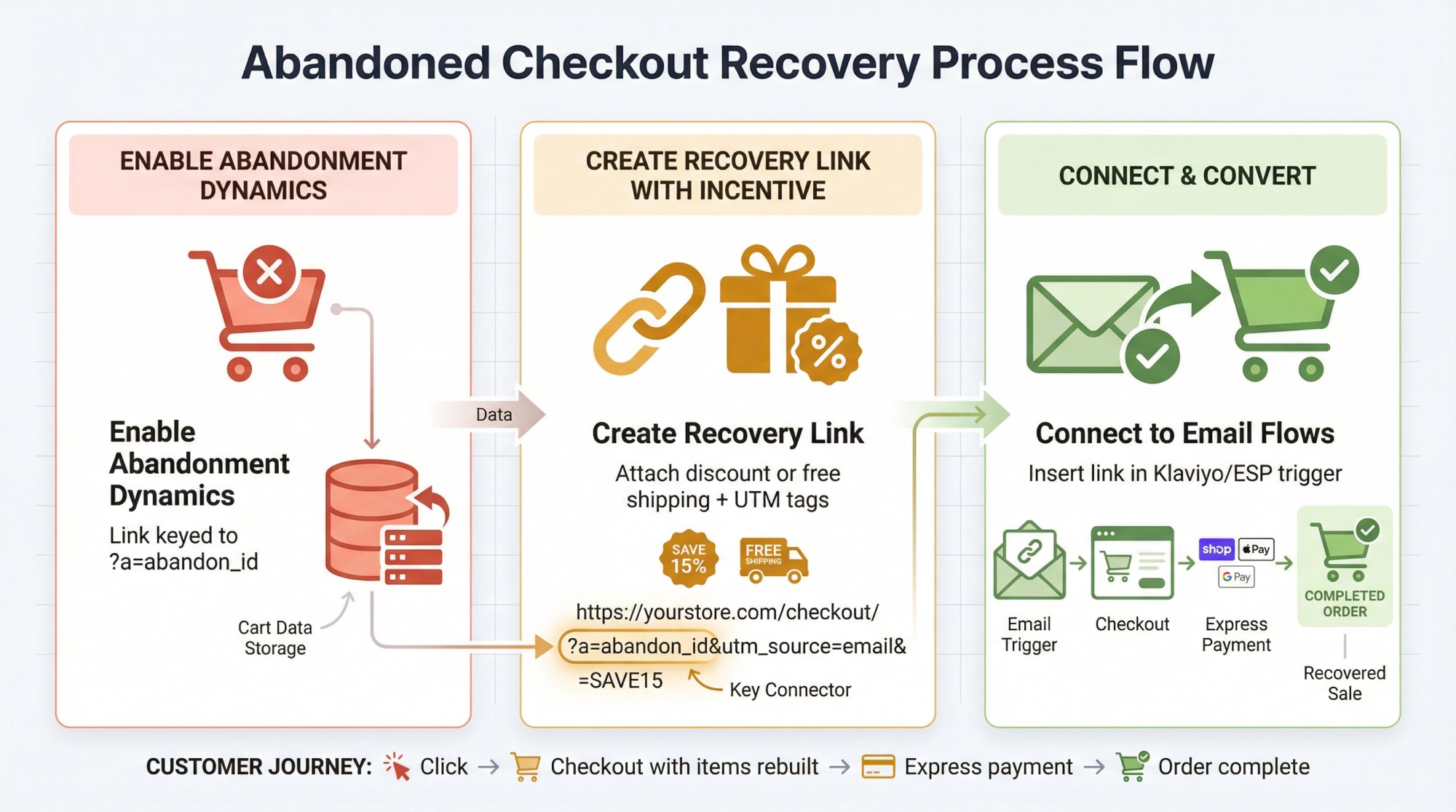
How to Recover Abandoned Checkouts with One-Click Links
Goal: Turn abandoned checkout emails from “reminder” to “we rebuilt everything for you.”
Step 1: Enable abandonment dynamics
Checkout Links supports an Abandonment card keyed to ?a=abandon_id that reconstructs the cart.
Step 2: Create a recovery link
- Enable Abandonment dynamic
- Attach an incentive (discount or free shipping)
- Add UTM tags like
utm_source=email&utm_campaign=abandon_checkoutStep 3: Connect to your flows
In Klaviyo or similar, insert the link with ?a={{ event.checkout.id }} in your abandoned checkout trigger.
Now your recovery emails do this:
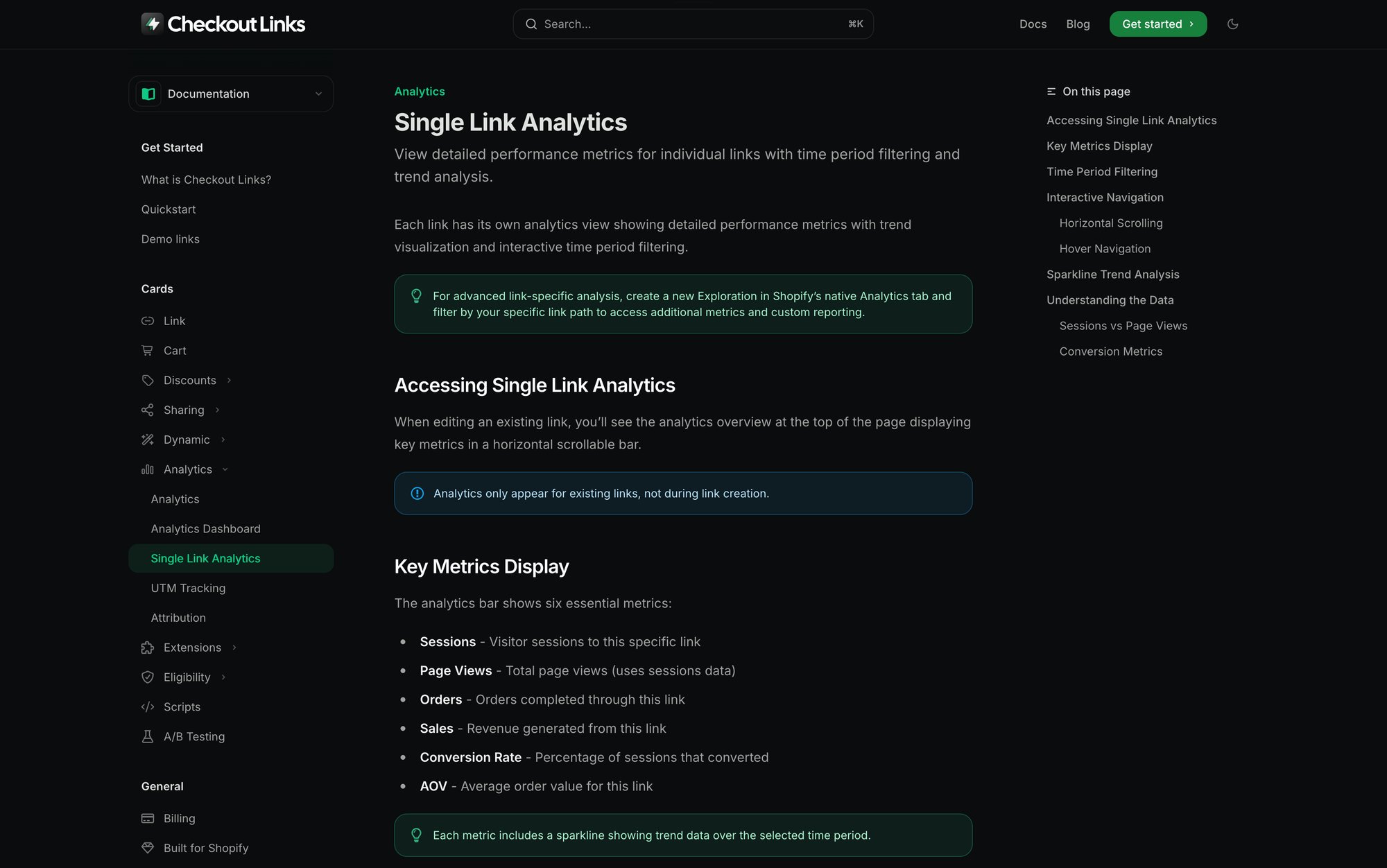
Internally, Checkout Links tracks sessions, orders, revenue, and conversion per link in Shopify analytics.
Shopify One Click Checkout Apps: What to Know
There’s a whole ecosystem of apps marketing “one-click checkout.” Here’s how to think about them.
1. Native Shopify One Click Checkout Features
You already saw these:
- One-page checkout
- Shop Pay and accelerated methods
- Cart permalinks
- Checkout UI extensions and validation (for Plus) These are the non-negotiable base layer.
2. Direct Checkout Link Apps for Shopify
These lean on Shopify’s cart permalink system but differ in depth.
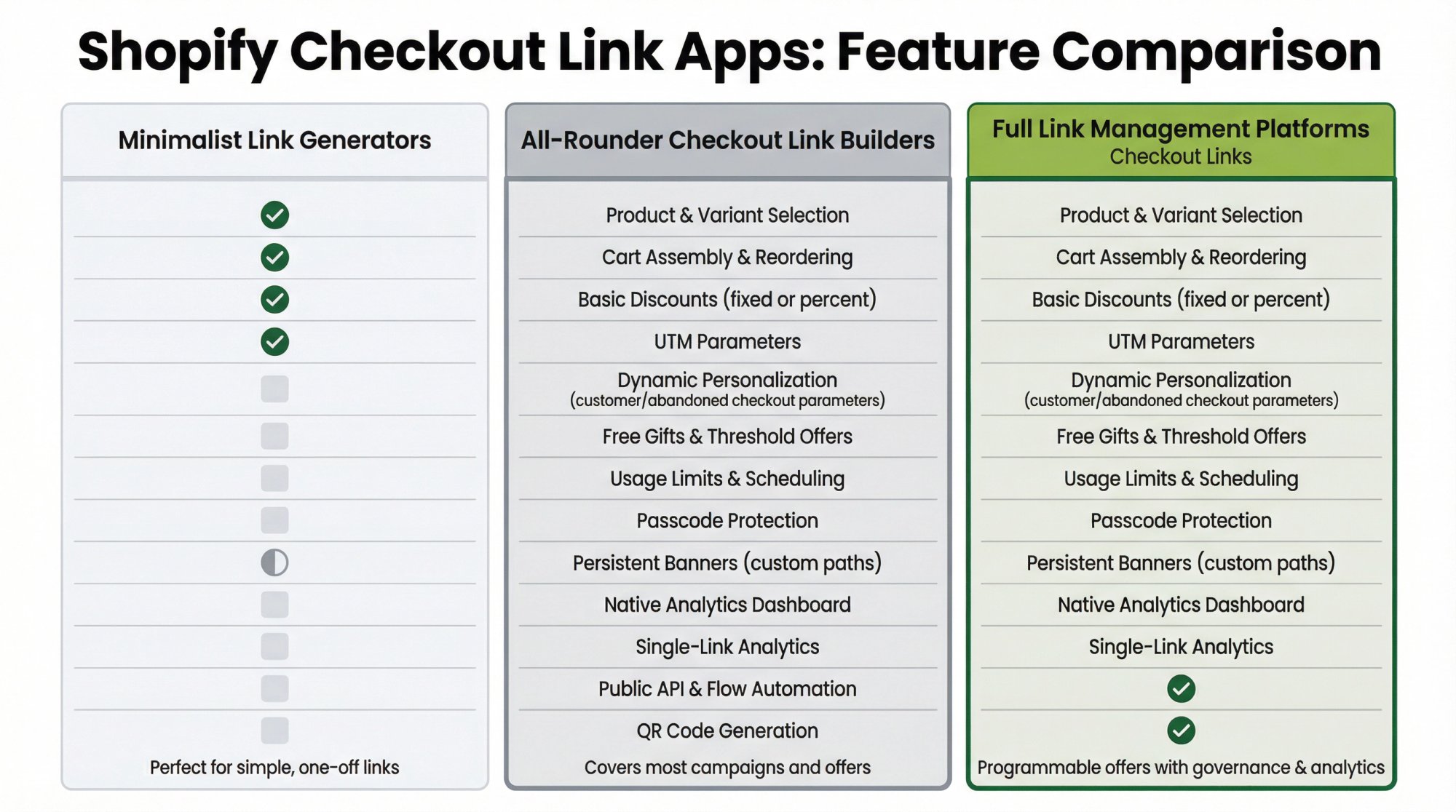
Minimalist link generators
You pick products and variants, optionally add a discount, get a link and QR. Great for simple menus and basic social campaigns.
All-rounder checkout link builders
These let you build links with products, discounts, and UTMs, and sometimes prefill basic customer info.
Full link management platforms
This is where Checkout Links sits.
Beyond what smaller apps offer, we add:
→ Dynamic behavior per customer or abandoned checkout
→ Free gifts and threshold offers using Shopify discount functions
→ Usage limits, scheduling, and passcodes for gated drops
→ A popup over your store for offers that need a moment of explanation (not just checkout)
→ Built-in analytics inside Shopify’s native reporting surface
→ A Klaviyo integration that personalizes one link for every customer in a flow
If you just need a couple of simple links, a lightweight app works fine. If you want your marketing team to treat links as programmable offers with governance and analytics, that’s Checkout Links territory.
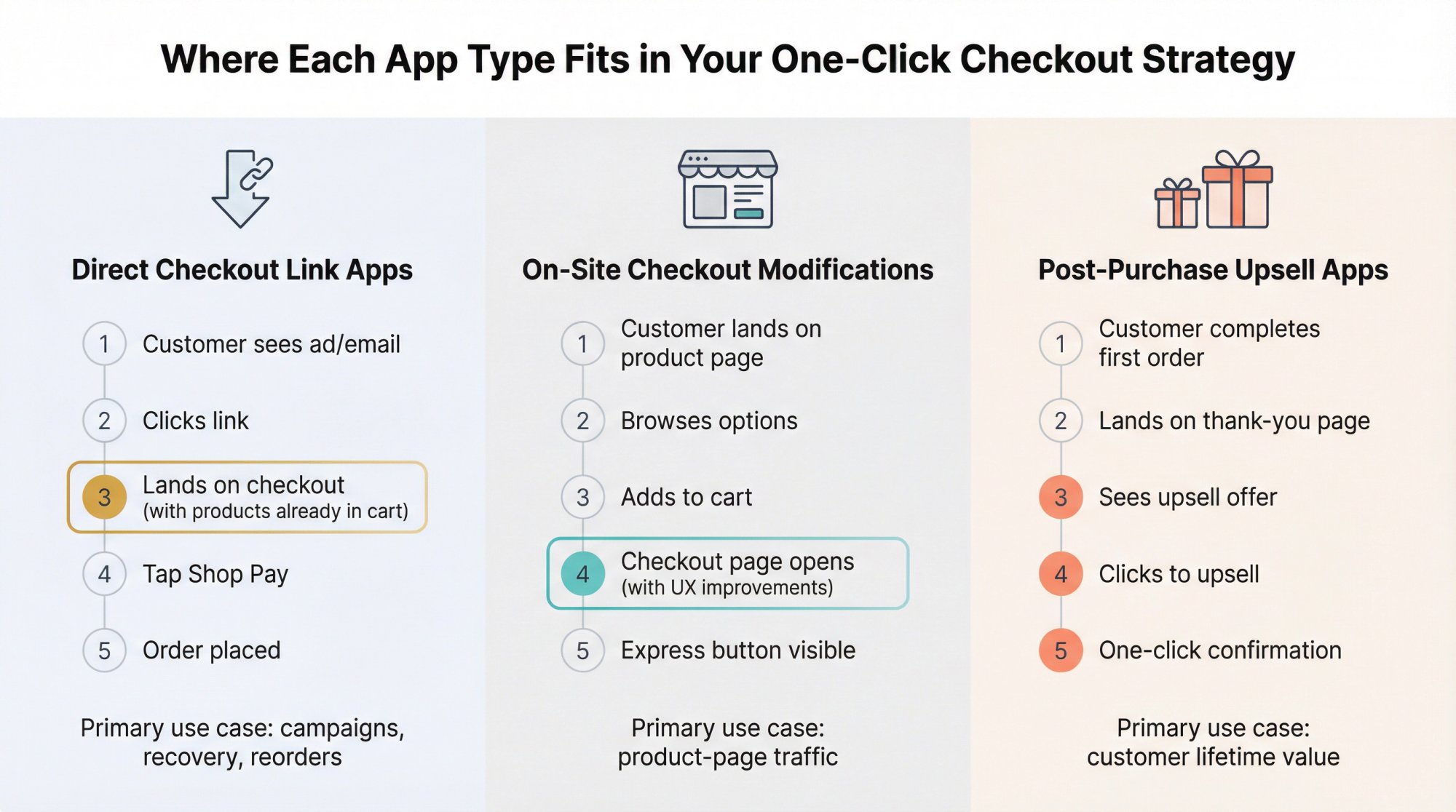
3. On-Site One Click Checkout Apps
These modify storefront UX rather than generating off-site links.
These are useful when your traffic lands mostly on product pages, not off-site links. They’re complementary to direct checkout links, not a replacement.
4. Post-Purchase One Click Upsell Apps
Here “one click” happens after the first order.
Post-purchase upsell apps add one-click offers on the thank-you page.
This fits the same mental model:
① First click: they buy via a direct checkout link
② Second click: they accept an upsell without re-entering payment
Does One Click Checkout Increase Revenue?
You’re not doing this for fun. Let’s talk numbers.
One Click Checkout ROI: What the Data Shows
Three relevant data points for 2025:
① Average cart abandonment is about 70.22%
② About 18% of shoppers abandoned because checkout was too long or complicated
③ Shop Pay can lift conversion by up to 50% vs. guest checkout and outperforms other accelerated methods by at least 10%, according to a Shopify-commissioned study
Shopify’s enterprise content shows brands using fast checkout seeing aggressive growth. Muddy Bites reported over 1,100% year-over-year growth while leaning on accelerated checkout experiences.
You can’t assume those exact numbers for your store, but you can safely assume:
- Faster checkout and fewer fields will move some of that 18% back into conversions
- Combining accelerated checkouts with direct links attacks both sides: fewer steps and faster last mile
How to Measure One Click Checkout Performance
For any “one-click” initiative, track:
Per-link metrics
Sessions, checkouts initiated, orders, conversion rate, revenue, average order value
(Checkout Links pushes this into Shopify analytics with per-link views)
Share of orders using express checkout
Keep an eye on the percentage using Shop Pay and other accelerated methods
Time to checkout from campaigns
Compare flows where you send to product pages vs. direct checkout
Calculating One Click Checkout ROI
Say you’re considering Checkout Links at $25/month.
Assume:
• 10,000 sessions per month from email and SMS
• Current conversion: 3% (300 orders)
• Average profit per order: $25
Now you ship a direct checkout link strategy and move conversion to 3.6% (a 20% relative lift, which is modest compared to some reported cases).
• That’s 360 orders, or 60 extra orders per month
• Extra profit: 60 × 25 = 1,500
Paying $25 for that is trivial. The breakeven is 1 order per month at that margin.
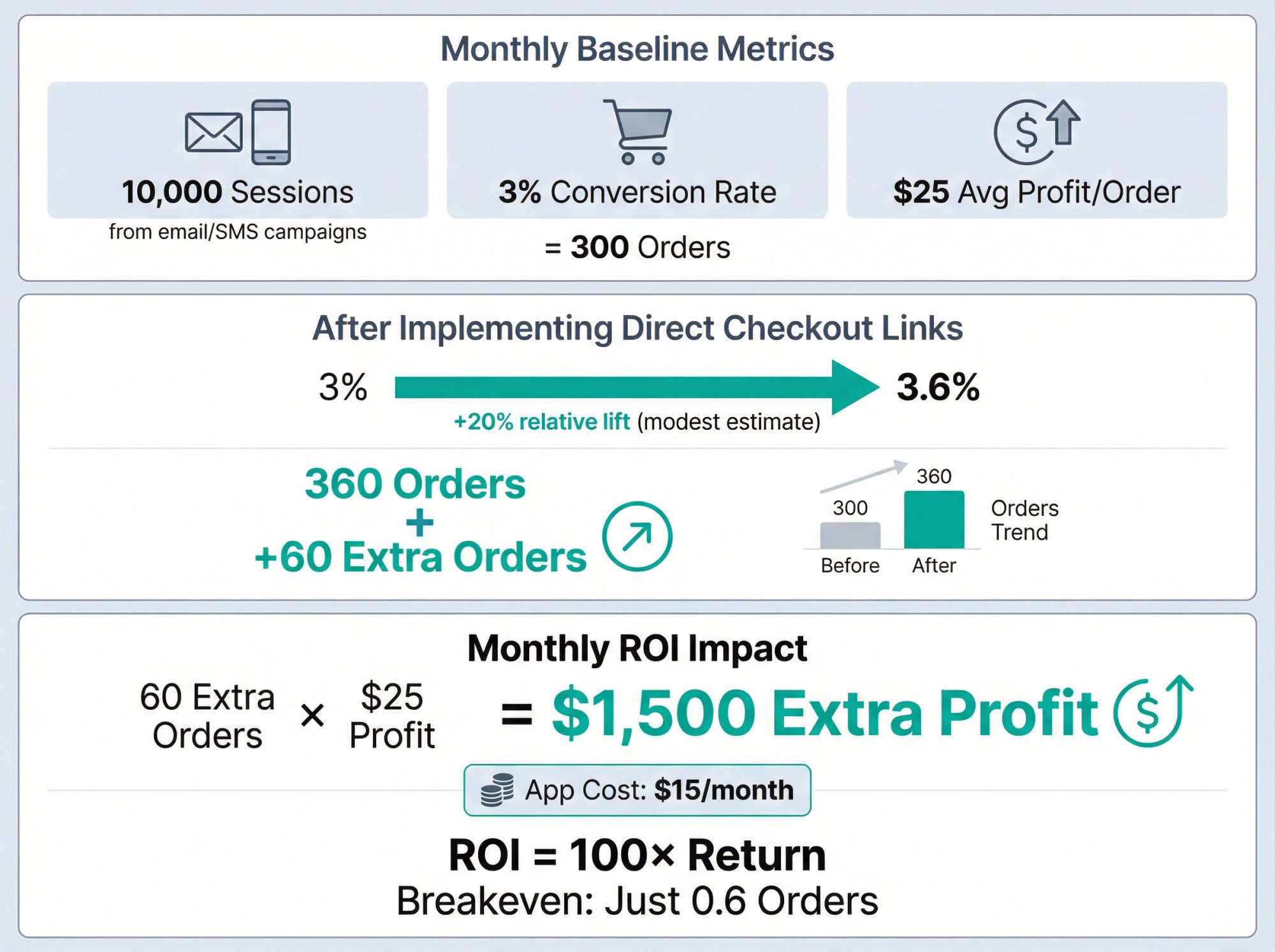
Whether you use Checkout Links or another tool, you should run this math for each initiative.
Common One Click Checkout Mistakes to Avoid
It’s easy to get excited about “one click” and forget constraints. Here are the big traps.
1. One Click Checkout Compliance Requirements
No matter what an app claims, you cannot:
- Collect full card details and bypass Shopify checkout without increasing your compliance burden
- Secretly charge cards without consent
- Rewrite core checkout behavior in ways that violate card network rules If an app says it “replaces Shopify checkout” for card transactions, red flag.
The safest pattern is what Checkout Links does:
2. True One Click Only Works for Returning Customers
It’s not realistic to promise Amazon-level one-click to strangers who’ve never bought from you.
What you can do:
• Make their first checkout smooth with one-page layouts and clean UX
• Use direct checkout links plus Shop Pay to make future checkouts almost instant
If your marketing claims absolute one-click for everyone, you’re setting yourself up for disappointed shoppers and possibly angry regulators.
3. How to Apply Validation Rules to Express Checkout
If you rely on:
- Per-customer usage limits
- B2B eligibility rules
- Age or region restrictions You need those rules to apply when buyers use Shop Pay, PayPal, Apple Pay, etc.
Shopify’s Cart and Checkout Validation Functions run server-side and apply to all checkout methods, including express.
Checkout Links uses a validation rule for per-customer link usage limits, but you may have other validation logic too. Make sure they play together.
4. How to Prevent Broken Checkout Links
Any link-based strategy has two failure modes:
① Products get unpublished, out of stock, or removed from the sales channel
② Discount codes get deactivated
Mitigations:
- Treat live slugs as immutable: don’t rename them mid-campaign
- Build a governance checklist for link creation that verifies product availability and discount scope
- When you uninstall any link app, existing links stop working immediately, so remove them from active campaigns first
5. When NOT to Use Direct Checkout Links
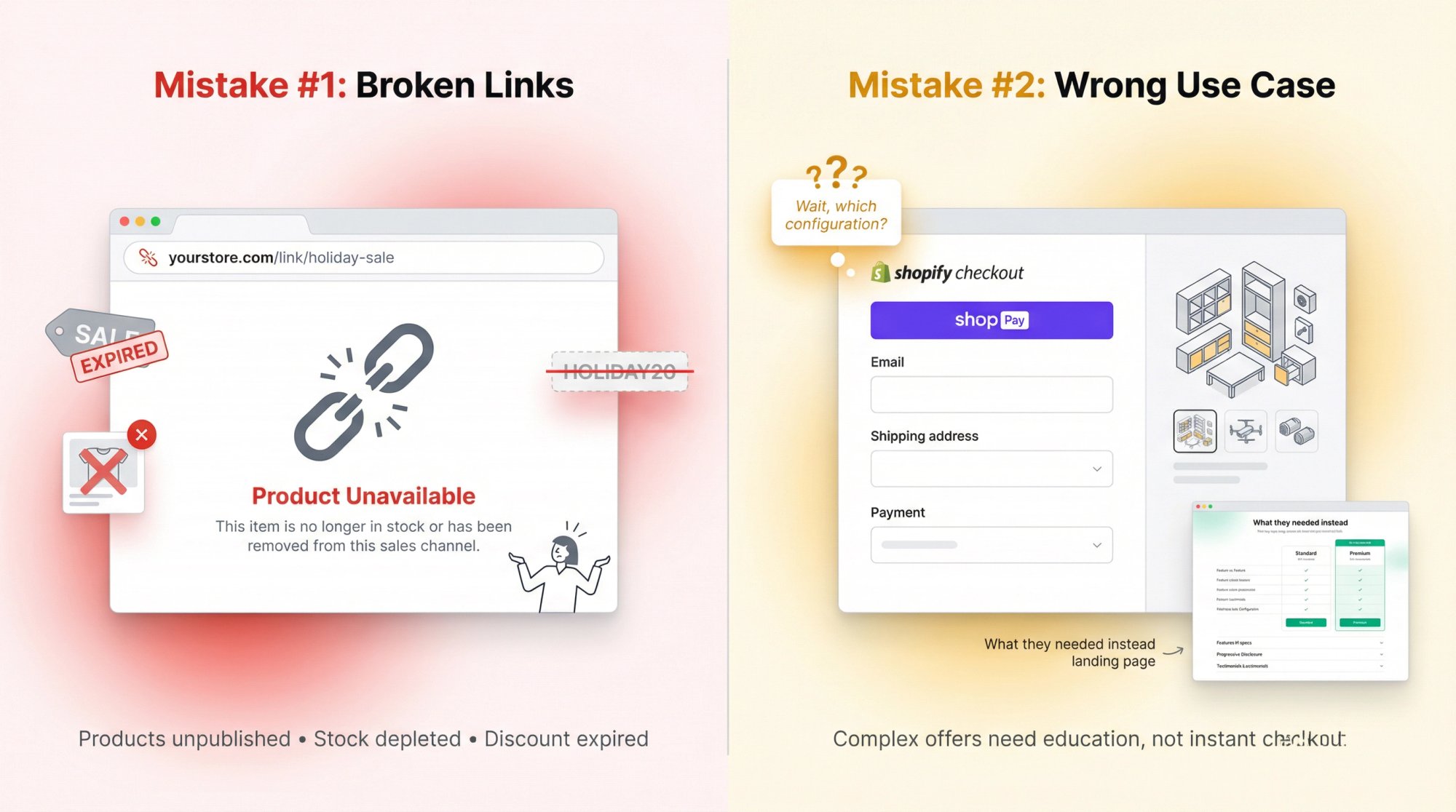
Counterintuitive but important: going straight to checkout isn’t always best.
There are scenarios where sending to a landing page with:
• Education
• Bundling logic
• Progressive free-gift thresholds
• Social proof
…will outperform direct checkout links.
Checkout Links supports opening a popup over your store for complex bundles or education-heavy offers.
The correct mental model:
Test both.
7-Day Plan to Launch One Click Checkout
If you want something concrete, here’s a one-week rollout blueprint using Checkout Links as the orchestration layer.
(You can adapt this structure even if you test other tools.)
Day 1: Enable Core Shopify Checkout Features
→ Switch to one-page checkout if you haven’t already
→ Turn on Shop Pay and other accelerated methods in payment settings
→ Confirm your main markets see express buttons on product and checkout pages
Day 2: Install and Configure Checkout Link App
① Install Checkout Links from the Shopify App Store
② Create three links:
- Direct to checkout for a single hero product
- Direct to checkout for a small bundle
- A popup link for a complex offer ③ Add UTM parameters to each
Day 3: Launch Your First One-Click Campaign
-
Pick a small customer segment (prior purchasers of your best-seller)
-
Send them an email with two buttons: → “View details” (product page)
→ “Buy now in 1 click” (your Checkout Links direct checkout URL)
-
Watch which drives more completed orders over a few days
Day 4: Set Up Abandoned Checkout Recovery
① Enable Abandonment dynamic in a Checkout Links link
② Attach a modest incentive and usage limit
③ In your ESP, update abandoned checkout flows to use the link with ?a= parameter
④ Verify click-through rebuilds the exact cart
Day 5: Create VIP Customer Reorder Links
• Create a dynamic customer reorder link with a VIP perk
• Build a segment of high-LTV customers
• Send “Reorder in 1 click” campaign using ?c= in the URL
• Watch express checkout usage and conversion vs. baseline
Day 6: Generate QR Codes for Offline Sales
- Generate a QR code for a reorder or bundle link
- Print it on a packaging insert or card: “Scan to reorder in 10 seconds”
- Test with a portion of your shipments
Day 7: Analyze Performance and Optimize
In Checkout Links analytics and Shopify’s native reports, review:
→ Sessions, checkouts, orders, conversion, revenue per link
→ Share of orders using express methods
• Kill links that underperform, double down on those that outperform product-page flows
• Document what worked and roll it out wider
After this week, you’ll have:
Real data on whether one-click flows beat your existing funnels
A mental model for which offers should be direct-to-checkout vs. landing pages
A repeatable process for adding one-click flows to any campaign
Data Currency Note
All prices, stats, and product descriptions in this guide are based on sources current as of late 2025:
- Shopify’s one-page checkout and accelerated checkout documentation
- Shopify’s Shop Pay performance claims backed by an external study
- Baymard Institute’s 2025 cart abandonment statistics, last updated September 22, 2025
- 2024-2025 articles and app listings for Shopify apps mentioned App pricing and features move fast. Before committing:
• Check the current Shopify App Store listing for updated pricing and reviews
• Verify any checkout app has the Built for Shopify badge where possible
• Confirm it supports Checkout Extensibility if you’re on Plus
If you keep the mental model from this guide and pair it with current docs, you’ll stay ahead of most stores still wishing checkout were faster instead of deliberately designing it that way.


